
Last updated on
Oct 19, 2026

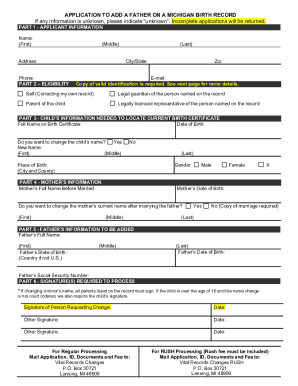
Get the free Michigan Birth Certificate Application
We are not affiliated with any brand or entity on this form

Fill out
Complete the form online in a simple drag-and-drop editor.

eSign
Add your legally binding signature or send the form for signing.

Share
Share the form via a link, letting anyone fill it out from any device.

Export
Download, print, email, or move the form to your cloud storage.
Why pdfFiller is the best tool for your documents and forms


End-to-end document management
From editing and signing to collaboration and tracking, pdfFiller has everything you need to get your documents done quickly and efficiently.
Accessible from anywhere
pdfFiller is fully cloud-based. This means you can edit, sign, and share documents from anywhere using your computer, smartphone, or tablet.
Secure and compliant
pdfFiller lets you securely manage documents following global laws like ESIGN, CCPA, and GDPR. It's also HIPAA and SOC 2 compliant.
What is Birth Record Application
The Michigan Birth Certificate Application is a government form used by individuals to request a certified copy of a birth record in the state of Michigan.
pdfFiller scores top ratings on review platforms




Who needs Birth Record Application?
Explore how professionals across industries use pdfFiller.

Birth Record Application is needed by:
-
Parents wanting a certified copy of their child's birth certificate.
-
Individuals needing to prove their identity for legal purposes.
-
Military veterans applying for benefits requiring a birth certificate.
-
Seniors seeking discounts on birth record fees.
-
Residents of Michigan requesting vital records documentation.
Comprehensive Guide to Birth Record Application
What is the Michigan Birth Certificate Application
The Michigan Birth Certificate Application is a form utilized to obtain a certificate of registration or a certified copy of a birth record in Michigan. This application is essential for individuals needing legal proof of birth, whether for identification, travel, or bureaucratic requirements. The application process is generally straightforward, allowing applicants to submit necessary information online or via mail.
This document applies to anyone who requires their birthplace formally recognized, including parents requesting it for their children. It requires input on personal details, including the individual's name, date of birth, and parental information.
Purpose and Benefits of the Michigan Birth Certificate Application
Obtaining your birth certificate is vital for a range of legal identification processes, including but not limited to, applying for a passport or enrolling in school. The official documentation verifies identity and age, which can be critical for various administrative tasks.
Some of the significant advantages of having an official birth certificate include:
-
Ensuring accurate personal records
-
Facilitating access to benefits, such as healthcare and insurance
-
Providing necessary documents for schooling and employment
Eligibility Criteria for the Michigan Birth Certificate Application
To apply for a birth certificate in Michigan, applicants must meet specific eligibility criteria. Only individuals closely related to the person named on the certificate can apply, such as parents, guardians, or adult children.
Applicants must also present valid identification, such as a driver’s license or government-issued ID, confirming their relationship to the individual listed on the certificate. Be aware that there are restrictions in place for verifying identity to protect sensitive information.
How to Fill Out the Michigan Birth Certificate Application Online (Step-by-Step)
Filling out the Michigan Birth Certificate Application is a straightforward process, especially when done online through platforms like pdfFiller. Here are the steps involved:
-
Visit pdfFiller’s website and search for the Michigan Birth Certificate Application.
-
Access the application and begin entering the required fields, including your name and date of birth.
-
Input the names of the parents as requested in the designated fields.
-
Complete any checkboxes or additional sections as prompted.
-
Review the information for accuracy before submitting.
Field-by-Field Instructions for the Michigan Birth Certificate Application
Each field in the Michigan Birth Certificate Application serves a specific purpose and demands careful attention. Here’s a breakdown of some essential fields to consider:
-
Full name of the individual at birth
-
Date of birth in the proper format
-
Names of both parents, ensuring correct spelling
It is crucial to avoid common mistakes, such as misspelling names or incorrect dates, which can delay the processing of your application.
Required Documents and Supporting Materials
When submitting your Michigan Birth Certificate Application, certain documents are necessary to facilitate processing. The required materials include:
-
A valid form of personal identification for the applicant
-
Identification documents for the individual named on the certificate, if applicable
-
Any supporting materials, like court orders for name changes
Be sure to verify the type of identification required to ensure a smooth application process.
Submitting the Michigan Birth Certificate Application
Once you complete the application, you have various options for submission. The primary methods include online submissions through the pdfFiller platform or traditional mail. If you choose to mail your application, ensure you send it to the correct state office handling birth records.
Processing times can vary based on submission method, and it’s advisable to check the status of your application periodically to ensure timely receipt of your birth certificate.
Security and Compliance for the Michigan Birth Certificate Application
When dealing with sensitive documents like birth certificates, security is paramount. pdfFiller employs 256-bit encryption to safeguard personal information during the application process. This level of security ensures that your data is protected from unauthorized access.
Additionally, pdfFiller complies with regulations including HIPAA and GDPR, offering users peace of mind regarding the handling of their personal information.
Benefits of Using pdfFiller for Completing Your Michigan Birth Certificate Application
pdfFiller provides a user-friendly solution for completing your Michigan Birth Certificate Application efficiently. With the platform, you can fill out the form online without needing downloads or complicated software installations. The ease of use allows for seamless editing, eSigning, and sharing directly from the interface.
Utilizing pdfFiller enhances the application experience with features that make form completion quick and straightforward.
Next Steps After Obtaining Your Birth Certificate
Once you receive your birth certificate, consider how to utilize this important document. It serves multiple legal purposes, such as verifying identity or age for various applications.
If you need additional copies or wish to amend the certificate, be aware of the procedures involved in requesting these changes to ensure you have all necessary documentation readily available.
How to fill out the Birth Record Application
-
1.Access the Michigan Birth Certificate Application on pdfFiller by searching for the form in the pdfFiller library or using the provided link.
-
2.Open the form in the pdfFiller interface, which offers fillable fields and intuitive navigation.
-
3.Before starting, gather necessary information such as the individual's name at birth, date of birth, parents' names, current address, and your relationship to the individual named in the application.
-
4.Carefully fill in the required fields by clicking on each field and typing in the appropriate information.
-
5.Make sure to check any options or checkboxes where applicable, ensuring accuracy in your entries.
-
6.Once all fields are completed, review the form for any errors or missing information to ensure it is filled out correctly.
-
7.After reviewing, you can finalize your application by signing in the designated area, providing your printed name as instructed.
-
8.To save your progress, click the save option available on pdfFiller; you can download a copy of the completed form to your device.
-
9.You also have the option to submit the request via email or print it out to mail it to the necessary office for processing.

What documents are needed to apply for a Michigan birth certificate?
To apply for a Michigan birth certificate, you need a valid driver's license or another form of acceptable identification. Additional documents may include proof of your relationship to the individual listed on the certificate.
Are there fees associated with obtaining a birth certificate?
Yes, fees vary depending on the number of copies requested and the applicant's status. Discounts may be available for seniors and military veterans.
How long does it take to process a birth certificate application?
Processing times can vary, but typically it takes a few weeks. For expedited service, check the processing options available during your application submission.
Can I submit my Michigan Birth Certificate Application online?
Yes, you can submit the application online via pdfFiller. Ensure all required fields are filled correctly before submitting.
What if I make a mistake on the application?
If you make a mistake, review the form before finalizing. Be sure to correct any incorrect information before signing. If necessary, you can start over on pdfFiller.
Who is eligible to request a birth certificate in Michigan?
Typically, immediate family members such as parents, legal guardians, or authorized individuals can request a birth certificate. Verification of relationship is necessary.
What is included in the information required on the form?
You will need to provide the individual's name at birth, date of birth, parents' names, your current address, and your relationship to the person named on the certificate.
Related Forms





Get the latest insights from our blog


If you believe that this page should be taken down, please follow our DMCA take down process
here
.
This form may include fields for payment information. Data entered in these fields is not covered by PCI DSS compliance.