
Last updated on
Oct 19, 2026

Get the free Bexar Central Appraisal District Change of Mailing Address Form
We are not affiliated with any brand or entity on this form

Fill out
Complete the form online in a simple drag-and-drop editor.

eSign
Add your legally binding signature or send the form for signing.

Share
Share the form via a link, letting anyone fill it out from any device.

Export
Download, print, email, or move the form to your cloud storage.
Why pdfFiller is the best tool for your documents and forms


End-to-end document management
From editing and signing to collaboration and tracking, pdfFiller has everything you need to get your documents done quickly and efficiently.
Accessible from anywhere
pdfFiller is fully cloud-based. This means you can edit, sign, and share documents from anywhere using your computer, smartphone, or tablet.
Secure and compliant
pdfFiller lets you securely manage documents following global laws like ESIGN, CCPA, and GDPR. It's also HIPAA and SOC 2 compliant.
What is Bexar Mailing Address Change
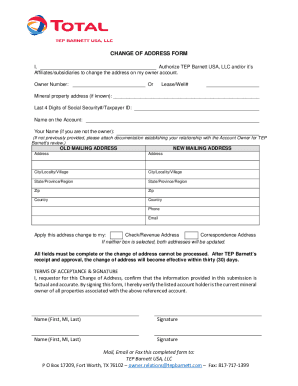
The Bexar Central Appraisal District Change of Mailing Address Form is a legal document used by property owners in Texas to update their mailing address for tax assessment purposes.
pdfFiller scores top ratings on review platforms




Who needs Bexar Mailing Address Change?
Explore how professionals across industries use pdfFiller.

Bexar Mailing Address Change is needed by:
-
Property Owners in Texas
-
Real Estate Agents
-
Tax Professionals
-
Property Managers
-
Bexar County Residents
-
Individuals dealing with property assessments
Comprehensive Guide to Bexar Mailing Address Change
What is the Bexar Central Appraisal District Change of Mailing Address Form?
The Bexar Central Appraisal District Change of Mailing Address Form is a crucial document for property owners in Texas that enables them to update their mailing address for property tax assessment purposes. This form plays a significant role in ensuring that property owners receive timely notifications regarding property taxes and assessments.
Updating your mailing address is vital for receiving tax-related communications without delays. Property owners in Texas are specifically required to use this form to maintain accurate records with the Appraisal District, helping to avoid potential issues or penalties associated with incorrect information.
Purpose and Benefits of the Change of Mailing Address Form
Filling out the Bexar Central Appraisal District Change of Mailing Address Form is essential for property owners to ensure they receive vital property tax notices without interruption. By submitting this form, property owners can access several benefits:
-
Timely receipt of property tax notifications, helping owners meet payment deadlines.
-
Avoidance of penalties that might arise from missed communications.
-
Assurance that property information remains current in Appraisal District records.
Who Needs to Use the Bexar Central Appraisal District Change of Mailing Address Form?
This form is specifically intended for property owners residing within Bexar County. It is important to clarify that renters or non-owners do not need to use this form, as it is designed exclusively for property ownership scenarios. Situations that may necessitate a change of address include moving to a new residence or changing contact details.
Eligibility Criteria for the Bexar Central Appraisal District Change of Mailing Address Form
Eligibility to file the Change of Mailing Address Form is generally restricted to property owners within Bexar County. Applicants must provide proof of ownership, which is a requirement for filing this form. Certain restrictions may apply based on situational factors, and understanding these can help simplify the process for eligible individuals.
How to Fill Out the Bexar Central Appraisal District Change of Mailing Address Form Online
Completing the Change of Mailing Address Form online can be straightforward when following these steps:
-
Access the form using pdfFiller in your web browser.
-
Fill in the required fields, including your name and property account number or address.
-
Provide the reason for your address change and include the new mailing address.
-
Review each section to ensure accuracy before submission.
-
Submit the completed form to the Appraisal District Office as per the provided instructions.
To avoid common mistakes, ensure all details are filled out correctly upon reviewing the form thoroughly.
Key Features of the Bexar Central Appraisal District Change of Mailing Address Form
When utilizing the Change of Mailing Address Form, users should be aware of its key features:
-
The online format allows for ease of use and accessibility for all users.
-
Security measures are in place to protect user data during submission.
-
There is an auto-save functionality to help prevent data loss.
-
Error-checking features can guide users to correct any mistakes.
Submission Methods for the Change of Mailing Address Form
Submitting the completed Bexar Central Appraisal District Change of Mailing Address Form can be done through a variety of methods:
-
Forms can be submitted electronically via pdfFiller.
-
Mail the completed form along with any required supporting documentation to the Appraisal District Office.
-
Ensure to adhere to any deadlines and processing times outlined by the office to avoid delays.
Common Errors and How to Avoid Them When Filing
Property owners may encounter several pitfalls when filling out the Change of Mailing Address Form. Common errors include:
-
Missing required fields that can lead to form rejection.
-
Incorrect property account numbers or addresses, which can cause communication issues.
-
Neglecting to review the completed form for accuracy before submission.
Double-checking information and utilizing available resources can greatly enhance accuracy when completing the form.
Security and Compliance with the Change of Mailing Address Form
Security is paramount when submitting sensitive information through the Change of Mailing Address Form. The following measures ensure compliance and data protection:
-
Use of encryption practices to safeguard submitted data.
-
Adherence to compliance standards, such as HIPAA and GDPR.
-
Commitment to user privacy through robust data retention policies.
Maximize Efficiency and Ease with pdfFiller
Utilizing pdfFiller can significantly enhance the form-filling experience. Key efficiencies offered by pdfFiller include:
-
Online editing capabilities that promote seamless document adjustments.
-
Easy eSigning and sharing features to streamline the submission process.
-
A user-friendly interface designed to accommodate all skill levels for convenient document management.
How to fill out the Bexar Mailing Address Change
-
1.To access the Bexar Central Appraisal District Change of Mailing Address Form on pdfFiller, visit the pdfFiller website and use the search bar to locate the form by its official name.
-
2.Once you find the form, click on it to open the document in the pdfFiller interface. Familiarize yourself with the available tools on the sidebar to assist in filling out the form.
-
3.Gather necessary information such as your name, property account numbers or locations, reason for address change, new mailing address, and your contact details before you begin filling out the form.
-
4.Use the form fields to input your information. Click on each blank field to enter the required details. Make sure your information matches your official documents, particularly your name and property details for accuracy.
-
5.If applicable, check any relevant checkboxes provided on the form. This could pertain to your reason for the address change or acknowledgement of the information provided.
-
6.Review the information you entered thoroughly to ensure everything is accurate and complete. Check for spelling errors and confirm that you have filled in all mandatory fields.
-
7.Once satisfied with your entries, finalize the form by clicking any options for saving or completing the form in the pdfFiller interface.
-
8.You can save your form in your pdfFiller account, download it as a PDF, or directly submit it via email or another specified method provided by pdfFiller.

Who is eligible to use the Bexar Central Appraisal District Change of Mailing Address Form?
The form is intended for property owners in Texas wishing to update their mailing address for tax assessment purposes. Ensure you are the owner of the property listed on the form.
Is there a deadline for submitting the change of address form?
While there isn't a specific deadline mentioned in the metadata, it’s advisable to submit the form as soon as you change your address to ensure timely updates for tax assessments.
What supporting documents are required when submitting this form?
Typically, you may need to provide proof of identity and property ownership, such as a government-issued ID and property deed. Refer to local submission guidelines for details.
How do I submit the completed form to the Bexar Central Appraisal District?
You can submit the completed form by mail or possibly in person at the Appraisal District Office. Ensure to check their website for any specific submission methods.
What are common mistakes to avoid when filling out this form?
Ensure that all information is accurate, specifically names and addresses. Avoid leaving any mandatory fields blank, as this may delay processing.
How long does it take to process the change of address request?
Processing times can vary, but typically, allow several weeks for the changes to reflect in your tax records. Contact the appraisal office for more precise timelines.
Is notarization required for the Bexar Central Appraisal District Change of Mailing Address Form?
No, notarization is not required to submit this form according to the provided metadata.
Related Forms





Get the latest insights from our blog


If you believe that this page should be taken down, please follow our DMCA take down process
here
.
This form may include fields for payment information. Data entered in these fields is not covered by PCI DSS compliance.