
Last updated on
Oct 19, 2026

Get the free Retirement Option Election Form for Tier 4 and Tier 6
We are not affiliated with any brand or entity on this form

Fill out
Complete the form online in a simple drag-and-drop editor.

eSign
Add your legally binding signature or send the form for signing.

Share
Share the form via a link, letting anyone fill it out from any device.

Export
Download, print, email, or move the form to your cloud storage.
Why pdfFiller is the best tool for your documents and forms


End-to-end document management
From editing and signing to collaboration and tracking, pdfFiller has everything you need to get your documents done quickly and efficiently.
Accessible from anywhere
pdfFiller is fully cloud-based. This means you can edit, sign, and share documents from anywhere using your computer, smartphone, or tablet.
Secure and compliant
pdfFiller lets you securely manage documents following global laws like ESIGN, CCPA, and GDPR. It's also HIPAA and SOC 2 compliant.
What is Retirement Option Election
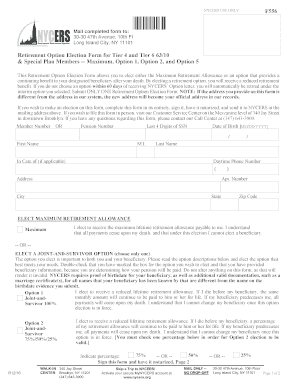
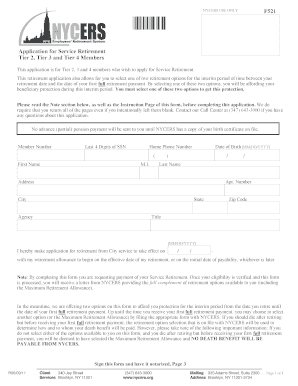
The Retirement Option Election Form for Tier 4 and Tier 6 is a government document used by NYCERS members to select their retirement payment options.
pdfFiller scores top ratings on review platforms




Who needs Retirement Option Election?
Explore how professionals across industries use pdfFiller.

Retirement Option Election is needed by:
-
Members of Tier 4 and Tier 6 of NYCERS
-
Retirees looking to choose a pension option
-
Beneficiaries involved in retirement planning
-
Notary Publics or Commissioners of Deeds for notarization
-
Financial advisors assisting clients with retirement options
-
State or local government agencies managing retiree benefits
Comprehensive Guide to Retirement Option Election
Understanding the Retirement Option Election Form for Tier 4 and Tier 6
The Retirement Option Election Form is crucial for members of NYCERS in Tiers 4 and 6. This form allows retirees to select their preferred retirement benefit, impacting their financial future and that of their beneficiaries.
The form provides options such as the Maximum Retirement Allowance and joint and survivor benefits. Choosing the right option is vital for ensuring long-term financial security.
Benefits of Using the Retirement Option Election Form for Tier 4 and Tier 6
Completing the Retirement Option Election Form accurately and promptly holds several advantages. Firstly, it guarantees financial security for retirees and their designated beneficiaries.
Additionally, it clarifies retirement elections, minimizing potential misunderstandings and complications later on. Proper completion of the form is essential for seamless processing of benefits.
Who Needs to Complete the Retirement Option Election Form?
The form is specifically for members of NYCERS who belong to Tier 4 and Tier 6. Individuals eligible for retirement must ensure they fill out this form to establish their benefits effectively.
Moreover, designating a beneficiary is crucial to secure ongoing benefits after the retiree's passing. This aspect cannot be overlooked, as it affects future distributions of retirement funds.
Key Features of the Retirement Option Election Form
The Retirement Option Election Form encompasses essential features to facilitate ease of use. It includes fillable sections where users can provide personal information and select their preferred retirement options.
Additionally, notarization is a key requirement, ensuring the authenticity of the submitted form, which enhances the integrity of the retirement process.
How to Complete the Retirement Option Election Form Online
Filling out the Retirement Option Election Form online involves several steps:
-
Access the form on the NYCERS website.
-
Fill in your personal information in the provided fields.
-
Select your desired retirement option.
-
Designate a beneficiary if applicable.
-
Review all information for accuracy before submission.
Before you begin, make sure you have the necessary information readily available to avoid delays. A checklist of required details can significantly simplify this process.
Common Errors in Completing the Retirement Option Election Form and How to Avoid Them
Many members encounter common pitfalls while completing the Retirement Option Election Form. Issues such as incorrect personal details or a lack of beneficiary designation can lead to significant problems later.
To mitigate these errors, take time to review the form thoroughly. Using a validation checklist can also help ensure that all fields are accurately filled out, which is critical for successful processing.
Notarization and Signing Requirements for the Retirement Option Election Form
Notarization adds a layer of legal assurance to the Retirement Option Election Form. Members must obtain the signature of a notary public or commissioner of deeds to verify their identity.
When it comes to signatures, understand the differences between digital and wet signatures. Both methods have their own acceptance criteria, and following these is essential for a valid submission.
Submitting the Retirement Option Election Form: Important Details
Once the form is completed, submission must occur promptly to meet deadlines. You can submit the form online, via mail, or in person, depending on your preference.
Adhering to key deadlines, such as the 60-day submission rule, is crucial to ensure that your retirement benefits are processed without unnecessary delays.
Tracking Your Submission and What to Expect After Filing the Retirement Option Election Form
After submitting your Retirement Option Election Form, tracking your application status is straightforward. NYCERS provides options for checking the status, ensuring you remain informed throughout the process.
In the event of a delay or if the form is rejected, understanding the next steps will prepare you to address any issues promptly. Staying proactive is key to successful resolution.
How pdfFiller Can Help You with the Retirement Option Election Form for Tier 4 and Tier 6
pdfFiller offers invaluable assistance when navigating the Retirement Option Election Form. With its robust platform, users can fill out and eSign documents securely, enhancing the overall experience.
Security remains a top priority, particularly when handling sensitive retirement documents. pdfFiller ensures compliance with data protection regulations, fostering peace of mind for users.
How to fill out the Retirement Option Election
-
1.Start by accessing the pdfFiller website and use the search function to find the Retirement Option Election Form for Tier 4 and Tier 6.
-
2.Once located, open the form in the pdfFiller interface, ensuring you can view all the fields that require input.
-
3.Gather necessary information before you begin filling out the form; this includes your personal details, retirement options, and information about your designated beneficiary.
-
4.Navigate to the fields on the form. Click on each fillable field to enter your information, ensuring that you verify the accuracy of the details provided.
-
5.If the form contains checkboxes or radio buttons for selection, click on the appropriate options to indicate your choices.
-
6.Follow the instructions provided within the form carefully to designate your beneficiary and select the retirement option that meets your needs.
-
7.After completing all fields, take a moment to review the entire form. Ensure all information is complete and accurate to avoid processing delays.
-
8.Save your completed form by clicking on the 'Save' button in pdfFiller. You may also choose to download a copy for your records.
-
9.Finalize by selecting the 'Submit' option if available, or follow the instructions for submitting the notarized form to NYCERS as stated.

Who is eligible to use the Retirement Option Election Form?
Eligibility for the Retirement Option Election Form is primarily for members of Tier 4 and Tier 6 of NYCERS who are preparing for retirement.
What is the deadline for submitting the form?
The completed form must be submitted within 60 days of receiving the NYCERS Option letter to ensure timely processing of your retirement benefits.
How can I submit the Retirement Option Election Form?
You can submit the completed form by mailing it to NYCERS or through your designated retirement planner, ensuring it is notarized before submission.
What supporting documents are required with this form?
Typically, you will need to provide personal identification and possibly additional documentation confirming your retirement plans or beneficiary information.
What are common mistakes to avoid when filling out the form?
Common mistakes include missing signatures, not notarizing the form if required, and incomplete beneficiary designations. Double-check all entries before submission.
How long does it take for NYCERS to process the form?
Processing times can vary but typically take several weeks. It’s advisable to submit the form as early as possible to avoid delays in receiving retirement benefits.
Are there any fees associated with submitting the form?
There are typically no fees for submitting the Retirement Option Election Form; however, consulting with a financial advisor may incur charges.
Related Forms




Get the latest insights from our blog


If you believe that this page should be taken down, please follow our DMCA take down process
here
.
This form may include fields for payment information. Data entered in these fields is not covered by PCI DSS compliance.