
Last updated on
Oct 19, 2026

Get the free West Virginia Document Authentication Request
We are not affiliated with any brand or entity on this form

Fill out
Complete the form online in a simple drag-and-drop editor.

eSign
Add your legally binding signature or send the form for signing.

Share
Share the form via a link, letting anyone fill it out from any device.

Export
Download, print, email, or move the form to your cloud storage.
Why pdfFiller is the best tool for your documents and forms


End-to-end document management
From editing and signing to collaboration and tracking, pdfFiller has everything you need to get your documents done quickly and efficiently.
Accessible from anywhere
pdfFiller is fully cloud-based. This means you can edit, sign, and share documents from anywhere using your computer, smartphone, or tablet.
Secure and compliant
pdfFiller lets you securely manage documents following global laws like ESIGN, CCPA, and GDPR. It's also HIPAA and SOC 2 compliant.
What is WV Auth Request
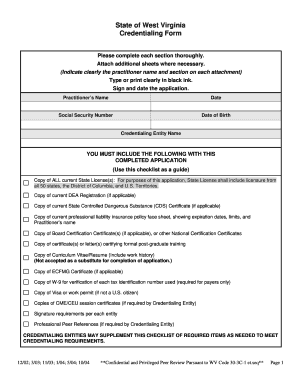
The West Virginia Document Authentication Request is a government form used by individuals and organizations to authenticate documents for use internationally.
pdfFiller scores top ratings on review platforms




Who needs WV Auth Request?
Explore how professionals across industries use pdfFiller.

WV Auth Request is needed by:
-
Individuals seeking to authenticate personal documents for overseas use.
-
Businesses needing to validate documents for international business operations.
-
Lawyers and legal firms requiring authenticated documents for clients.
-
Students aspiring to study abroad needing document verification.
-
Notaries public assisting clients with authentication requests.
Comprehensive Guide to WV Auth Request
What is the West Virginia Document Authentication Request?
The West Virginia Document Authentication Request is a critical form used to authenticate documents intended for use internationally. This form is produced by the West Virginia Secretary of State and plays a vital role for individuals needing to validate the authenticity of their documents. It requires specific user information and document details, along with various fields that must be accurately filled out and signed by the requester.
Purpose and Benefits of the West Virginia Document Authentication Request
Document authentication serves a significant purpose, particularly for those requiring documents for international transactions or legal matters. By obtaining authentication through the West Virginia Secretary of State, users can ensure that their documents are recognized globally. Proper use of this form leads to successfully authenticated documents, which can prevent legal issues and facilitate smoother processes when dealing with foreign entities.
Who Needs the West Virginia Document Authentication Request?
This form is essential for a diverse range of professionals, such as educators, healthcare providers, and legal practitioners, who may need to authenticate their credentials or important documents. Situations necessitating this request include applying for jobs abroad or enrolling in foreign educational institutions. Eligibility for submitting this request typically includes having the appropriate documents that require authentication for international use.
How to Fill Out the West Virginia Document Authentication Request Online
To fill out the form digitally using pdfFiller, follow these essential steps:
-
Access the West Virginia Document Authentication Request form on pdfFiller.
-
Complete the required fields with accurate user information, including your name and contact details.
-
Detail the documents to be authenticated, ensuring you provide precise descriptions.
-
Review all entries for accuracy and completeness before proceeding.
-
Sign the form digitally as required.
Ensuring all information is correct reduces the likelihood of processing delays.
Required Documents and Fees for the West Virginia Document Authentication Request
Submitting the West Virginia Document Authentication Request requires supporting documents, including:
-
The original documents intended for authentication.
-
A copy of your government-issued ID.
-
The completed authentication request form.
Fees must also accompany the request, with specifics available from the West Virginia Secretary of State's office. Accepted payment methods usually include checks or money orders. Depending on your situation, there may be possibilities for fee waivers or reductions.
How to Submit the West Virginia Document Authentication Request
There are several submission methods for the completed form:
-
Mail: Send the form and documents to the designated address.
-
In-person: Visit the West Virginia Secretary of State's office to submit directly.
-
Electronic: Use the online portal if available for submission.
Upon submission, you may receive confirmation via email or a tracking number to monitor the status of your request.
Common Errors and Solutions When Submitting the West Virginia Document Authentication Request
Common mistakes made on the authentication form include:
-
Incomplete information in required fields.
-
Failing to sign the document appropriately.
-
Submitting documents that do not meet the authentication criteria.
To avoid these pitfalls, thoroughly review your application before submission, and consider seeking assistance if you encounter difficulties with specific sections of the form.
Security and Privacy Considerations for the West Virginia Document Authentication Request
When handling sensitive information through pdfFiller, security is paramount. The platform employs robust security measures, including 256-bit encryption, to protect your data. Additionally, pdfFiller complies with regulations such as HIPAA and GDPR, ensuring your privacy is maintained while submitting documents.
Utilizing pdfFiller to Simplify Your West Virginia Document Authentication Request
pdfFiller enhances your experience when filling out the document authentication request. Key features include:
-
Cloud access for documents from any device.
-
Ease of editing and creating fillable forms.
-
Convenient eSigning capabilities.
By leveraging these tools, users can navigate the authentication process more effectively, ensuring their documents are submitted seamlessly.
How to fill out the WV Auth Request
-
1.Access the West Virginia Document Authentication Request form by navigating to the official pdfFiller website.
-
2.Using the search function, enter the form's name to quickly locate it on pdfFiller.
-
3.Once you open the form, start inputting your personal details in the designated fields.
-
4.Collect all necessary information such as your full name, address, phone number, and details about the documents you are submitting.
-
5.If applicable, ensure you fill out any checkboxes or additional fields that may pertain to your request.
-
6.Review your information carefully to ensure accuracy and completeness before finalizing the document.
-
7.Utilize pdfFiller's tools to edit or modify any field if you notice any discrepancies after initial completion.
-
8.Save your progress periodically to avoid losing entered information while filling out the form.
-
9.Complete the payment section within the form, as an authentication fee may be required.
-
10.After filling out the form, thoroughly double-check all fields to avoid common mistakes such as missing signatures.
-
11.Save your completed document in pdf format or download it directly to your device before submission.
-
12.Submit the document along with your authentication fee directly through the pdfFiller platform or print it out for mailing to the West Virginia Secretary of State's office.

Who is eligible to use the West Virginia Document Authentication Request form?
Anyone in need of document authentication for international use, including individuals, businesses, and legal representatives, is eligible to use this form.
Is there a deadline for submitting the authentication request?
While there may not be a strict deadline, timely submission is recommended to account for processing times and ensure your documents meet any international deadlines.
How can I submit the completed authentication request?
You can submit the completed request either electronically through pdfFiller or print it and send it to the West Virginia Secretary of State's office via mail.
What supporting documents do I need to include?
You must include the documents you wish to authenticate along with the completed form and appropriate payment fee to process your request.
What are some common mistakes to avoid when filling out this form?
Ensure all sections are filled out accurately, especially signature fields, and be attentive to required fees and document inclusions to avoid delays.
What is the typical processing time for document authentication?
Processing times can vary, but typically, authentication requests are processed within a few business days once received at the Secretary of State's office.
Are there any fees associated with the authentication request?
Yes, there is often a processing fee that must be included with your submission. Check the latest fee structure on the West Virginia Secretary of State's website.
Related Forms





Get the latest insights from our blog


If you believe that this page should be taken down, please follow our DMCA take down process
here
.
This form may include fields for payment information. Data entered in these fields is not covered by PCI DSS compliance.