
Last updated on
Oct 19, 2026

Get the free Residential Building Permit Submittal Checklist
We are not affiliated with any brand or entity on this form

Fill out
Complete the form online in a simple drag-and-drop editor.

eSign
Add your legally binding signature or send the form for signing.

Share
Share the form via a link, letting anyone fill it out from any device.

Export
Download, print, email, or move the form to your cloud storage.
Why pdfFiller is the best tool for your documents and forms


End-to-end document management
From editing and signing to collaboration and tracking, pdfFiller has everything you need to get your documents done quickly and efficiently.
Accessible from anywhere
pdfFiller is fully cloud-based. This means you can edit, sign, and share documents from anywhere using your computer, smartphone, or tablet.
Secure and compliant
pdfFiller lets you securely manage documents following global laws like ESIGN, CCPA, and GDPR. It's also HIPAA and SOC 2 compliant.
What is Permit Submittal Checklist
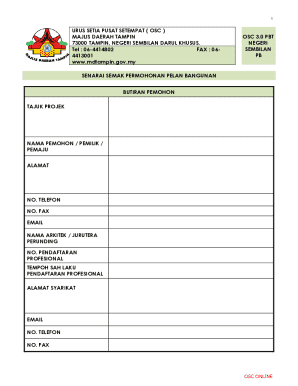
The Residential Building Permit Submittal Checklist is a form used by residents in Washington State to ensure completeness of their permit application for residential alterations.
pdfFiller scores top ratings on review platforms




Who needs Permit Submittal Checklist?
Explore how professionals across industries use pdfFiller.

Permit Submittal Checklist is needed by:
-
Homeowners planning renovations or remodels.
-
Contractors submitting building permit applications.
-
Property developers applying for residential projects.
-
Architects needing to ensure compliance with building requirements.
-
Real estate agents assisting clients with property improvements.
-
Local government officials reviewing permit applications.
Comprehensive Guide to Permit Submittal Checklist
Understanding the Residential Building Permit Submittal Checklist
The Residential Building Permit Submittal Checklist is a crucial document in Washington State's permit application process, specifically for residential alterations, remodels, and repairs. This checklist serves to guide applicants in ensuring they include all necessary documents and follow required steps when submitting their permit applications. Key documents that must be submitted include site plans, building plans, and compliance worksheets.
Purpose and Benefits of the Residential Building Permit Submittal Checklist
This checklist is vital for applicants as it ensures completeness and compliance, which can significantly reduce delays during the review process. By adhering to the checklist's guidelines, applicants are more likely to streamline their building permit submission, ensuring that all necessary information is readily available for review, thus facilitating faster approvals.
Who Needs the Residential Building Permit Submittal Checklist?
The checklist is primarily targeted toward homeowners, contractors, and builders who are involved in residential alterations or repairs. Situations that necessitate the use of this checklist include significant remodels and major repair projects. Each role, including homeowners and licensed contractors, must be aware of their responsibilities in the submission process.
Eligibility Criteria and State-Specific Requirements
To utilize the Residential Building Permit Submittal Checklist, applicants must meet specific eligibility criteria articulated by Washington State regulations. Local jurisdictions, such as Everett, WA, may have additional rules that affect submission and approval processes. Applicants should be aware of unique laws or regulations that may apply to residential building permits in their area, ensuring compliance before proceeding with their applications.
Required Documents and Preparation Guidelines
For a successful submission, applicants must compile a detailed list of required documents. These documents typically include the following:
-
Site plans
-
Building plans
-
Energy code compliance worksheets
-
Engineering calculations
Gathering and organizing these materials prior to submission is essential for efficiency and compliance with all submission guidelines.
How to Fill Out the Residential Building Permit Submittal Checklist
Completing the checklist requires careful attention to detail. The following steps should be followed to successfully fill out the checklist:
-
Review each section of the form carefully.
-
Complete all fields accurately, avoiding omissions.
-
Pay special attention to common pitfalls, such as missing signatures.
-
Consult specific instructions for any additional fields requiring detailed information.
Submission Process and Methods for the Residential Building Permit Submittal Checklist
Applicants have several options for submitting the completed checklist, including both online and offline methods. It is essential to know where to submit the form and any fees that may be associated. Applicants should also be aware of important deadlines and processing times that may affect their applications.
What to Expect After Submission
Once the checklist is submitted, applicants can anticipate a process that includes confirmation of receipt and tracking for the application status. Possible outcomes may vary, and in the event of a notice of rejection, applicants should be prepared to understand common reasons for rejection. Knowing how to amend the checklist or correct any issues will aid in resubmission.
How pdfFiller Facilitates Filling Out the Permit Checklist
pdfFiller offers robust support for users working to complete the Residential Building Permit Submittal Checklist efficiently. Key features of the platform include:
-
Editing and filling out forms with ease
-
eSigning documents securely
-
Sharing documents while ensuring confidentiality
These elements, combined with 256-bit encryption and compliance with security standards, make pdfFiller a reliable choice for managing sensitive documentation.
Moving Forward with Your Residential Project
Utilizing pdfFiller for your checklist needs can empower you to undertake your project with confidence. Being well-prepared with appropriate forms and requirements is essential for a smoother approval experience for your residential construction or remodel project.
How to fill out the Permit Submittal Checklist
-
1.To access the Residential Building Permit Submittal Checklist on pdfFiller, navigate to the pdfFiller website and use the search bar to locate the form by its name.
-
2.Once you find the form, click on it to open the document in the pdfFiller interface. Make sure to familiarize yourself with the layout.
-
3.Before filling out the form, gather all necessary documents required for a complete application, like site plans, building plans, and compliance worksheets.
-
4.As you complete the form, use the checkboxes and fields to indicate the presence of each required document. Zoom in on sections as necessary to ensure clarity.
-
5.pdfFiller provides interactive elements; hover over fields for tips on required information or formats if you are unsure what to input.
-
6.After completing all fields, review your entries for accuracy and confirm that all necessary documentation is listed appropriately.
-
7.After reviewing your completed form, use the save option to keep a copy for your records and select the download button if you need a printable version.
-
8.Finally, submit your form via the pdfFiller interface to your designated local government department or save it for submission through alternate means as directed.

What documents do I need to submit with this checklist?
Along with the Residential Building Permit Submittal Checklist, you'll typically need to provide site plans, building plans, energy compliance worksheets, and any structural engineering calculations as required by local regulations.
Are there deadlines for submitting this form?
While specific deadlines can vary by jurisdiction, it is essential to submit your checklist promptly, ideally well in advance of your project start date, to allow for processing and any necessary revisions.
How do I submit the completed checklist?
Completed checklists can usually be submitted either in person at your local municipal office or via their online portal if available. Ensure to check your local submission procedures for specific guidelines.
What are common mistakes to avoid when filling out the form?
Common mistakes include missing required documentation, failing to check all relevant boxes, and providing incomplete information. Double-check all entries and ensure no required documents are overlooked.
How long does it take to process the permit application?
Processing times can vary widely based on local workload and regulations but typically range from a few weeks to several months. Check with your local agency for expected timelines.
Do I need notarization for this checklist?
No, the Residential Building Permit Submittal Checklist does not require notarization. However, always verify if specific local regulations require any additional verification.
Who can help if I have questions while filling out the checklist?
If you have questions, consider contacting your local building department for guidance. They can provide specific information relevant to your area and assist with any form-specific concerns.
Related Forms


Get the latest insights from our blog



If you believe that this page should be taken down, please follow our DMCA take down process
here
.
This form may include fields for payment information. Data entered in these fields is not covered by PCI DSS compliance.