
Last updated on
Oct 19, 2026

Get the free Minnesota PSEO Notice of Student Registration Form 2026-27
We are not affiliated with any brand or entity on this form

Fill out
Complete the form online in a simple drag-and-drop editor.

eSign
Add your legally binding signature or send the form for signing.

Share
Share the form via a link, letting anyone fill it out from any device.

Export
Download, print, email, or move the form to your cloud storage.
Why pdfFiller is the best tool for your documents and forms


End-to-end document management
From editing and signing to collaboration and tracking, pdfFiller has everything you need to get your documents done quickly and efficiently.
Accessible from anywhere
pdfFiller is fully cloud-based. This means you can edit, sign, and share documents from anywhere using your computer, smartphone, or tablet.
Secure and compliant
pdfFiller lets you securely manage documents following global laws like ESIGN, CCPA, and GDPR. It's also HIPAA and SOC 2 compliant.
What is PSEO Form
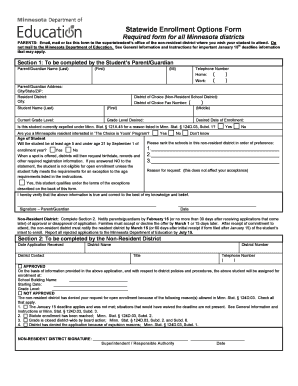
The Minnesota PSEO Notice of Student Registration Form 2026-27 is an enrollment document used by Minnesota students to register for postsecondary courses.
pdfFiller scores top ratings on review platforms




Who needs PSEO Form?
Explore how professionals across industries use pdfFiller.

PSEO Form is needed by:
-
High school students in Minnesota seeking postsecondary courses.
-
Parents or guardians of students enrolling in PSEO.
-
Secondary school officials facilitating student enrollment.
-
Contacts at postsecondary institutions for course registration.
-
Home school educators assisting students with PSEO registration.
Comprehensive Guide to PSEO Form
What is the Minnesota PSEO Notice of Student Registration Form 2026-27?
The Minnesota PSEO Notice of Student Registration Form is an essential document for students in Minnesota looking to enroll in postsecondary courses while still in high school. This form streamlines the enrollment process by coordinating between the student, their parent or guardian, and the relevant educational institutions.
Eligible students can utilize this form to indicate their intent to participate in the Postsecondary Enrollment Options (PSEO) program, which allows them to access a wealth of academic opportunities. The importance of the form lies in its role in facilitating students' transitions from high school to higher education, ultimately enhancing their educational paths.
Purpose and Benefits of the Minnesota PSEO Notice of Student Registration Form 2026-27
The Minnesota PSEO Notice of Student Registration Form serves multiple purposes that benefit students and their families significantly. By enrolling in postsecondary courses while still in high school, students can experience advantages that extend into their future academic pursuits.
-
Students gain early exposure to college-level coursework.
-
The form simplifies the process of accessing a diverse range of educational options.
-
Participation can offer significant academic and financial benefits, such as earning college credits.
Who Needs the Minnesota PSEO Notice of Student Registration Form 2026-27?
Completing the Minnesota PSEO Notice of Student Registration Form necessitates the involvement of several key roles. Each participant has specific responsibilities that ensure the accuracy and timely submission of the form.
-
Student: Must provide personal information and sign the form.
-
Parent/Guardian: Required to review, consent, and sign.
-
School Representative: May include a counselor or administrator who verifies the student’s eligibility.
-
Postsecondary Institution Contact: Typically provides additional information regarding enrollment requirements.
Eligibility Criteria for the Minnesota PSEO Notice of Student Registration Form 2026-27
To successfully enroll using the Minnesota PSEO Notice of Student Registration Form, students must meet specific eligibility criteria. Understanding these requirements is crucial to facilitating a smooth enrollment process.
-
Students must be in grades 11 or 12 and fulfill their school’s academic performance standards.
-
There are particular credit requirements and determinations regarding academic standing that applicants need to meet.
-
Important deadlines for form submission and eligibility assessments are clearly outlined and must be adhered to.
How to Fill Out the Minnesota PSEO Notice of Student Registration Form 2026-27 Online (Step-by-Step)
Filling out the Minnesota PSEO Notice of Student Registration Form online can be accomplished by following a few straightforward steps. Properly completing the form ensures that all relevant information is accurately conveyed.
-
Access the online form through the designated educational platform.
-
Carefully complete all required fields, providing accurate information for each section.
-
Gather necessary documentation, such as proof of academic status or course expectations.
-
Review your entries for any missing information and correct any errors.
-
Submit the completed form according to the provided guidelines.
Common Errors and How to Avoid Them on the Minnesota PSEO Notice of Student Registration Form 2026-27
During the completion of the Minnesota PSEO Notice of Student Registration Form, individuals often encounter common pitfalls that may result in processing delays. Understanding these errors can help prevent complications.
-
Missing signatures or approvals from required individuals can lead to rejection.
-
Incorrect or incomplete information entered in required fields may cause issues.
-
Validating the form before submission helps to avoid common mistakes.
How to Submit the Minnesota PSEO Notice of Student Registration Form 2026-27
Once the Minnesota PSEO Notice of Student Registration Form is filled out, the next step involves submission. Following proper submission protocol ensures timely processing and review of the form.
-
The completed form may need to be submitted online or by mail, depending on the institution's requirements.
-
After submission, confirm receipt with the educational institution to track the status.
-
Note any associated fees or deadlines for submission that may apply.
What Happens After You Submit the Minnesota PSEO Notice of Student Registration Form 2026-27?
Upon submitting the Minnesota PSEO Notice of Student Registration Form, students can anticipate several outcomes regarding their enrollment status. Understanding this process is key to managing expectations.
-
The educational institution reviews submitted forms to verify eligibility and completeness.
-
Communication will follow regarding acceptance status or if further steps are required.
-
Keeping a secure personal record of submission is crucial for tracking.
Security and Compliance for the Minnesota PSEO Notice of Student Registration Form 2026-27
Ensuring data security and compliance when handling the Minnesota PSEO Notice of Student Registration Form is paramount. Staying informed about the platforms used for managing sensitive information helps safeguard student data.
-
Utilizing secure tools like pdfFiller guarantees industry-standard 256-bit encryption.
-
Compliance with regulations such as HIPAA and GDPR underlines the importance of information privacy.
-
Secure handling of documents is critical when submitting forms online.
Utilizing pdfFiller for Your Minnesota PSEO Notice of Student Registration Form 2026-27
For a streamlined registration experience, consider using pdfFiller to manage your Minnesota PSEO Notice of Student Registration Form. This platform presents numerous features that facilitate efficient document handling.
-
Edit, fill out, and eSign the form directly within pdfFiller.
-
Utilize a secure platform designed for the management of sensitive information.
-
Sign up for free to access these benefits and simplify your registration process.
How to fill out the PSEO Form
-
1.To access the Minnesota PSEO Notice of Student Registration Form 2026-27 on pdfFiller, start by visiting the pdfFiller website and searching for the form by its official name.
-
2.Once located, open the form in the pdfFiller interface. You will see fillable fields for each required section, including student and parent information.
-
3.Before you begin filling out the form, gather all necessary information, such as the student’s academic details, parent/guardian contact information, and specifics from the secondary school and postsecondary institution.
-
4.Carefully navigate through the form, filling in each section as required. Ensure that you fill in all mandatory fields to avoid submission issues.
-
5.Utilize the checkboxes and option fields appropriately. Review the eligibility requirements outlined at the beginning to ensure your details meet these criteria.
-
6.Once you have completed all sections, double-check your inputs for accuracy. Review the information provided by both the student and parents/guardians.
-
7.Finalize the form by adding signature lines for each role. Ensure that signatures are included where necessary to validate the form.
-
8.After reviewing, save your progress. You can also download the completed form in your preferred format, or submit it directly through pdfFiller if your institution allows.
-
9.If needed, utilize pdfFiller’s tools to share the form via email or print it out for physical submissions.

What are the eligibility requirements for the Minnesota PSEO program?
To be eligible for the PSEO program, students must be in grades 11 or 12, demonstrate readiness for college-level coursework, and meet specific academic standards set by the secondary institution and postsecondary partner.
What is the deadline for submitting the Minnesota PSEO Notice of Student Registration Form?
Submission deadlines for the PSEO registration form typically align with the academic calendar of the postsecondary institution. Be sure to check with your respective school for exact dates to avoid missing enrollment opportunities.
How can I submit the completed Minnesota PSEO form?
You can submit the completed form electronically via pdfFiller if the institution allows online submissions, or print it out for manual submission at your secondary or postsecondary institution's office.
Are there any required supporting documents for the PSEO registration?
Yes, you may need to provide additional documentation such as proof of academic standing or guidance counselor approval along with the Minnesota PSEO Notice of Student Registration Form. Check with your secondary school for specifics.
What common mistakes should I avoid while filling out the form?
Common mistakes include missing required fields, incorrectly signing the document, and failing to check eligibility requirements. Always double-check your entries before submission to ensure all information is accurate.
What is the processing time for the PSEO registration form?
Processing times can vary widely based on the institution. Typically, expect confirmation of enrollment within a few weeks after submission. Contact your secondary or postsecondary institution for specific details.
What should I do if I need assistance with the form?
If you require assistance, contact your guidance counselor, educational advisor, or the admissions office at the postsecondary institution. They can provide guidance and support throughout the registration process.
Related Forms




Get the latest insights from our blog


If you believe that this page should be taken down, please follow our DMCA take down process
here
.
This form may include fields for payment information. Data entered in these fields is not covered by PCI DSS compliance.