
Last updated on
Oct 19, 2026

Get the free EPS Approval Form for Occupational Medicine
We are not affiliated with any brand or entity on this form

Fill out
Complete the form online in a simple drag-and-drop editor.

eSign
Add your legally binding signature or send the form for signing.

Share
Share the form via a link, letting anyone fill it out from any device.

Export
Download, print, email, or move the form to your cloud storage.
Why pdfFiller is the best tool for your documents and forms


End-to-end document management
From editing and signing to collaboration and tracking, pdfFiller has everything you need to get your documents done quickly and efficiently.
Accessible from anywhere
pdfFiller is fully cloud-based. This means you can edit, sign, and share documents from anywhere using your computer, smartphone, or tablet.
Secure and compliant
pdfFiller lets you securely manage documents following global laws like ESIGN, CCPA, and GDPR. It's also HIPAA and SOC 2 compliant.
What is EPS Approval Form
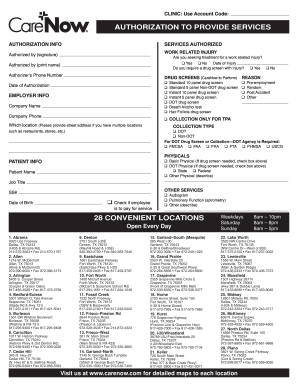
The EPS Approval Form for Occupational Medicine is a medical consent document used by companies to authorize occupational medicine services for employees.
pdfFiller scores top ratings on review platforms




Who needs EPS Approval Form?
Explore how professionals across industries use pdfFiller.

EPS Approval Form is needed by:
-
Company representatives seeking to authorize medical services for employees
-
HR professionals managing employee health protocols
-
Occupational health providers requiring consent for services
-
Employees needing medical evaluations for occupational health
-
Employers ensuring compliance with workplace health regulations
Comprehensive Guide to EPS Approval Form
What is the EPS Approval Form for Occupational Medicine?
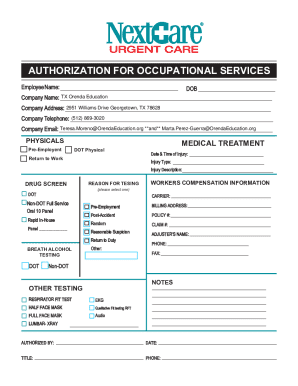
The EPS Approval Form is a crucial document used in occupational medicine to authorize medical services for employees. This occupational medicine form serves as a means for companies to streamline the process of obtaining medical approvals for their staff. Key components of the EPS Approval Form include fields for company and employee information, options for medical tests, and a signature line for the company's legal approval.
The company's signature is significant as it ensures that the authorization is legitimate and binding, making it a vital part of the process to adhere to legal standards and protocols in employee healthcare.
Purpose and Benefits of the EPS Approval Form for Occupational Medicine
The EPS Approval Form significantly contributes to the process of employee medical approval, enabling companies to effectively manage their workforce's health needs. By utilizing this form, employers ensure compliance with regulations related to workplace health and safety.
-
Facilitates the authorization of medical services for employees.
-
Helps in risk management by documenting approvals.
-
Streamlines communication between healthcare providers and employers.
This occupational medicine form not only simplifies medical authorizations but also protects companies against potential legal issues stemming from unauthorized medical procedures.
Key Features of the EPS Approval Form for Occupational Medicine
The EPS Approval Form is designed with several essential features that prioritize efficiency and clarity. It includes specific fields for both company and employee details, ensuring that accurate information is captured for medical recordkeeping.
-
Options for various exams and screenings, such as drug tests and physical evaluations.
-
Multiple methods for sending medical results, including fax and email.
These features enhance the form's usability and help healthcare providers obtain necessary approvals to proceed with patient assessments efficiently.
Who Needs the EPS Approval Form for Occupational Medicine?
Various roles within a company may require the EPS Approval Form for occupational medicine. Typically, company representatives are responsible for completing and submitting the form to ensure legal compliance and employee health management.
This form is essential across different industries, as employers prioritizing workplace safety and health must have a systematic process for handling employee medical conditions.
How to Fill Out the EPS Approval Form for Occupational Medicine Online (Step-by-Step)
Completing the EPS Approval Form through pdfFiller is straightforward. Follow these steps to fill it out digitally:
-
Access the EPS Approval Form template on pdfFiller.
-
Input the required company and employee information in the designated fields.
-
Select the appropriate medical exams and screenings needed.
-
Review the entered details for accuracy.
-
Submit the completed form through the chosen submission method.
When filling out the form, be cautious to enter correct information to avoid errors that may delay the approval process.
Submitting the EPS Approval Form for Occupational Medicine
When the EPS Approval Form is completed, there are several methods available for submission. Users can submit the form online, via fax, or through traditional mail.
-
Online submission allows for quick processing, while faxing provides immediate acknowledgment.
-
Mail submissions must consider additional processing times and possible delays.
It's crucial to be aware of any submission deadlines, as timely filings can affect the speed of medical service authorizations.
What Happens After You Submit the EPS Approval Form for Occupational Medicine?
After submission, users typically receive confirmation of their submission status, which can be tracked through the respective channels. Notifications may come via email or postal mail, depending on the method of submission chosen.
-
Common reasons for rejection include missing information or non-compliance with submission guidelines.
-
Users can address rejections by correcting noted issues and resubmitting promptly.
Security and Compliance for the EPS Approval Form for Occupational Medicine
Ensuring the security and compliance of the EPS Approval Form is paramount due to the sensitive nature of the information involved. pdfFiller implements robust security measures, including encryption and adherence to HIPAA and GDPR standards.
Protecting employee medical data is crucial, and users can trust pdfFiller for secure document management, ensuring that all information remains confidential and compliant with legal requirements.
Sample or Example of a Completed EPS Approval Form for Occupational Medicine
To aid users in understanding the EPS Approval Form, a filled-out example can clarify how to properly interpret the fields and checkboxes. This visual reference helps users comprehend the form's requirements and improves accuracy in future submissions.
When reviewing the example, pay attention to the specific information required in each section to ensure all relevant details are filled correctly.
Experience the Ease of Using pdfFiller for Your EPS Approval Form Needs
Utilizing pdfFiller for the EPS Approval Form offers numerous advantages in terms of efficiency and ease. Users can benefit from features such as document editing, eSigning capabilities, and the convenience of a cloud-based platform.
The user-friendly interface encourages individuals to effectively complete and manage their EPS Approval Form needs with confidence.
How to fill out the EPS Approval Form
-
1.Access the EPS Approval Form by navigating to pdfFiller and logging in to your account.
-
2.In the search bar, type 'EPS Approval Form for Occupational Medicine' and select the form from the results.
-
3.Open the form in the pdfFiller editor once you find it.
-
4.Before filling out the form, gather necessary information such as the company name, employee details, and specific medical exams or screenings required.
-
5.Click on each field to input the company representative's name, employee information, and check the desired types of exams offered.
-
6.Ensure you use the available checkboxes to specify the type of drug screenings, physicals, and other medical tests needed.
-
7.After completing all fields, review the form carefully to confirm that all information is accurate.
-
8.Use the signature field to obtain the necessary approval from the company representative before submission.
-
9.Once the form is finalized, save or download it directly through pdfFiller. Alternatively, you can choose to submit it via email or fax as provided in the options.

Who is eligible to use the EPS Approval Form for Occupational Medicine?
The EPS Approval Form is designed for company representatives and HR professionals who need to authorize occupational medicine services for their employees in the US.
Are there any deadlines for submitting the EPS Approval Form?
While the form does not specify a submission deadline, it is essential to submit it promptly to facilitate timely medical services for employees.
How can I submit the completed form?
You can submit the completed EPS Approval Form via email or fax, as indicated in the options provided on the form, or save it for submission in other specified formats.
What information is needed to fill out the EPS Approval Form?
You will need to gather company details, employee information, and specific types of medical exams or screenings required prior to filling out the form.
What are common mistakes to avoid when filling out this form?
Common mistakes include leaving fields blank, providing inaccurate information, or failing to obtain the necessary signature from a company representative.
How long does it take to process the form after submission?
Processing times vary by occupational medicine provider, but typically the results are available within a few business days after submission.
Is notarization required for the EPS Approval Form?
No, notarization is not required for the EPS Approval Form for Occupational Medicine.
Related Forms




Get the latest insights from our blog


If you believe that this page should be taken down, please follow our DMCA take down process
here
.
This form may include fields for payment information. Data entered in these fields is not covered by PCI DSS compliance.