
Last updated on
Oct 19, 2026

Get the free Birth Preferences Form
We are not affiliated with any brand or entity on this form

Fill out
Complete the form online in a simple drag-and-drop editor.

eSign
Add your legally binding signature or send the form for signing.

Share
Share the form via a link, letting anyone fill it out from any device.

Export
Download, print, email, or move the form to your cloud storage.
Why pdfFiller is the best tool for your documents and forms


End-to-end document management
From editing and signing to collaboration and tracking, pdfFiller has everything you need to get your documents done quickly and efficiently.
Accessible from anywhere
pdfFiller is fully cloud-based. This means you can edit, sign, and share documents from anywhere using your computer, smartphone, or tablet.
Secure and compliant
pdfFiller lets you securely manage documents following global laws like ESIGN, CCPA, and GDPR. It's also HIPAA and SOC 2 compliant.
What is Birth Preferences
The Birth Preferences Form is a healthcare document used by expectant parents to outline their preferences for labor, delivery, and postpartum care.
pdfFiller scores top ratings on review platforms




Who needs Birth Preferences?
Explore how professionals across industries use pdfFiller.

Birth Preferences is needed by:
-
Expectant parents preparing for labor and delivery
-
Healthcare providers assisting with childbirth
-
Hospitals and birthing centers offering maternity services
-
Obstetricians and midwives involved in prenatal care
-
Support partners accompanying the patient during labor
Comprehensive Guide to Birth Preferences
What is the Birth Preferences Form?
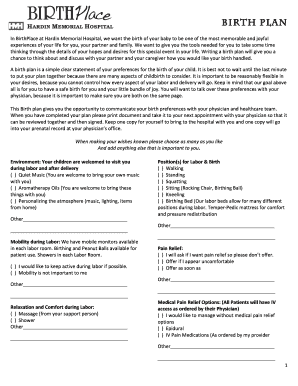
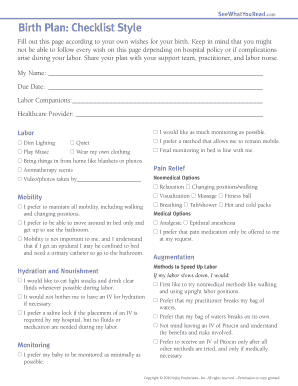
The Birth Preferences Form is designed to assist expectant parents in delineating their specific desires regarding labor, delivery, and postpartum care. This form serves as a communication tool to ensure that personal preferences are understood and respected during the childbirth process. By outlining labor delivery preferences, parents can articulate their wishes clearly to healthcare providers, enhancing the overall birthing experience.
Purpose and Benefits of Using the Birth Preferences Form
By utilizing the Birth Preferences Form, parents and healthcare providers can cultivate a better understanding of each other's expectations. This form not only facilitates effective communication but also ensures that vital medical consent is obtained during labor and delivery. Understanding personal preferences can lead to improved satisfaction with the birthing experience for both parents and their healthcare teams.
Key Features of the Birth Preferences Form
The Birth Preferences Form comprises various sections that cover crucial aspects of the labor and delivery process. Key features include:
-
Vaginal delivery preferences
-
Cesarean section preferences
-
Pain management options
-
Baby care preferences
-
Postpartum preferences
This comprehensive structure incorporates fillable fields and checkboxes, necessitating the signatures of both the patient and healthcare provider to ensure acknowledgment and agreement.
Who Should Use the Birth Preferences Form?
The primary users of the Birth Preferences Form include expectant parents and healthcare providers. This form is particularly helpful in scenarios where parents wish to express their specific desires and requirements surrounding childbirth. It enhances the preparedness of both parties as they navigate the labor and delivery process.
How to Fill Out the Birth Preferences Form Online (Step-by-Step)
Filling out the Birth Preferences Form online through pdfFiller is straightforward. Follow these steps:
-
Access the Birth Preferences Form on pdfFiller.
-
Complete all required fields and tick appropriate checkboxes.
-
Review your preferences carefully before submission.
-
Ensure that both signatures are obtained before finalizing the form.
Pay special attention to all fields to ensure comprehensive and accurate completion of your preferences.
Common Mistakes and How to Avoid Them When Filling Out the Form
While completing the Birth Preferences Form, users may encounter several common errors. These include:
-
Forgetting to include necessary signatures
-
Leaving sections incomplete
To avoid mistakes, utilize a review checklist and ensure thoroughness in documenting all preferences accurately. Double-checking each part of the form can facilitate correct submission.
Signing the Birth Preferences Form: What You Need to Know
Signing the Birth Preferences Form requires attention to detail, particularly regarding the differences between digital and wet signatures. Both the patient and healthcare provider are required to sign the form, securing mutual agreement. Digital signatures, especially when using pdfFiller, offer convenience and efficiency compared to traditional wet signatures.
Security and Privacy Considerations for the Birth Preferences Form
When handling the Birth Preferences Form, it is vital to consider security and confidentiality, particularly due to the sensitive nature of personal health information. pdfFiller implements robust security measures, including compliance with regulations such as HIPAA and GDPR, ensuring that data protection is a top priority when managing documents.
Next Steps After Completing Your Birth Preferences Form
Upon completing the Birth Preferences Form, there are several submission methods available to users. These options include:
-
Electronic submission via pdfFiller
-
Paper submission to healthcare providers
Once submitted, it is prudent to confirm the status of your submission to ensure that your preferences are communicated effectively.
Enhance Your Experience with pdfFiller
pdfFiller simplifies the process of managing forms, including the Birth Preferences Form, through its cloud-based features. Users can take advantage of easy editing, secure cloud storage, and seamless eSigning. By choosing pdfFiller, users can efficiently complete their Birth Preferences Form and manage their documents effectively.
How to fill out the Birth Preferences
-
1.Access the Birth Preferences Form on pdfFiller by searching for its name or navigating to the healthcare forms section.
-
2.Open the form by clicking on it; you will see fillable fields and checkboxes throughout the document.
-
3.Before starting the completion process, gather necessary information such as your personal preferences for labor, delivery, and postpartum care.
-
4.Using the pdfFiller interface, click on each field to input your preferences. You can select options or type responses where indicated.
-
5.Make sure to review each section thoroughly, as it includes important topics like cesarean section preferences and baby care.
-
6.Once you have completed all fields, take a moment to double-check your entries for accuracy and completeness.
-
7.After reviewing, proceed to sign the form electronically by adding your signature and that of your healthcare provider where required.
-
8.Finally, save your work on pdfFiller, and consider downloading a copy for your records. Alternatively, you can submit the form directly through pdfFiller.

Who is eligible to use the Birth Preferences Form?
The Birth Preferences Form is intended for expectant parents who wish to communicate their preferences for prenatal care, labor, and postpartum experiences. Healthcare providers involved in childbirth also need to understand and acknowledge the form.
Are there any deadlines for submitting the Birth Preferences Form?
While there is no strict deadline for submitting the Birth Preferences Form, it is recommended to complete and share it with your healthcare provider by at least 30 days before your due date to ensure all preferences are honored.
How do I submit the Birth Preferences Form?
You can submit the Birth Preferences Form through pdfFiller either by sharing it directly with your healthcare provider or by downloading it and delivering a printed copy during your prenatal visits.
What supporting documents are required with the Birth Preferences Form?
Typically, no additional documents are required with the Birth Preferences Form. However, it is a good idea to have your medical records and identification handy during the discussion with your healthcare provider.
What are some common mistakes to avoid when filling out the form?
Common mistakes include leaving fields blank, failing to indicate specific preferences clearly, or not obtaining required signatures from both patient and provider. Review your entries carefully before finalizing the form.
How long does it take to process the Birth Preferences Form?
Once submitted, processing the Birth Preferences Form is typically immediate, but it's advisable to confirm with your healthcare provider that your preferences have been documented and understood prior to delivery.
Can the Birth Preferences Form be modified after submission?
Yes, the Birth Preferences Form can be modified at any time before delivery, allowing for any changes in your preferences or circumstances. Ensure your healthcare provider is informed of any updates.
Related Forms




Get the latest insights from our blog


If you believe that this page should be taken down, please follow our DMCA take down process
here
.
This form may include fields for payment information. Data entered in these fields is not covered by PCI DSS compliance.