
Last updated on
Oct 19, 2026

Get the free Out of Network Provider Request Form
We are not affiliated with any brand or entity on this form

Fill out
Complete the form online in a simple drag-and-drop editor.

eSign
Add your legally binding signature or send the form for signing.

Share
Share the form via a link, letting anyone fill it out from any device.

Export
Download, print, email, or move the form to your cloud storage.
Why pdfFiller is the best tool for your documents and forms


End-to-end document management
From editing and signing to collaboration and tracking, pdfFiller has everything you need to get your documents done quickly and efficiently.
Accessible from anywhere
pdfFiller is fully cloud-based. This means you can edit, sign, and share documents from anywhere using your computer, smartphone, or tablet.
Secure and compliant
pdfFiller lets you securely manage documents following global laws like ESIGN, CCPA, and GDPR. It's also HIPAA and SOC 2 compliant.
What is Provider Request Form
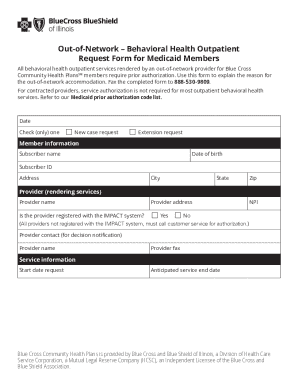
The Out of Network Provider Request Form is a medical billing document used by healthcare providers to submit their information for access to the McLaren Health Plan Portal or claims payment.
pdfFiller scores top ratings on review platforms




Who needs Provider Request Form?
Explore how professionals across industries use pdfFiller.

Provider Request Form is needed by:
-
Healthcare providers seeking to join McLaren Health Plan
-
Billing companies handling claims for providers
-
Providers requesting a contract for participation
-
Tax professionals preparing W9 forms for providers
-
Office administrators managing provider information
Comprehensive Guide to Provider Request Form
What is the Out of Network Provider Request Form?
The Out of Network Provider Request Form serves a crucial role for healthcare providers looking to access the McLaren Health Plan Portal. This document enables providers to submit essential information, including their name, tax ID, NPI, and contact details. Proper completion of this form is vital for effective claims payment processing, ensuring smooth reimbursement for services rendered.
Healthcare providers must be aware of the information required when filling out the form to avoid delays in accessing the necessary services and resources through the McLaren Health Plan Portal.
Purpose and Benefits of the Out of Network Provider Request Form
The primary purpose of this form is to streamline participation in the McLaren Health Plan, offering various advantages to healthcare providers. By completing the out of network provider request form, providers can simplify the claims payment process and ensure their access to McLaren Health Plan services.
This form also allows for a more straightforward method of requesting contracts, whether through email or traditional mail, reducing administrative burdens and enhancing efficiency.
Who Needs the Out of Network Provider Request Form?
Several types of healthcare providers should consider utilizing the Out of Network Provider Request Form. Primarily, out-of-network providers seeking to participate in the McLaren Health Plan will find this form essential. Eligibility conditions vary, but generally, any healthcare provider or practice looking to enhance their service offerings through this plan can benefit.
Providers who might particularly benefit include specialists, clinics, and practices that have previously operated outside the network but wish to integrate with McLaren Health Plan.
How to Fill Out the Out of Network Provider Request Form Online (Step-by-Step)
Filling out the Out of Network Provider Request Form online is a straightforward process. Begin by ensuring you have the necessary information, including your tax ID, NPI, and taxonomy. Here’s a step-by-step guide:
-
Access the form online via the McLaren Health Plan Portal.
-
Enter your provider details accurately in the required fields.
-
Add your contact information and any relevant addresses.
-
Attach the required documents such as the completed W9 form.
-
Review your entries for accuracy before submitting.
Common Errors and How to Avoid Them When Completing the Form
When filling out the Out of Network Provider Request Form, providers may encounter several common errors. These sometimes include incorrect tax IDs, missing contact details, or failure to attach necessary documents. To avoid these pitfalls, consider the following strategies:
-
Double-check all entered information for accuracy.
-
Ensure all required fields are completed before submission.
-
Consult any available guidelines to clarify uncertainties.
Submission Methods and Delivery of the Out of Network Provider Request Form
Once completed, there are multiple methods available for submitting the Out of Network Provider Request Form. Providers can choose to send their forms via mail, email, or through the online portal, depending on their preference. When submitting:
-
Verify the correct submission method to avoid delays.
-
Consider tracking your submission for confirmation.
-
Be aware of processing times associated with each method.
What Happens After You Submit the Out of Network Provider Request Form?
After submission, the Out of Network Provider Request Form undergoes a review process conducted by the McLaren Health Plan. Providers can expect to receive notification or confirmation about their application status within a designated timeframe.
In some cases, further information may be required, so staying alert to communications from McLaren is advisable.
Security and Compliance for the Out of Network Provider Request Form
The handling of the Out of Network Provider Request Form is subject to comprehensive security measures to protect sensitive information. Measures including encryption protect data submitted by healthcare providers. Furthermore, compliance with HIPAA and other relevant regulations ensures that all information is safeguarded.
Providers can submit their information with confidence, knowing that data protection is a priority throughout the submission process.
Experience the Ease of Filling Out the Out of Network Provider Request Form with pdfFiller
Utilizing pdfFiller can significantly enhance the process of completing the Out of Network Provider Request Form. With user-friendly editing features and eSigning capabilities, pdfFiller provides a seamless experience for healthcare providers.
The platform also ensures secure handling of sensitive documents, giving providers peace of mind while submitting their information.
How to fill out the Provider Request Form
-
1.To begin, access the Out of Network Provider Request Form on pdfFiller by navigating to the website and entering the form name into the search bar.
-
2.Once the form loads, familiarize yourself with the fillable fields and checkboxes available on the document interface.
-
3.Before starting, gather all necessary provider details, including the provider's name, tax ID, NPI, taxonomy, contact information, and addresses, to ensure a smooth filling experience.
-
4.Begin completing the form by clicking on each field and entering the appropriate information using pdfFiller's editing tools.
-
5.For any checkbox options presented on the form, click to select the relevant choices, ensuring all your responses align with the information required.
-
6.After you have filled in all sections, review the completed form thoroughly for accuracy and completeness, correcting any errors you may notice.
-
7.Once you are satisfied with the information completed, save your form by clicking the save option on pdfFiller, ensuring you retain a copy for your records.
-
8.If needed, download the form to your device or use the submission options provided to send the form either via mail or email according to preference.

Who is eligible to submit the Out of Network Provider Request Form?
Healthcare providers who wish to access the McLaren Health Plan Portal or seek claims payment are eligible to submit the Out of Network Provider Request Form.
What supporting documents are required with this form?
A completed W9 form is required along with the Out of Network Provider Request Form. The provider's dedailed information must be accurately filled out to ensure processing.
How can I submit the Out of Network Provider Request Form?
You can submit the form via mail or email, depending on your preference. Ensure that all required fields are completed before submission to avoid delays.
What common mistakes should be avoided when filling out this form?
Be careful to enter accurate provider information and ensure that all fields are completed, including the W9. Missing details can lead to delays in processing your request.
Is there a deadline for submitting the form?
While specific deadlines may depend on your situation, it is advisable to submit the form as soon as possible to expedite access to the McLaren Health Plan Portal and processing of claims.
How long does it take to process the Out of Network Provider Request Form?
Processing times vary, but typically it may take a few weeks. Ensure all information is accurate and complete to help avoid any delays in processing.
What can I do if my form is rejected or needs corrections?
If your form is rejected, review the provided feedback, make the necessary corrections, and resubmit. Ensure all required information and supporting documents are included.
Related Forms



Get the latest insights from our blog


If you believe that this page should be taken down, please follow our DMCA take down process
here
.
This form may include fields for payment information. Data entered in these fields is not covered by PCI DSS compliance.