
Last updated on
Oct 19, 2026

Get the free Contractor Supplementary Application
We are not affiliated with any brand or entity on this form

Fill out
Complete the form online in a simple drag-and-drop editor.

eSign
Add your legally binding signature or send the form for signing.

Share
Share the form via a link, letting anyone fill it out from any device.

Export
Download, print, email, or move the form to your cloud storage.
Why pdfFiller is the best tool for your documents and forms


End-to-end document management
From editing and signing to collaboration and tracking, pdfFiller has everything you need to get your documents done quickly and efficiently.
Accessible from anywhere
pdfFiller is fully cloud-based. This means you can edit, sign, and share documents from anywhere using your computer, smartphone, or tablet.
Secure and compliant
pdfFiller lets you securely manage documents following global laws like ESIGN, CCPA, and GDPR. It's also HIPAA and SOC 2 compliant.
What is Contractor Application
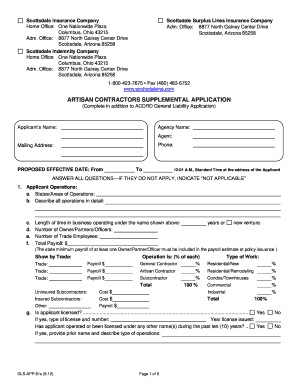
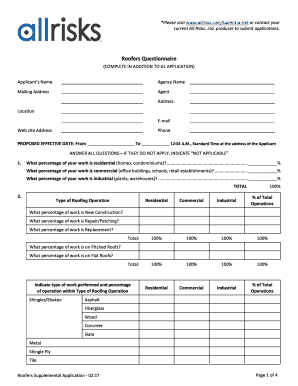
The Contractor Supplementary Application is a vendor registration form used by contractors to provide detailed information about their business operations and insurance coverage.
pdfFiller scores top ratings on review platforms




Who needs Contractor Application?
Explore how professionals across industries use pdfFiller.

Contractor Application is needed by:
-
Contractors applying for business licenses
-
Insurance providers assessing contractor risk
-
Regulatory agencies evaluating compliance
-
Businesses partnered with contractors requiring documentation
-
Safety program coordinators conducting assessments
Comprehensive Guide to Contractor Application
What is the Contractor Supplementary Application?
The Contractor Supplementary Application serves as a vital tool for contractors in organizing detailed information related to their business operations. It is designed to streamline the process of gathering necessary information for contractor license applications and insurance coverage. Providing comprehensive data through this form enhances the chances of approval and compliance in various operational aspects.
Purpose and Benefits of the Contractor Supplementary Application
This application is essential for contractors aiming to secure licenses and insurance. By completing this application, contractors ensure they provide all necessary details required for business operation and insurance coverage. Key benefits include:
-
Streamlined communication with licensing and insurance providers.
-
Detailed documentation that meets compliance standards.
-
A clearer overview of safety programs in place.
Key Features of the Contractor Supplementary Application
The Contractor Supplementary Application is equipped with numerous features to facilitate ease of use. Some important aspects include:
-
Fillable fields for entering contractor's license number.
-
Sections dedicated to years in business and work exposures.
-
Details on safety programs that enhance operational standards.
Who Needs the Contractor Supplementary Application?
The primary users of this form include various types of contractors and businesses requiring licenses or insurance. Eligibility to submit the Contractor Supplementary Application generally involves providing accurate business operation details. Target users encompass:
-
General contractors.
-
Specialty contractors.
-
Small business owners in the construction sector.
How to Fill Out the Contractor Supplementary Application Online (Step-by-Step)
Filling out the Contractor Supplementary Application online via pdfFiller is straightforward. Here’s a detailed walkthrough:
-
Access the application on the pdfFiller platform.
-
Fill in your insurance information accurately in the designated sections.
-
Provide detailed safety program information as required.
Common Errors and How to Avoid Them
While completing the Contractor Supplementary Application, applicants may encounter frequent mistakes. To enhance accuracy and avoid rejection, consider these tips:
-
Double-check all entered information for correctness.
-
Ensure all required fields are completed.
-
Review the application for clarity and consistency.
Security and Compliance for the Contractor Supplementary Application
When handling sensitive data within the Contractor Supplementary Application, robust security measures are implemented. Compliance with relevant laws and regulations ensures the protection of personal information. Key highlights include:
-
Use of 256-bit encryption for data security.
-
Adherence to SOC 2 Type II and HIPAA standards.
-
GDPR compliance to protect user privacy.
Submission Methods and Delivery of the Contractor Supplementary Application
Upon completion, submitting the Contractor Supplementary Application is straightforward. Users can choose various methods, including online submission via pdfFiller, which allows for quick processing. Important considerations include:
-
Note submission deadlines to avoid any delays.
-
Be aware of any associated fees for processing.
-
Track your submission status after filing for updates.
What Happens After You Submit the Contractor Supplementary Application
After submitting the Contractor Supplementary Application, several steps occur to ensure processing. Applicants can check the application status and may need to provide additional documentation. Typical follow-up actions might include:
-
Receiving updates via email regarding your application status.
-
Potential requests for further information from the reviewing authority.
Get Started with Your Contractor Supplementary Application Today
Take the initiative to fill out your Contractor Supplementary Application using pdfFiller today. The platform emphasizes user-friendly design and strong security features to assist in the completion process, creating a smooth experience for all applicants.
How to fill out the Contractor Application
-
1.To access the Contractor Supplementary Application on pdfFiller, go to the pdfFiller website and use the search bar to find the form by its name or upload it directly if you have it saved.
-
2.Once the form is open in pdfFiller, familiarize yourself with the layout. You'll see various fields that need to be completed, including text boxes and checkboxes for section completion.
-
3.Before starting to fill out the form, gather all necessary information, such as your contractor license number, years in business, states in which you operate, and your workers' compensation coverage details.
-
4.Begin by entering your personal and business information in the designated fields. Use the pdfFiller interface to click on each field to type in your answers. Make sure to review each entry for accuracy.
-
5.Complete other sections regarding the types of work performed, safety programs, and specific exposures in precise terms. Utilize checkboxes as needed to indicate relevant details.
-
6.As you finish each section, periodically use the 'Save' feature to secure your progress and avoid data loss. You can always come back to edit if necessary.
-
7.Once you have filled out all the required fields, review the entire form for any mistakes or missing information. Use the correction tools if you need to make adjustments.
-
8.After finalizing your entries, you can submit your form electronically, download it for printing, or save it in your pdfFiller account for future access.

What are the eligibility requirements for completing the Contractor Supplementary Application?
To complete the Contractor Supplementary Application, you must be a registered contractor with a valid license, and you should have information regarding your business operations and safety programs available.
Is there a deadline for submitting this application?
Deadlines for submission vary based on your local regulations and the entity requesting the form. Check with your licensing authority to avoid delays in your contractor application process.
How can I submit the completed Contractor Supplementary Application?
You can submit the completed form electronically through pdfFiller if required, or you can save and print it for physical submission to the relevant governing body.
What supporting documents do I need to submit with this form?
Typically, you may need to provide copies of your contractor license, proof of insurance, and documentation detailing your safety programs and work exposures along with this form.
What are common mistakes to avoid when filling out this application?
Common mistakes include leaving required fields blank, providing incorrect information about business operations, or failing to sign the application where indicated.
How long does it take to process the Contractor Supplementary Application?
Processing times can vary based on the agency handling your form but expect it to take several weeks. Always check with the appropriate regulatory body for precise timelines.
Are there any fees associated with submitting this application?
Yes, there might be fees involved depending on your jurisdiction and the specific regulatory requirements. Verify the fee structure with your local authority to ensure full compliance.
Related Forms





Get the latest insights from our blog


If you believe that this page should be taken down, please follow our DMCA take down process
here
.
This form may include fields for payment information. Data entered in these fields is not covered by PCI DSS compliance.