
Last updated on
Oct 19, 2026

Get the free Recurring Direct Payments Authorization Form
We are not affiliated with any brand or entity on this form

Fill out
Complete the form online in a simple drag-and-drop editor.

eSign
Add your legally binding signature or send the form for signing.

Share
Share the form via a link, letting anyone fill it out from any device.

Export
Download, print, email, or move the form to your cloud storage.
Why pdfFiller is the best tool for your documents and forms


End-to-end document management
From editing and signing to collaboration and tracking, pdfFiller has everything you need to get your documents done quickly and efficiently.
Accessible from anywhere
pdfFiller is fully cloud-based. This means you can edit, sign, and share documents from anywhere using your computer, smartphone, or tablet.
Secure and compliant
pdfFiller lets you securely manage documents following global laws like ESIGN, CCPA, and GDPR. It's also HIPAA and SOC 2 compliant.
What is Recurring Payment Authorization
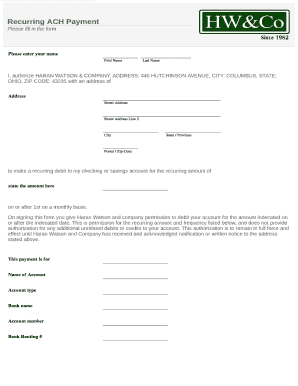
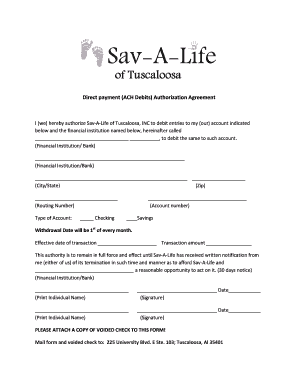
The Recurring Direct Payments Authorization Form is a financial document used by businesses to obtain permission for recurring transactions from a customer's account.
pdfFiller scores top ratings on review platforms




Who needs Recurring Payment Authorization?
Explore how professionals across industries use pdfFiller.

Recurring Payment Authorization is needed by:
-
Business owners seeking to automate payments
-
Accounting departments managing operational expenses
-
Clients requiring consistent payment schedules
-
Vendors providing subscription services
-
Financial institutions facilitating payment processing
-
Organizations collecting regular donations
-
Freelancers or contractors offering retainer services
Comprehensive Guide to Recurring Payment Authorization
What is the Recurring Direct Payments Authorization Form?
The Recurring Direct Payments Authorization Form is a critical document that grants businesses permission to charge or debit an account at regular intervals. It is commonly used in various business scenarios, including subscription services, gym memberships, and automatic bill payments. Utilizing this form ensures both parties understand the recurring transaction, fostering a clearer financial relationship.
This form typically includes explicit instructions and multiple fillable fields, which streamline the communication of payment details. Keywords such as "recurring direct payments authorization form" and "direct payment authorization" are essential for ensuring that users can easily identify the function of this form.
Purpose and Benefits of the Recurring Direct Payments Authorization Form
The Recurring Direct Payments Authorization Form serves numerous benefits for both businesses and consumers. By enabling streamlined regular payments, the form significantly reduces the likelihood of missed payments, which can lead to late fees or service interruptions.
This form simplifies financial transactions, making it easier for businesses to manage their cash flow while providing customers with a hassle-free payment experience. With terms like "recurring debit form" and "business payment authorization," users can quickly find relevant resources when searching for this essential tool.
Key Features of the Recurring Direct Payments Authorization Form
Several key features enhance the usability of the Recurring Direct Payments Authorization Form. Key elements include fillable fields for account information, payment amounts, frequency of payments, and clear checkboxes for users to indicate their preferences. Furthermore, a revocation section is included, which allows users to easily stop payments when necessary.
Incorporating features like a "payment authorization template" ensures compliance and user-friendliness, guiding signatories through the process of authorizing transactions effectively.
Who Needs the Recurring Direct Payments Authorization Form?
This form is essential for various individuals and businesses that require systematic payment solutions. Target audiences include both consumers who subscribe to services and businesses that offer recurring payment plans.
Common use cases include digital service subscriptions, membership fees, and installment plans. By providing a clear framework for automatic charges, the "recurring payment authorization form" serves as a vital resource for maintaining consistent payment schedules.
How to Fill Out the Recurring Direct Payments Authorization Form Online (Step-by-Step)
Filling out the Recurring Direct Payments Authorization Form accurately is crucial. Follow these steps for correct completion:
-
Locate the necessary fields for account details, including bank or card information.
-
Enter the specified payment amount and set the payment frequency, such as weekly or monthly.
-
Review all information for accuracy before submitting, ensuring there are no errors that could lead to payment issues.
Being mindful of accurate information can help avoid common pitfalls like providing incorrect amounts or leaving fields incomplete. This is particularly important when using keywords like "recurring debit form" and "payment authorization template" to search for form guidance.
Common Errors and How to Avoid Them
There are several common errors users may encounter when filling out this form. Frequently reported mistakes include:
-
Incomplete fields that can delay processing.
-
Incorrect payment amounts, leading to billing discrepancies.
-
Misinterpretation of the payment frequency, which can cause unexpected charges.
To avoid these errors, it is beneficial to double-check all entered information before submitting the form. This vigilance ensures accurate processing and fosters a reliable payment relationship.
How to Sign or Notarize the Recurring Direct Payments Authorization Form
Signing the Recurring Direct Payments Authorization Form requires attention to detail. A valid signature can be provided either digitally or through traditional pen-and-paper methods, depending on the situation.
In some cases, notarization may be necessary to further validate the authorization, ensuring compliance with legal requirements. Understanding the necessary steps to secure a valid signature helps streamline the approval process.
How to Download and Submit the Recurring Direct Payments Authorization Form PDF
Downloading and submitting the Recurring Direct Payments Authorization Form is straightforward. Here are the steps involved in the process:
-
Visit the designated website or platform to locate the form.
-
Download the PDF file and save it to your device for easy access.
-
Complete the form with the required information, following all guidelines.
-
Submit the filled-out form via email or any specified method directed by the business.
Ensuring you follow these steps can help in maintaining the integrity of the submission process, particularly for users seeking clarity on "direct payment authorization."
Security and Compliance for the Recurring Direct Payments Authorization Form
Security is paramount when handling sensitive information with the Recurring Direct Payments Authorization Form. pdfFiller implements robust security features, including 256-bit encryption, to safeguard user data.
Moreover, compliance with regulations such as HIPAA and GDPR ensures that all transactions are conducted within legal frameworks. This focus on security instills confidence for users entrusting their information through the form.
Simplify Your Payment Processes with pdfFiller
Using pdfFiller to manage your forms enhances your payment processes significantly. The platform offers user-friendly features, including eSigning and comprehensive form management, making completion effortless.
Additionally, pdfFiller prioritizes user security, ensuring that you can confidently handle sensitive documents. Leverage pdfFiller to facilitate the completion and submission of the Recurring Direct Payments Authorization Form today.
How to fill out the Recurring Payment Authorization
-
1.To begin, access the form on pdfFiller by searching for 'Recurring Direct Payments Authorization Form' in the template library.
-
2.Once opened, navigate to the fields where you will enter the required details, such as your name and contact information.
-
3.Before filling out the form, gather necessary information including your bank account details and the payment amount and frequency you wish to authorize.
-
4.Complete each section carefully, ensuring all fields are filled in accurately to prevent processing delays.
-
5.Use the checkboxes to specify the payment frequency and any other options provided in the form.
-
6.After completing all fields, review your entries to verify that all information is accurate and complete.
-
7.If needed, consult the explicit instructions provided on pdfFiller for additional guidance.
-
8.Once satisfied with the information provided, proceed to sign the document electronically using pdfFiller’s signature tool.
-
9.After signing, ensure no fields are left blank and all required information is provided.
-
10.Finally, save your changes, and choose whether to download the completed form or submit it directly through pdfFiller’s submitting options.

Who is eligible to use the Recurring Direct Payments Authorization Form?
Any business or organization that needs to set up recurring payments from customers or clients can use this form, provided they have the customer’s authorization.
How do I submit the completed form?
You can submit the completed form through pdfFiller by downloading it and sending it via email, or by submitting it directly through the platform’s submission feature.
Is there a deadline for submitting this authorization form?
While there is no universal deadline, it is advisable to submit the form before the intended first payment date to ensure timely processing of the authorization.
What common mistakes should I avoid when filling out this form?
Ensure all fields are completed accurately, double-check the payment details, and confirm the signature is included to avoid rejection of the authorization.
Are there any fees associated with using this form?
The form itself does not incur any fees; however, check with your financial institution for any potential transaction fees associated with recurring payments.
What supporting documents do I need to submit along with this form?
Typically, supporting documents are not needed with this form, but you may need to provide verification of the account details if requested by the business.
How long does it take for the authorization to be processed?
Processing times vary by institution, but it generally takes a few business days for the authorization to take effect after submission.
Related Forms




Get the latest insights from our blog


If you believe that this page should be taken down, please follow our DMCA take down process
here
.
This form may include fields for payment information. Data entered in these fields is not covered by PCI DSS compliance.