
Last updated on
Oct 19, 2026

Get the free CenturyLink Lifeline Assistance Application
We are not affiliated with any brand or entity on this form

Fill out
Complete the form online in a simple drag-and-drop editor.

eSign
Add your legally binding signature or send the form for signing.

Share
Share the form via a link, letting anyone fill it out from any device.

Export
Download, print, email, or move the form to your cloud storage.
Why pdfFiller is the best tool for your documents and forms


End-to-end document management
From editing and signing to collaboration and tracking, pdfFiller has everything you need to get your documents done quickly and efficiently.
Accessible from anywhere
pdfFiller is fully cloud-based. This means you can edit, sign, and share documents from anywhere using your computer, smartphone, or tablet.
Secure and compliant
pdfFiller lets you securely manage documents following global laws like ESIGN, CCPA, and GDPR. It's also HIPAA and SOC 2 compliant.
What is Lifeline Application
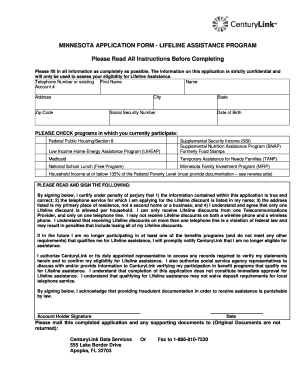
The CenturyLink Lifeline Assistance Application is an application form used by residents of South Dakota to apply for discounts on monthly service charges for voice or broadband services through the Lifeline program.
pdfFiller scores top ratings on review platforms




Who needs Lifeline Application?
Explore how professionals across industries use pdfFiller.

Lifeline Application is needed by:
-
Low-income households seeking voice service discounts
-
Individuals receiving government aid or benefits
-
South Dakota residents applying for broadband service discounts
-
Families needing affordable telecommunication options
-
Persons with limited income requiring basic communication services
Comprehensive Guide to Lifeline Application
What is the CenturyLink Lifeline Assistance Application?
The CenturyLink Lifeline Assistance Application is a vital form that allows eligible South Dakota residents to apply for discounts on monthly charges for voice and broadband services. This application is part of the Lifeline program designed to provide financial assistance to low-income consumers, ensuring they have access to essential communication services.
The relevance of this program cannot be overstated, as it directly supports those who may struggle to afford basic telecommunication services, making it an important resource for South Dakota residents.
Purpose and Benefits of the CenturyLink Lifeline Assistance Application
Applying for the Lifeline program offers several advantages. Eligible applicants can receive significant discounts on their monthly phone and internet services, which can greatly alleviate financial burdens.
These savings empower individuals to stay connected with family, access educational resources, and seek employment opportunities, making the Lifeline program a crucial support system for many.
Eligibility Criteria for the CenturyLink Lifeline Assistance Application
To qualify for the CenturyLink Lifeline Assistance Application, applicants must meet specific eligibility criteria. This includes adhering to income standards set by the federal government or participating in recognized aid programs such as Medicaid or Supplemental Nutrition Assistance Program (SNAP).
It's important to note that only one Lifeline discount is allowed per household, ensuring fair access to the program for those in need.
How to Fill Out the CenturyLink Lifeline Assistance Application Online (Step-by-Step)
Filling out the CenturyLink Lifeline Assistance Application online is straightforward. Follow this step-by-step guide:
-
Visit the CenturyLink Lifeline homepage.
-
Locate the section for the Lifeline Assistance Application.
-
Fill in your 'Applicant name' and 'Telephone Number'.
-
Provide your 'Address' and 'Social Security Number'.
-
Verify your eligibility by checking any relevant aid program participation.
-
Review your information for accuracy before submission.
Common Errors and How to Avoid Them
During the application process, applicants may encounter several common errors that can delay approval. Frequent mistakes include missing required fields, incorrect Social Security numbers, or providing incomplete proof of eligibility.
To ensure accuracy, double-check all entries, ensure personal information matches official documents, and confirm that all necessary documents are attached. Taking these precautionary steps can streamline your application process.
Submission Methods and Delivery for the CenturyLink Lifeline Assistance Application
Applicants have multiple methods to submit their completed CenturyLink Lifeline Assistance Application. You can choose to submit the form online through the dedicated website or send it via postal mail.
If mailing your application, ensure you use the correct address provided on the application form, and consider using a secure mailing option to protect your sensitive information.
What Happens After You Submit the CenturyLink Lifeline Assistance Application?
After submission, applicants can track the status of their CenturyLink Lifeline Assistance Application. Typically, the processing time can vary but expect to receive updates within a few weeks.
The outcomes may include approval for the discount, a request for additional documentation, or denial due to failure to meet eligibility requirements. Understanding this process can help manage expectations while waiting for a decision.
Security and Compliance for the CenturyLink Lifeline Assistance Application
Handling sensitive information through the CenturyLink Lifeline Assistance Application necessitates a strong focus on data protection and security. pdfFiller implements robust measures to ensure all data is encrypted and compliant with privacy regulations such as HIPAA and GDPR.
Applicants can feel confident that their personal information is safeguarded throughout the application process, emphasizing the importance of security in managing sensitive documents.
Why Use pdfFiller for Your CenturyLink Lifeline Assistance Application?
pdfFiller offers an efficient solution for completing the CenturyLink Lifeline Assistance Application. Featuring tools for editing, eSigning, and securely managing sensitive documents, pdfFiller simplifies the application process.
Additionally, users benefit from a user-friendly interface that allows them to easily fill out, save, and submit the form, making it a preferred choice for applicants seeking to navigate the Lifeline program.
Get Started with Your CenturyLink Lifeline Assistance Application Today
Users are encouraged to utilize pdfFiller for an efficient application experience. Taking immediate action can help you secure the discounts available through the Lifeline program, ensuring access to necessary communication services.
How to fill out the Lifeline Application
-
1.To start, access the CenturyLink Lifeline Assistance Application form on pdfFiller. Search for the form by its name in the pdfFiller search bar, and click on the link to open it.
-
2.Once the form is open, familiarize yourself with the interface. You will see fillable fields where you can type in your information directly.
-
3.Before filling out the form, gather necessary materials such as proof of eligibility for aid programs, identification details, and any other personal information that is required.
-
4.Begin filling out the form by entering your name in the 'Applicant name' field. Provide your telephone number, address, and Social Security Number in the designated areas.
-
5.If applicable, check the relevant checkboxes indicating your participation in qualifying programs. Make sure all information is accurate.
-
6.After completing all sections of the form, take a moment to review your entries. Ensure that you have signed the form where indicated to confirm your application.
-
7.To save your completed form, click on the 'Save' button. If you need to print or download the form, select the corresponding option in the pdfFiller menu.
-
8.Finally, submit your application as outlined in the instructions that accompany the form. This typically involves sending it to the designated government agency.

Who is eligible for the CenturyLink Lifeline Assistance Application?
Eligibility for the CenturyLink Lifeline Assistance Application typically includes low-income households, individuals participating in qualifying aid programs, and those meeting specific income standards as outlined in the Lifeline program.
What documents are required to complete the application?
To complete the CenturyLink Lifeline Assistance Application, you will need documentation proving eligibility, which may include government aid letters, income statements, and personal identification such as a Social Security Number.
How can I submit the completed form?
After completing the CenturyLink Lifeline Assistance Application, you typically submit it by mailing it to the designated agency as instructed in the form. Ensure that it is sent to the correct address for processing.
What are some common mistakes to avoid when filling out the form?
Common mistakes include missing required fields, providing incorrect personal information, not signing the application, and failing to include necessary supporting documents for eligibility verification.
Is there a deadline for submitting the CenturyLink Lifeline application?
While the CenturyLink Lifeline Assistance Application does not generally have a specific deadline, it's advisable to apply as soon as you determine eligibility to ensure timely receipt of discounts on your services.
How long does it take to process my application once submitted?
Processing times can vary, but typically, applicants can expect to receive a response regarding their CenturyLink Lifeline Assistance Application within a few weeks. Check with the local agency for more specific timelines.
Can I fill out the form online?
Yes, the CenturyLink Lifeline Assistance Application is accessible online through platforms like pdfFiller, allowing you to fill out and submit your application conveniently, ensuring all required information is completed.
Related Forms







Get the latest insights from our blog


If you believe that this page should be taken down, please follow our DMCA take down process
here
.
This form may include fields for payment information. Data entered in these fields is not covered by PCI DSS compliance.