
Last updated on
Oct 19, 2026

Get the free New Employee Hire Form
We are not affiliated with any brand or entity on this form

Fill out
Complete the form online in a simple drag-and-drop editor.

eSign
Add your legally binding signature or send the form for signing.

Share
Share the form via a link, letting anyone fill it out from any device.

Export
Download, print, email, or move the form to your cloud storage.
Why pdfFiller is the best tool for your documents and forms


End-to-end document management
From editing and signing to collaboration and tracking, pdfFiller has everything you need to get your documents done quickly and efficiently.
Accessible from anywhere
pdfFiller is fully cloud-based. This means you can edit, sign, and share documents from anywhere using your computer, smartphone, or tablet.
Secure and compliant
pdfFiller lets you securely manage documents following global laws like ESIGN, CCPA, and GDPR. It's also HIPAA and SOC 2 compliant.
What is New Hire Form
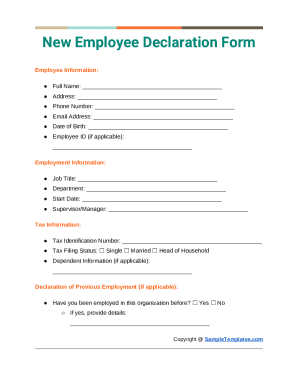
The New Employee Hire Form is a vital document used by employers to collect essential information from new hires during the onboarding process.
pdfFiller scores top ratings on review platforms




Who needs New Hire Form?
Explore how professionals across industries use pdfFiller.

New Hire Form is needed by:
-
HR personnel seeking to onboard new employees
-
Department managers requiring employee information for team assignments
-
New hires needing to submit personal and employment details
-
Payroll departments for processing payment information
-
Compliance officers ensuring the accuracy of onboarding documentation
Comprehensive Guide to New Hire Form
What is the New Employee Hire Form?
The New Employee Hire Form is a crucial document in the hiring process, designed to collect essential employee information. This form gathers personal details, employment type, and contact information, serving as a foundational employment documentation form. Key elements include the need for attachments such as a social security card and tax forms, emphasizing compliance with hiring regulations.
Signatures from both the employee and the department manager are required, ensuring accountability in the onboarding process. Understanding the significance of this new hire paperwork helps streamline the transition for new hires into their roles.
Purpose and Benefits of the New Employee Hire Form
This form is essential for both employees and employers, significantly enhancing the onboarding experience. By utilizing the new employee hire form, companies can streamline the collection of accurate employee data, which is vital for effective payroll and HR management.
The employment documentation form helps maintain organized employment records, ensuring compliance with legal and regulatory requirements. Accurate data collection is crucial for timely payroll processing and supports efficient management of employee-related tasks.
Key Features of the New Employee Hire Form
The New Employee Hire Form includes several unique features that facilitate its completion. It offers fillable fields and checkboxes, making it easier for new employees to provide necessary information without missing critical details.
-
Required attachments, such as a social security card and tax forms, must be submitted.
-
Electronic signing and submission are streamlined through Dayforce, enhancing efficiency.
These features not only simplify the process but also contribute to a more organized approach to new hire onboarding.
Who Needs the New Employee Hire Form?
The New Employee Hire Form is required for individuals qualifying as new employees within an organization. This includes anyone joining the company, regardless of their position or department.
It's also important for department managers to complete their responsibilities concerning the form, as they must sign it to validate the new hire's onboarding. There may be other associated parties, such as HR representatives, who need to be informed of the new hire's status.
How to Fill Out the New Employee Hire Form Online
Filling out the New Employee Hire Form online through pdfFiller is straightforward. Begin by accessing the form and follow these steps:
-
Provide personal details in the designated fillable fields.
-
Upload any required attachments, ensuring all documentation is complete.
-
Use pdfFiller’s editing tools to verify accuracy before submission.
Common issues may include problems with file uploads or incorrect data entry. Users can address these by double-checking input and utilizing support features in pdfFiller for prompt assistance.
Submission Process for the New Employee Hire Form
The submission of the completed New Employee Hire Form is efficient. Follow these guidelines for seamless processing:
-
Submit the completed form through the Dayforce platform.
-
Be aware of deadlines for submission to avoid potential late filing consequences.
-
Check the status of your submission for peace of mind, ensuring it has been received.
Properly following the submission process helps ensure that everything is in order for the new employee’s start date.
Security and Compliance for Handling the New Employee Hire Form
Maintaining security and compliance when handling the New Employee Hire Form is paramount. pdfFiller employs advanced security measures, including 256-bit encryption, ensuring the protection of sensitive employee information.
Data privacy is essential when dealing with employment documentation forms. Best practices for storing and retaining personal information should be adhered to, safeguarding both the employee's and employer's interests.
Enhance Your Experience with pdfFiller
Utilizing pdfFiller can greatly enhance the management of the New Employee Hire Form. The platform offers various features such as editing, eSigning, and convenient cloud access, making it easier to manage and track documents.
User testimonials highlight how pdfFiller has streamlined the hiring process for many organizations, showcasing its effectiveness in helping users navigate new hire paperwork with ease.
How to fill out the New Hire Form
-
1.Access the New Employee Hire Form by logging into your pdfFiller account and searching for the form name in the search bar. Click on the appropriate form to open it.
-
2.Once your form is open, navigate through the fillable fields using your mouse or keyboard. Click on each field to input your information as required.
-
3.Before starting, gather essential information such as your social security number, contact details, and any required attachments like tax forms and justification memos.
-
4.Take your time to carefully review each section of the form. Ensure that all required fields are filled out and that the information is accurate.
-
5.After completing the form, use the preview feature to look over the entire document and make any necessary corrections.
-
6.Once satisfied with your entries, save your progress. You can choose to download the form to your device or submit it directly through pdfFiller if that option is available.
-
7.Follow any additional specific submission instructions provided by your organization. Be sure to submit the form before the designated deadlines to avoid delays in your hiring process.

Who is eligible to fill out the New Employee Hire Form?
The New Employee Hire Form is primarily filled out by newly hired employees who must provide personal and employment information as part of the onboarding process.
What documents need to accompany the form?
It is essential to attach a justification memo, social security card, and any required tax forms alongside the New Employee Hire Form for proper processing.
How do I submit the New Employee Hire Form?
You can submit the form electronically through pdfFiller or print it out and submit it directly to your HR department, as per your organization’s procedures.
What common mistakes should I avoid when filling out this form?
Ensure that you do not leave required fields blank and double-check that your personal details are accurate to prevent processing delays.
Are there any deadlines for submitting the New Employee Hire Form?
Yes, it is important to submit the form within your onboarding timeline as specified by your employer to facilitate prompt processing of your employment documentation.
How long will it take to process my New Employee Hire Form?
Processing times may vary based on your organization’s HR workflow, but generally, expect confirmation of your submission within a few days.
Is the New Employee Hire Form required by the IRS?
No, the New Employee Hire Form is not an IRS form; however, it does require other important documentation for employment verification and tax purposes.
Related Forms





Get the latest insights from our blog



If you believe that this page should be taken down, please follow our DMCA take down process
here
.
This form may include fields for payment information. Data entered in these fields is not covered by PCI DSS compliance.