
Last updated on
Oct 19, 2026

Get the free Provider Direct Deposit Authorization Form
We are not affiliated with any brand or entity on this form

Fill out
Complete the form online in a simple drag-and-drop editor.

eSign
Add your legally binding signature or send the form for signing.

Share
Share the form via a link, letting anyone fill it out from any device.

Export
Download, print, email, or move the form to your cloud storage.
Why pdfFiller is the best tool for your documents and forms


End-to-end document management
From editing and signing to collaboration and tracking, pdfFiller has everything you need to get your documents done quickly and efficiently.
Accessible from anywhere
pdfFiller is fully cloud-based. This means you can edit, sign, and share documents from anywhere using your computer, smartphone, or tablet.
Secure and compliant
pdfFiller lets you securely manage documents following global laws like ESIGN, CCPA, and GDPR. It's also HIPAA and SOC 2 compliant.
What is Direct Deposit Form
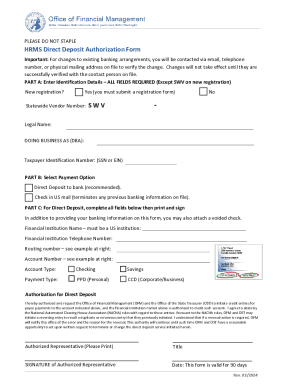
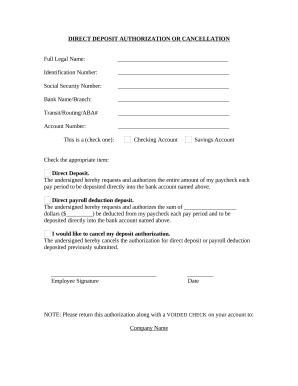
The Provider Direct Deposit Authorization Form is a financial document used by providers in Washington State to set up, change, or cancel direct deposit payments.
pdfFiller scores top ratings on review platforms




Who needs Direct Deposit Form?
Explore how professionals across industries use pdfFiller.

Direct Deposit Form is needed by:
-
Healthcare Providers looking to receive payments electronically
-
Authorized Representatives managing payment arrangements for businesses
-
Accountants needing to process direct deposits for clients
-
Vendors operating in Washington State requiring quick payment methods
-
Businesses adhering to financial reporting guidelines
Comprehensive Guide to Direct Deposit Form
What is the Provider Direct Deposit Authorization Form?
The Provider Direct Deposit Authorization Form serves as a crucial document for providers operating in Washington State. This form facilitates the effective management of direct deposits, allowing providers to streamline their payment processes. To complete the form, certain identification details are needed, including the Statewide Vendor Number, legal name, and other essential information.
Purpose and Benefits of the Provider Direct Deposit Authorization Form
Utilizing the Provider Direct Deposit Authorization Form is necessary for establishing, modifying, or terminating direct deposit arrangements. This process ensures that providers receive secure and timely payments, minimizing delays caused by traditional payment methods. Choosing direct deposit enhances efficiency and adds convenience in managing financial transactions.
-
Securely transfer funds directly to bank accounts
-
Receive timely payments without delays
-
Reduce administrative burdens associated with check processing
Key Features of the Provider Direct Deposit Authorization Form
The form includes essential components designed to simplify completion and ensure accuracy. It features fillable fields for necessary information and checkboxes for easy selection. Selections required on the form encompass direct deposit information such as bank details, and the signature block is crucial for verification.
-
Fillable fields for personal and banking information
-
Checkboxes for preferable payment methods
-
Validity period of 90 days for the authorization
Who Needs the Provider Direct Deposit Authorization Form?
This form is essential for various parties, including healthcare providers and vendors in Washington State. Authorized representatives must complete and sign the form, ensuring that all information is correct to facilitate successful transactions. Accurate details, including bank account information, are vital for avoiding payment issues.
How to Fill Out the Provider Direct Deposit Authorization Form Online (Step-by-Step)
Filling out the Provider Direct Deposit Authorization Form via pdfFiller is straightforward. Follow these steps to ensure proper completion:
-
Access the form on the pdfFiller platform.
-
Enter your Statewide Vendor Number and legal name in the designated fields.
-
Provide your bank's name, routing number, and account number accurately.
-
Review all fields for completeness and accuracy before submission.
-
Sign the form as an authorized representative.
Submission Methods and Delivery for the Provider Direct Deposit Authorization Form
After completing the form, there are multiple methods available for submission. You may choose to mail the form or submit it electronically through the designated platform. Ensure that you meet any specific requirements for your chosen submission method, as well as understand the expected processing times and confirmation of receipt.
-
Mailing to the specified address based on your service area
-
Submitting electronically through recognized platforms like pdfFiller
-
Reviewing processing times as per submission method
Common Errors and How to Avoid Them When Using the Provider Direct Deposit Authorization Form
Users frequently make several common mistakes when filling out this form. To ensure successful submission, consider the following tips:
-
Double-check for accurate bank details to avoid payment rejections.
-
Ensure all required fields are filled to prevent processing delays.
-
Utilize a review checklist before finalizing the submission to minimize errors.
Security and Privacy Considerations for the Provider Direct Deposit Authorization Form
Handling sensitive financial information demands stringent security measures. pdfFiller employs advanced security features such as 256-bit encryption and compliance with HIPAA guidelines to protect your data. It is essential to practice good privacy measures when submitting your form to secure personal information.
Your Next Steps: Efficiently Manage Your Provider Direct Deposit with pdfFiller
Leverage pdfFiller's comprehensive suite of tools to simplify your document management process. These features enhance the efficiency of filling out and managing the Provider Direct Deposit Authorization Form, allowing you to focus on your services. Additional resources on pdfFiller are available to further assist with managing forms and documents effectively.
How to fill out the Direct Deposit Form
-
1.Access the Provider Direct Deposit Authorization Form by visiting the pdfFiller website and searching for the form title.
-
2.Open the form by selecting it from the search results.
-
3.Begin by carefully reviewing the instructions provided on the form to understand what information is required.
-
4.Collect necessary information such as your Statewide Vendor Number, legal name, business name (DBA), and taxpayer identification number before filling out the form.
-
5.Use the text boxes to enter the required identification details accurately in the respective fields.
-
6.Choose your preferred payment method by selecting the appropriate checkbox for direct deposit.
-
7.Fill in the banking details related to your direct deposit, including the bank name, routing number, and account number.
-
8.Once you have completed all the fields, double-check your entries to ensure accuracy and completeness.
-
9.Locate the signature block on the form and ensure it is signed by an authorized representative.
-
10.After finalizing the form, save your changes on pdfFiller, and then choose the option to download the completed form to your device.
-
11.If necessary, use the submission options provided by pdfFiller to send the form electronically or print it for physical submission.

Who is eligible to use the Provider Direct Deposit Authorization Form?
Eligibility for the Provider Direct Deposit Authorization Form typically includes healthcare providers and authorized representatives in Washington State who need to manage direct deposits with the state or businesses.
What are the deadlines for submitting the form?
While specific deadlines may vary, it is advisable to submit the Provider Direct Deposit Authorization Form as soon as possible to avoid delays in processing your direct deposit payments.
How do I submit the completed form?
After completing the Provider Direct Deposit Authorization Form, you can submit it electronically through pdfFiller's platform or print it out and submit it to the relevant agency by mail.
What supporting documents do I need to provide?
Typically, you may need to provide identification documents related to your business or entity, such as your taxpayer identification number, as well as any documentation verifying your banking details.
What are common mistakes to avoid when filling out the form?
Ensure all information is entered correctly, especially your banking details and identification numbers, as errors can lead to payment delays. Additionally, don't forget to sign the form as required.
How long does it take for the form to be processed?
Processing times can vary based on the agency's workload, but typically, if all information is correct, you can expect a response within a few weeks after submission.
Can I change my direct deposit information after submission?
Yes, if you need to change your direct deposit information, you will have to fill out and submit a new Provider Direct Deposit Authorization Form to update your records accordingly.
Related Forms




Get the latest insights from our blog


If you believe that this page should be taken down, please follow our DMCA take down process
here
.
This form may include fields for payment information. Data entered in these fields is not covered by PCI DSS compliance.