
Last updated on
Oct 19, 2026

Get the free Scales Corporation Proxy Voting Form
We are not affiliated with any brand or entity on this form

Fill out
Complete the form online in a simple drag-and-drop editor.

eSign
Add your legally binding signature or send the form for signing.

Share
Share the form via a link, letting anyone fill it out from any device.

Export
Download, print, email, or move the form to your cloud storage.
Why pdfFiller is the best tool for your documents and forms


End-to-end document management
From editing and signing to collaboration and tracking, pdfFiller has everything you need to get your documents done quickly and efficiently.
Accessible from anywhere
pdfFiller is fully cloud-based. This means you can edit, sign, and share documents from anywhere using your computer, smartphone, or tablet.
Secure and compliant
pdfFiller lets you securely manage documents following global laws like ESIGN, CCPA, and GDPR. It's also HIPAA and SOC 2 compliant.
What is Proxy Voting Form
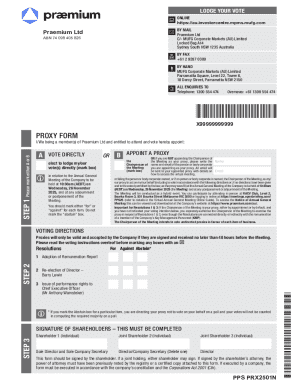
The Scales Corporation Proxy Voting Form is a document used by shareholders to vote or appoint a proxy for the annual meeting of Scales Corporation Limited.
pdfFiller scores top ratings on review platforms




Who needs Proxy Voting Form?
Explore how professionals across industries use pdfFiller.

Proxy Voting Form is needed by:
-
Shareholders of Scales Corporation Limited
-
Proxy appointees for shareholder voting
-
Corporate governance professionals
-
Legal advisors for business forms
-
Accountants managing shareholder records
Comprehensive Guide to Proxy Voting Form
What is the Scales Corporation Proxy Voting Form?
The Scales Corporation Proxy Voting Form is essential for shareholders looking to participate in the annual meeting of Scales Corporation Limited. This form allows shareholders to express their voting preferences even if they cannot attend the meeting in person. Its significance lies in facilitating proxy voting, which enables delegated representation for shareholders unable to be present.
Utilizing the proxy voting form template simplifies complex voting processes, making it accessible for all participants. Understanding how to effectively use this form is crucial for ensuring that shareholder voices are heard at the annual meeting.
Purpose and Benefits of the Scales Corporation Proxy Voting Form
The primary purpose of the Scales Corporation Proxy Voting Form is to assist shareholders in expressing their voting preferences clearly. For those unable to attend the annual meeting in New Zealand, this form offers a vital opportunity to participate from afar.
Key benefits include:
-
Enabling shareholders to exercise their votes regardless of attendance.
-
Simplifying the voting process through a structured form.
-
Ensuring that all shareholder opinions are considered during decision-making.
Key Features of the Scales Corporation Proxy Voting Form
The Scales Corporation Proxy Voting Form includes multiple submission methods, allowing for online, postal, and proxy voting. It features fillable fields, checkboxes, and signature lines to ensure completeness when submitting. To guarantee proper completion, the form comes with clear instructions for every section.
-
Multiple submission options for flexibility.
-
Fillable fields to aid in user accuracy.
-
Instructions detailing how to properly complete and submit.
Who Needs the Scales Corporation Proxy Voting Form?
This form is essential for both eligible shareholders and their proxies. Understanding the roles of each group is crucial, as both require signing the document to validate their votes.
It is important for all eligible voters to submit their forms on time to avoid missing the opportunity to influence corporate decisions. Here’s a quick overview of the requirements:
-
Shareholders must provide their control number and signature.
-
Proxies need to submit the form as per outlined guidelines.
How to Fill Out the Scales Corporation Proxy Voting Form Online
Filling out the Scales Corporation Proxy Voting Form online requires careful attention to detail. Follow these step-by-step instructions:
-
Access the online form and locate your Control Number and CSN.
-
Complete each section by providing the requested information.
-
Review your entries for any common errors, such as missing information.
Pay special attention to each section to avoid mistakes that could lead to rejection of your submission.
Submission Methods for the Scales Corporation Proxy Voting Form
Submitting the Scales Corporation Proxy Voting Form is straightforward, with options including online, postal, and in-person delivery. Each submission method has specific guidelines and deadlines to ensure compliance.
Remember, forms must be received by 3:30 PM NZ time on the designated submission deadline. It’s advisable to confirm receipt for peace of mind.
-
Online submission is the quickest method.
-
Postal submissions require timely mailing to meet deadlines.
-
In-person submissions can be made to designated location addresses.
What Happens After You Submit the Scales Corporation Proxy Voting Form?
Once submitted, your form will undergo processing to determine its acceptance. You may experience different outcomes, such as acceptance, rejection, or a request for corrections. To track your submission after you've submitted the form is essential for maintaining transparency and ensuring your vote counts.
-
Accepted: Your vote is counted as expected.
-
Rejected: Follow the guidelines to understand common rejection reasons.
-
Needs correction: You're typically notified regarding required changes.
How pdfFiller Helps You with the Scales Corporation Proxy Voting Form
pdfFiller enhances the experience of completing the Scales Corporation Proxy Voting Form with various features aimed at efficiency and security. Utilizing pdfFiller ensures that your documents are handled with the highest security measures, including 256-bit encryption.
The platform allows for easy editing, eSigning, and shareability, making it the ideal solution for filling out forms digitally. This adds a layer of convenience to the entire voting process.
Tips for Ensuring Your Scales Corporation Proxy Voting Form is Correct
To avoid delays or issues with your submission, utilize a pre-filing checklist. This list will help ensure that no critical details are overlooked.
Before submission, perform a thorough review using a validation checklist to confirm all information is accurate. If there are any discrepancies, knowing how to correct or amend the form in advance can save you time.
-
Double-check all sections for accurate information.
-
Use a checklist to verify all required signatures are included.
Explore Your Options with pdfFiller Today
pdfFiller is your go-to platform for tackling proxy voting needs seamlessly. By leveraging a cloud-based solution, users can easily fill out the Scales Corporation Proxy Voting Form.
The user-friendly interface streamlines document management, allowing for easy digital signing and efficient submission. Embrace the convenience that pdfFiller provides in handling your essential business forms.
How to fill out the Proxy Voting Form
-
1.Access the Scales Corporation Proxy Voting Form on pdfFiller by navigating to the provided link or uploading the PDF file.
-
2.Once open, familiarize yourself with the form layout including sections for personal details, voting preferences, and signatures.
-
3.Before filling out the form, gather necessary information such as your Control Number and CSN/Shareholder Number.
-
4.Begin by filling in your name and contact information in the designated fields. Make sure all details are accurate and complete before proceeding.
-
5.Next, proceed to the voting sections where you can select your preferred resolutions or appoint a proxy. Use checkboxes as applicable and ensure your choices are clearly marked.
-
6.Once all the sections are populated, double-check your entries for completeness and correctness. This includes ensuring any required signatures are left blank for signing or correctly filled as needed.
-
7.Final review includes ensuring that the completed form adheres to corporate guidelines and deadlines. Follow pdfFiller prompts for finalizing the document.
-
8.To save or submit the form, click on the save icon, choose your preferred format for download, and select the submission method indicated on the form for electronic or postal submission.

Who is eligible to use the Scales Corporation Proxy Voting Form?
Eligibility is generally limited to registered shareholders of Scales Corporation Limited who wish to vote or appoint a proxy for the annual meeting.
What is the deadline for submitting the Proxy Voting Form?
The completed Proxy Voting Form must be received by 3.30pm on Sunday, 12 April 2026, New Zealand time. Ensure timely submission to avoid disqualification.
How can I submit the completed Proxy Voting Form?
You can submit your completed form either online through the provided method or via postal mail as specified in the submission guidelines on the form.
What supporting documents may be needed with the Proxy Voting Form?
Typically, no additional documentation is required unless specified; however, you may need to verify your identity as a shareholder using your Control Number and CSN.
What should I do if I make a mistake on the form?
If you notice an error after submission, contact Scales Corporation's shareholder services immediately. They may provide guidance on how to correct your proxy vote.
How long does it take for the Proxy Voting Form to be processed?
Processing times can vary, but generally, you should allow a few days for verification and processing before the annual meeting.
Are there any fees associated with using the Proxy Voting Form?
There are typically no fees associated with completing and submitting the Proxy Voting Form for shareholders of Scales Corporation.
Related Forms



Get the latest insights from our blog


If you believe that this page should be taken down, please follow our DMCA take down process
here
.
This form may include fields for payment information. Data entered in these fields is not covered by PCI DSS compliance.