
Last updated on
Oct 7, 2026

Get the free Letter of Medical Necessity (LOMN)
We are not affiliated with any brand or entity on this form

Fill out
Complete the form online in a simple drag-and-drop editor.

eSign
Add your legally binding signature or send the form for signing.

Share
Share the form via a link, letting anyone fill it out from any device.

Export
Download, print, email, or move the form to your cloud storage.
Why pdfFiller is the best tool for your documents and forms


End-to-end document management
From editing and signing to collaboration and tracking, pdfFiller has everything you need to get your documents done quickly and efficiently.
Accessible from anywhere
pdfFiller is fully cloud-based. This means you can edit, sign, and share documents from anywhere using your computer, smartphone, or tablet.
Secure and compliant
pdfFiller lets you securely manage documents following global laws like ESIGN, CCPA, and GDPR. It's also HIPAA and SOC 2 compliant.
What is LOMN FSA Form
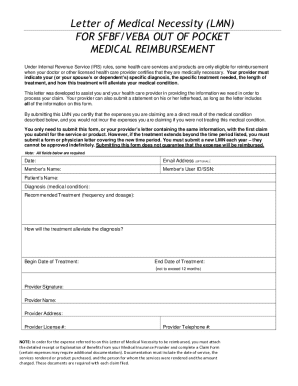
The Letter of Medical Necessity (LOMN) is a healthcare form used by participants to request reimbursement for specific medical items through a Flexible Spending Account (FSA).
pdfFiller scores top ratings on review platforms




Who needs LOMN FSA Form?
Explore how professionals across industries use pdfFiller.

LOMN FSA Form is needed by:
-
Licensed healthcare providers issuing prescriptions
-
Participants using Flexible Spending Accounts
-
Patients requiring specific medical equipment or treatment
-
Insurance companies processing claims
-
Billing departments handling medical reimbursements
Comprehensive Guide to LOMN FSA Form
What is the Letter of Medical Necessity (LOMN)?
The Letter of Medical Necessity (LOMN) is a vital document in healthcare that defines the necessity of specific medical items for reimbursement purposes. This form serves primarily to facilitate reimbursements through Flexible Spending Accounts (FSA) for covered medical items.
The LOMN details the essential medical justification required by insurers and can significantly impact the approval of FSA claims. Effective medical documentation is critical in ensuring that patients can access necessary treatments without financial hurdles.
Purpose and Benefits of the Letter of Medical Necessity (LOMN)
The LOMN is crucial for both patients and healthcare providers, playing a key role in financial processes related to medical expenses. One of the primary benefits of the LOMN includes streamlining reimbursement processes for participants, allowing them to recover costs associated with medical necessities.
Moreover, this document helps guide licensed providers in their documentation needs, ensuring that all necessary information is conveyed accurately. By utilizing the LOMN effectively, patients can also realize potential savings on medical expenses.
Key Features of the Letter of Medical Necessity (LOMN)
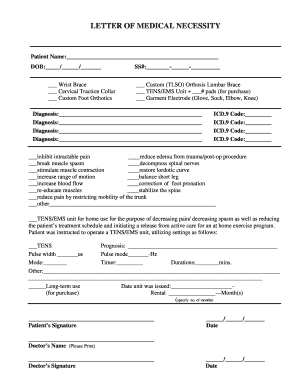
Essential components of the LOMN include various fillable fields and checkboxes designed to capture vital information. Users must be aware of the different sections of the form, which require specific signatures and relevant diagnosis codes.
Each part of the LOMN should be filled out with attention to detail, particularly in relation to treatment periods. Completing the form accurately is crucial for successful reimbursement requests.
Who Needs the Letter of Medical Necessity (LOMN)?
The LOMN is designed for use by both licensed providers and participants seeking reimbursement for medical items. Licensed Providers are responsible for filling out the necessary details, while Participants must understand when to request this form and under what circumstances it is applicable.
Eligibility criteria for participants typically include having a qualifying medical condition, thus ensuring they can substantiate their reimbursement claims effectively.
How to Fill Out the Letter of Medical Necessity (LOMN) Online (Step-by-Step)
Filling out the LOMN online involves several key steps:
-
Gather all necessary personal and treatment information required for the form.
-
Complete each fillable field by providing accurate details as per the instructions.
-
Double-check diagnosis codes and ensure all required signatures are included.
-
Review the form for completeness before submission to avoid common errors.
-
Submit the completed form through the preferred method, such as online or mail.
Submission Methods and Important Deadlines for the Letter of Medical Necessity (LOMN)
Users have various submission methods available for the LOMN, including online submissions and mailing options. Each method may differ in terms of processing times and required actions.
It is crucial to adhere to submission deadlines to prevent any delays or complications with reimbursement. Users should also be aware of any fees associated with their chosen submission method.
Common Errors and How to Avoid Them When Filling Out the Letter of Medical Necessity (LOMN)
When completing the LOMN, several common errors occur that users should be aware of:
-
Omitting necessary personal information or medical details.
-
Failing to provide the correct diagnosis codes.
-
Neglecting to include all required signatures.
To ensure accuracy, users should double-check all fields before submission and retain a copy for their records. Taking the time to review the completed form can help in identifying and rectifying any discrepancies.
Understanding Security and Compliance for the Letter of Medical Necessity (LOMN)
Security is a paramount concern when dealing with sensitive documents like the LOMN. pdfFiller adheres to strict security standards, ensuring compliance with regulations such as HIPAA and GDPR.
Data protection measures are in place during the completion and submission processes to safeguard personal and medical information. Utilizing a secure platform for these transactions is essential to maintain the confidentiality of sensitive healthcare documents.
Sample of a Completed Letter of Medical Necessity (LOMN)
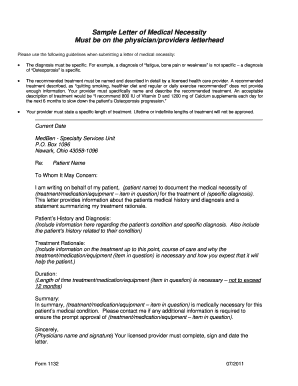
Having a reference can greatly assist users in filling out their own forms. Thus, a visual representation of a completed LOMN offers a practical guide for understanding the necessary sections and fields.
Highlighted key sections will provide users with insight into how to appropriately annotate their own forms, ensuring all required information is included effectively.
Empowering Users with pdfFiller for Completing the Letter of Medical Necessity
pdfFiller offers a user-friendly platform specifically designed to streamline the process of filling out and signing the LOMN. The tool provides numerous benefits, including secure access and easy-to-use features.
By engaging with pdfFiller, users can navigate the complexities of the LOMN with ease and confidence, ensuring a smoother experience in completing their medical necessity requests.
How to fill out the LOMN FSA Form
-
1.To access the Letter of Medical Necessity (LOMN), navigate to pdfFiller's website and log into your account. Use the search bar to find the form by entering its name or browsing through the healthcare forms category.
-
2.Once the form is open, examine the fields available for completion. Fields typically include sections for the participant's personal information, licensed provider details, treatment specifics, and diagnosis codes.
-
3.Before you start filling in the form, gather all necessary information. This includes the patient’s personal details, specific medical items needed, and any relevant diagnosis codes provided by a licensed provider.
-
4.Using pdfFiller's interface, click on each field to input your information. Utilize the fillable fields to enter details directly and checkbox options for any applicable selections. Ensure your entries are accurate for seamless processing.
-
5.After completing all fields, take a moment to review the entire document thoroughly. Check for any missing information or errors, particularly in the licensed provider’s signature section and relevant treatment details.
-
6.Once satisfied with the completed form, you can save your progress within pdfFiller. Consider downloading a copy to your device for your records, or directly submit it through the platform if supported.
-
7.If submitting electronically, follow prompts to submit the form to your Flexible Spending Account administrator or related insurance company. Ensure you keep a copy for your records.

Who is eligible to fill out the Letter of Medical Necessity?
The Letter of Medical Necessity can be filled out by participants who are enrolled in a Flexible Spending Account (FSA) and need to request reimbursement for qualified medical expenses. A licensed healthcare provider must also endorse the form.
What supporting documents are required with the LOMN?
Typically, you must attach proof of the medical necessity, such as diagnosis codes or a prescription from a licensed provider. Ensure all documents submitted align with your claim for reimbursement.
How should I submit the completed form?
You can submit the completed Letter of Medical Necessity either electronically through your provider's system or by mail, depending on the requirements of your Flexible Spending Account administrator. Always ensure you keep copies for your records.
Are there deadlines for submitting the LOMN?
Submission deadlines may vary based on your FSA plan. Generally, you should submit the LOMN with your reimbursement claim as soon as possible to ensure timely processing and avoid missed deadlines.
What common mistakes should I avoid when filling out the LOMN?
Common mistakes include leaving fields blank, incorrect diagnosis codes, or missing the licensed provider's signature. Double-check all entries for accuracy to prevent claim delays.
How long does processing take after submission?
Processing times for the Letter of Medical Necessity can vary, but it often takes between two to four weeks for review and reimbursement approval. For specific timelines, check with your FSA provider.
Is notarization required for the Letter of Medical Necessity?
No, notarization is not required for the Letter of Medical Necessity. However, a valid signature from the licensed provider is essential for the form's acceptance.
Related Forms







Get the latest insights from our blog


If you believe that this page should be taken down, please follow our DMCA take down process
here
.
This form may include fields for payment information. Data entered in these fields is not covered by PCI DSS compliance.