
Last updated on
Oct 7, 2026

Get the free Colonial Supplemental Insurance Election Form
We are not affiliated with any brand or entity on this form

Fill out
Complete the form online in a simple drag-and-drop editor.

eSign
Add your legally binding signature or send the form for signing.

Share
Share the form via a link, letting anyone fill it out from any device.

Export
Download, print, email, or move the form to your cloud storage.
Why pdfFiller is the best tool for your documents and forms


End-to-end document management
From editing and signing to collaboration and tracking, pdfFiller has everything you need to get your documents done quickly and efficiently.
Accessible from anywhere
pdfFiller is fully cloud-based. This means you can edit, sign, and share documents from anywhere using your computer, smartphone, or tablet.
Secure and compliant
pdfFiller lets you securely manage documents following global laws like ESIGN, CCPA, and GDPR. It's also HIPAA and SOC 2 compliant.
What is Supplemental Insurance Form
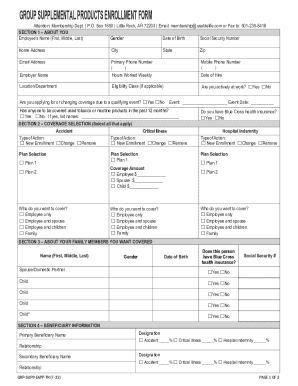
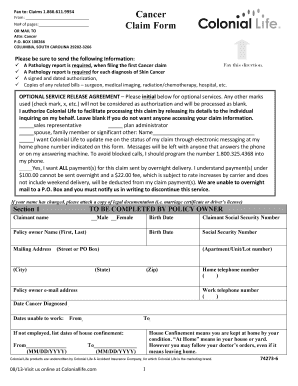
The Colonial Supplemental Insurance Election Form is an employee benefits enrollment document used by workers to enroll in or waive supplemental insurance benefits offered by their employer.
pdfFiller scores top ratings on review platforms




Who needs Supplemental Insurance Form?
Explore how professionals across industries use pdfFiller.

Supplemental Insurance Form is needed by:
-
Employees seeking supplemental insurance benefits
-
Human Resources professionals managing benefits enrollment
-
Employers offering Colonial Life insurance options
-
Payroll departments handling employee benefits
-
Insurance agents assisting clients with enrollment
Comprehensive Guide to Supplemental Insurance Form
What is the Colonial Supplemental Insurance Election Form?
The Colonial Supplemental Insurance Election Form is a crucial document used during employee benefits enrollment. This form allows employees to express their choices regarding supplemental insurance options provided by their employer. Understanding its purpose is essential, as this form plays a significant role in determining the supplemental insurance coverage an employee may receive. By filling out this form, employees can effectively manage their insurance selections, ensuring they have the necessary protection for their personal and family needs.
Purpose and Benefits of the Colonial Supplemental Insurance Election Form
The Colonial Supplemental Insurance Election Form serves multiple purposes for employees seeking supplemental insurance benefits. Firstly, it enables employees to either enroll in available options or waive coverage based on their needs. The benefits of supplemental insurance coverage can include financial support for unexpected medical expenses or critical illness. Employers play a key role in offering these essential benefits.
Key Features of the Colonial Supplemental Insurance Election Form
This form includes several critical features that facilitate the enrollment process. Employees will find fillable fields requiring personal information such as name, address, and Social Security number. Additionally, the form provides various benefit selection options to match employee needs. Another significant feature is the ability to submit the form electronically through platforms like pdfFiller, streamlining the process and providing immediate confirmation.
Who Should Use the Colonial Supplemental Insurance Election Form?
The primary audience for the Colonial Supplemental Insurance Election Form consists of employees who are eligible for supplemental insurance benefits. Furthermore, employers who offer these options must ensure their staff is informed about the requirements and procedures involved in completing this important document.
How to Fill Out the Colonial Supplemental Insurance Election Form Online
Filling out the Colonial Supplemental Insurance Election Form online is a straightforward process. Follow these steps to ensure accuracy:
-
Access the form on pdfFiller's platform.
-
Edit the form by entering required details in designated fields.
-
Carefully review each entry, especially personal information and benefit selections.
-
Double-check for completeness before submitting.
These simple steps can help mitigate errors and ensure all necessary information is provided accurately.
Common Errors and How to Avoid Them
When completing the Colonial Supplemental Insurance Election Form, several common errors can occur. Key mistakes often include missing required fields or incorrectly filling out benefit selection options. To avoid these pitfalls, employees should take the following steps:
-
Thoroughly verify all entries before submission.
-
Check for consistency in personal information and benefit selections.
By carefully reviewing the completed form, employees can help prevent delays in processing their submissions.
Submitting the Colonial Supplemental Insurance Election Form
Submitting the Colonial Supplemental Insurance Election Form can be done through various methods, depending on employer preferences. Employees can choose to submit the form in-person, via email, or online through platforms like pdfFiller. After submission, employees can expect a processing timeline and confirmation once their forms have been reviewed.
Security and Compliance for the Colonial Supplemental Insurance Election Form
Ensuring the safety and confidentiality of personal information when handling the Colonial Supplemental Insurance Election Form is paramount. pdfFiller employs robust security measures, including encryption and compliance with GDPR regulations, to protect user data. Implementing best practices is essential for maintaining confidentiality throughout the form submission process.
Why Choose pdfFiller for Your Colonial Supplemental Insurance Election Form?
Utilizing pdfFiller for completing the Colonial Supplemental Insurance Election Form offers several advantages. This platform simplifies the form-filling experience with features such as cloud-based access and electronic signing. Furthermore, pdfFiller guarantees secure handling and management of sensitive documents, making it an excellent choice for employees needing to enroll in supplemental insurance.
Get Started with Your Colonial Supplemental Insurance Election Form Today!
Take action today by visiting pdfFiller to begin filling out your Colonial Supplemental Insurance Election Form online. The platform ensures an easy-to-use interface and offers support throughout the completion process. Enjoy immediate access and a seamless submission experience with pdfFiller.
How to fill out the Supplemental Insurance Form
-
1.Access the Colonial Supplemental Insurance Election Form on pdfFiller by searching for the document in the platform's dashboard or using the provided link.
-
2.Open the form in the editor by clicking ‘Fill’ once you locate it. You’ll see an interface that presents fillable fields throughout the document.
-
3.Before you begin filling it out, gather necessary personal information including your name, Social Security Number, address, email, and any desired benefit selections.
-
4.Navigate to each field and click to enter your information. Use the keyboard to type where text is required and click checkboxes to select your chosen benefits.
-
5.Ensure that all required fields marked with an asterisk are completed accurately to avoid submission issues. Pay special attention to your personal details and the selections you make.
-
6.After filling in all relevant sections, take a moment to review the entire form for any errors or missing information.
-
7.Once satisfied with the accuracy, finalize your form by clicking the 'Save' button. You can choose to download a copy or submit it directly to your HR department.
-
8.To save, download, or submit, use the options available in the toolbar, making sure your choices reflect your intended action with the completed form.

Who is eligible to use the Colonial Supplemental Insurance Election Form?
Any employee of a company offering Colonial supplemental insurance benefits can use this form to enroll or waive coverage. It's crucial to check any company-specific guidelines.
What is the submission process for this form?
Once you have completed the Colonial Supplemental Insurance Election Form, submit it directly to your HR department either electronically through pdfFiller or by printing and handing it in physically.
Are there any deadlines for submitting the insurance election form?
Deadlines can vary depending on employer policies. It is recommended to submit the form as early as possible and check with HR for specific cutoff dates related to benefits enrollment.
Do I need to include supporting documents with the form?
Typically, you do not need to provide additional documents unless specified by your employer. Focus on accurately filling out the required personal information within the form.
What are common mistakes to avoid when completing this form?
Common mistakes include forgetting to sign the form, leaving required fields blank, and selecting incorrect benefits. Always double-check your entries and ensure your details are accurate.
How long does it take to process the submitted form?
Processing times can vary, but you can generally expect to receive confirmation from your HR department within a week. Follow up if you don't receive any communication.
Can this form be used for benefits not related to Colonial Life insurance?
No, this form is specifically designed for enrolling in or waiving Colonial Supplemental Insurance benefits and should not be used for other types of benefits.
Related Forms




Get the latest insights from our blog


If you believe that this page should be taken down, please follow our DMCA take down process
here
.
This form may include fields for payment information. Data entered in these fields is not covered by PCI DSS compliance.