
Last updated on
Oct 7, 2026

Get the free Emergency Contact Card
We are not affiliated with any brand or entity on this form

Fill out
Complete the form online in a simple drag-and-drop editor.

eSign
Add your legally binding signature or send the form for signing.

Share
Share the form via a link, letting anyone fill it out from any device.

Export
Download, print, email, or move the form to your cloud storage.
Why pdfFiller is the best tool for your documents and forms


End-to-end document management
From editing and signing to collaboration and tracking, pdfFiller has everything you need to get your documents done quickly and efficiently.
Accessible from anywhere
pdfFiller is fully cloud-based. This means you can edit, sign, and share documents from anywhere using your computer, smartphone, or tablet.
Secure and compliant
pdfFiller lets you securely manage documents following global laws like ESIGN, CCPA, and GDPR. It's also HIPAA and SOC 2 compliant.
What is Emergency Card
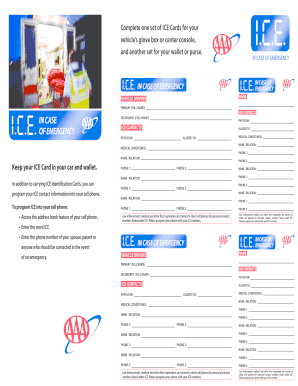
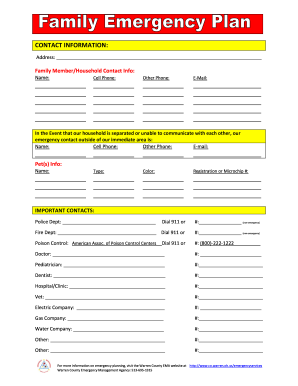
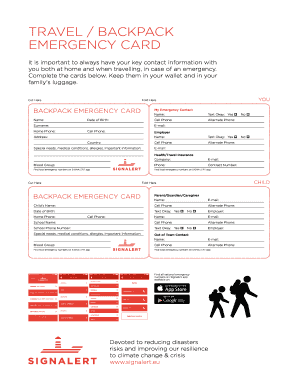
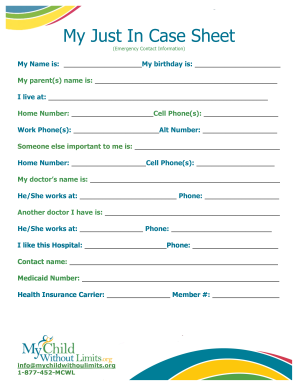
The Emergency Contact Card is a personal document used by households to record essential emergency information for each family member.
pdfFiller scores top ratings on review platforms




Who needs Emergency Card?
Explore how professionals across industries use pdfFiller.

Emergency Card is needed by:
-
Families preparing for emergencies
-
Caregivers managing multiple households
-
Individuals participating in disaster preparedness programs
-
Schools needing student emergency contacts
-
Healthcare providers requiring patient emergency information
-
Community organizations involved in local safety initiatives
Comprehensive Guide to Emergency Card
What is the Emergency Contact Card?
The Emergency Contact Card is a vital document that helps individuals and families quickly access essential information during crises. This card typically includes critical details such as phone numbers, home addresses, and emergency contacts, making it indispensable during disasters or emergencies. Having this information readily available can significantly enhance response times when every second counts.
Purpose and Benefits of the Emergency Contact Card
Creating and maintaining an emergency contact card is essential for every household. It aids in reducing stress by organizing important information that can be quickly referenced in emergencies. Moreover, this document plays a preventative role in disaster preparedness, ensuring that families are ready for unforeseen circumstances.
Key Features of the Emergency Contact Card
The Emergency Contact Card includes various fields designed to capture pertinent information. These may encompass healthcare providers, additional emergency contacts, and specific instructions for other caregivers. Some versions of the card even offer interactive elements, such as fillable fields, which allow users to complete the document seamlessly. Furthermore, security features are often integrated to safeguard sensitive information.
Who Needs the Emergency Contact Card?
Families, seniors, and those with health conditions or multiple dependents are among the target audiences for the Emergency Contact Card. The importance of this document is amplified for individuals managing complex health needs or in households where quick communication is crucial.
How to Fill Out the Emergency Contact Card Online
Filling out the Emergency Contact Card online is a straightforward process. Follow these steps:
-
Visit pdfFiller and search for the Emergency Contact Card template.
-
Gather all necessary information, including contacts and healthcare details.
-
Fill in the required fields carefully to ensure accuracy.
-
Save the completed card as a PDF for printing.
-
Print the card using appropriate settings to maintain clarity.
This preparation ensures the card remains easily accessible when needed.
Common Errors and How to Avoid Them
When completing the Emergency Contact Card, users often make mistakes that can lead to complications during emergencies. Common errors include:
-
Omitting critical contact information.
-
Failing to update information regularly.
-
Inaccuracies in healthcare provider details.
To avoid these issues, users should implement validation checks after filling out the card to ensure completeness and accuracy.
Security and Compliance with the Emergency Contact Card
Securing sensitive information on the Emergency Contact Card is paramount. Users must understand the significance of protecting this data to ensure privacy and compliance with regulations such as HIPAA and GDPR. Security features like 256-bit encryption provided by platforms like pdfFiller help safeguard this critical information.
How to Download, Print, and Store the Emergency Contact Card
Once the Emergency Contact Card is completed, follow these instructions to download and print:
-
Download the completed card as a PDF from pdfFiller.
-
Check printing settings to ensure the document prints correctly.
-
Store the card in a safe yet easily accessible location for future reference.
This ensures that the card is available whenever it is needed the most.
Utilizing pdfFiller for Your Emergency Contact Card
pdfFiller enhances the form-filling experience with features that streamline document processes, including eSigning and editing capabilities. Users have reported positive experiences due to the platform's ease of use, which can significantly aid in completing emergency preparedness documentation. Taking advantage of these capabilities can make emergency management simpler and more efficient.
Next Steps after Completing Your Emergency Contact Card
After filling out the Emergency Contact Card, users should take the following steps:
-
Review the card for accuracy and completeness.
-
Share the updated card with family members for awareness.
-
Regularly update the card to ensure all information is current.
Maintaining an up-to-date card is crucial for ongoing safety and effective emergency response.
How to fill out the Emergency Card
-
1.To start, access pdfFiller and search for 'Emergency Contact Card' in the form library.
-
2.Once located, click on the form to open it in the pdfFiller editor, allowing you to fill in necessary fields.
-
3.Before filling out the form, gather vital information such as phone numbers, home addresses, and contact details for healthcare providers.
-
4.Click on each blank field to input the collected data seamlessly. You can use the tab key or mouse to navigate between fields.
-
5.If your device allows, use the 'fill & sign' feature to enhance your input experience.
-
6.After completing all fields, review the form carefully to ensure accuracy, making any necessary corrections.
-
7.Once satisfied, save your work by clicking the save icon. You can also download the filled form in PDF format for your records.
-
8.Lastly, you can submit your Emergency Contact Card directly through email or print it out for physical access during an emergency.

Who should use the Emergency Contact Card?
The Emergency Contact Card is ideal for families, caregivers, and individuals involved in disaster preparedness who need a reliable way to store emergency contact information.
Is there a deadline for filling out this form?
There is no specific deadline for the Emergency Contact Card. However, it's best to complete it as soon as possible to ensure you have access to vital information during emergencies.
How do I submit the completed Emergency Contact Card?
You can submit the Emergency Contact Card by downloading it for personal records or printing it out to keep it accessible. Submission typically involves no additional procedures.
What supporting documents do I need to fill out this form?
No supporting documents are required to complete the Emergency Contact Card. Just gather relevant information such as contact numbers and addresses for each household member.
What are common mistakes to avoid when filling out this form?
Common mistakes include missing critical information like healthcare provider contacts and not keeping the form updated following a change in family status or contact details.
How long does it take to complete the Emergency Contact Card?
Filling out the Emergency Contact Card typically takes about 10 to 15 minutes, depending on the number of household members and the availability of information.
Is notarization required for the Emergency Contact Card?
No, notarization is not required for the Emergency Contact Card, as it is a personal record to keep for emergency reference.
Related Forms





Get the latest insights from our blog


If you believe that this page should be taken down, please follow our DMCA take down process
here
.
This form may include fields for payment information. Data entered in these fields is not covered by PCI DSS compliance.