
Last updated on
Oct 7, 2026

Get the free North Carolina Recreation Use Permit
We are not affiliated with any brand or entity on this form

Fill out
Complete the form online in a simple drag-and-drop editor.

eSign
Add your legally binding signature or send the form for signing.

Share
Share the form via a link, letting anyone fill it out from any device.

Export
Download, print, email, or move the form to your cloud storage.
Why pdfFiller is the best tool for your documents and forms


End-to-end document management
From editing and signing to collaboration and tracking, pdfFiller has everything you need to get your documents done quickly and efficiently.
Accessible from anywhere
pdfFiller is fully cloud-based. This means you can edit, sign, and share documents from anywhere using your computer, smartphone, or tablet.
Secure and compliant
pdfFiller lets you securely manage documents following global laws like ESIGN, CCPA, and GDPR. It's also HIPAA and SOC 2 compliant.
What is NC Recreation Permit
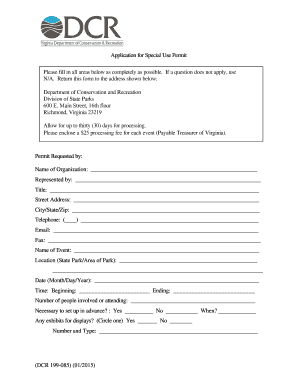
The North Carolina Recreation Use Permit is a government form used by organizations to apply for the use of group camp facilities at Singletary Lake State Park.
pdfFiller scores top ratings on review platforms




Who needs NC Recreation Permit?
Explore how professionals across industries use pdfFiller.

NC Recreation Permit is needed by:
-
Non-profit organizations planning group camping activities
-
Educational institutions seeking outdoor learning experiences
-
Corporate teams wanting to host retreats in state parks
-
Youth groups organizing summer camps
-
Families looking to reserve group camp facilities
-
Event planners coordinating group events at parks
Comprehensive Guide to NC Recreation Permit
What is the North Carolina Recreation Use Permit?
The North Carolina Recreation Use Permit serves as an official authorization for the use of group camp facilities, primarily at state parks like Singletary Lake State Park. This permit ensures organized activities comply with park regulations and provides necessary logistics for gatherings. To secure this permit, applicants are required to submit a non-refundable deposit along with a signed recreation use permit form, acknowledging the rules set by the NC Division of Parks.
Purpose and Benefits of the North Carolina Recreation Use Permit
This permit is essential for individuals or groups intending to utilize the facilities at group camp locations, ensuring that all events run smoothly and are well-managed. Using the permit not only facilitates better organization of activities, but also enhances the overall experience for attendees, allowing groups to enjoy the beautiful amenities provided by NC parks and recreation.
Eligibility Criteria for the North Carolina Recreation Use Permit
Eligibility for the North Carolina Recreation Use Permit includes a variety of group types, from educational organizations to community groups. Specific requirements must be met, such as providing documentation that identifies the group and its purpose. Additionally, there may be restrictions regarding the size and nature of events, ensuring that safety and compliance with the NC Division of Parks standards are maintained.
How to Fill Out the North Carolina Recreation Use Permit Online (Step-by-Step)
For an efficient application process, follow these steps to fill out the North Carolina Recreation Use Permit online through pdfFiller:
-
Access the permit form via the pdfFiller platform.
-
Input your organization’s details in the designated fields.
-
Specify the group size and preferred dates of use.
-
Review all entries for accuracy before submission.
-
Complete the eSigning process as required.
Ensure all required information is accurate to avoid delays.
Field-by-Field Instructions for the North Carolina Recreation Use Permit
Completing the North Carolina Recreation Use Permit requires attention to detail in each form field. Key fields include:
-
Organization Name: Ensure the official name is provided.
-
Group Size: Indicate the exact number of attendees accurately.
-
Event Purpose: Clearly describe the nature of the gathering.
Common mistakes involve incorrect group sizes or failing to provide sufficient details about the event, which can lead to application rejection.
Submission Methods and Delivery for the North Carolina Recreation Use Permit
You can submit the completed North Carolina Recreation Use Permit through various methods:
-
Online via pdfFiller
-
Mail directly to the NC Division of Parks and Recreation
It's crucial to be aware of any deadlines associated with submission. Applicants should expect to receive confirmation following their submission and be informed about the next steps in processing.
Confirmation and Tracking Your Submission
After submitting the North Carolina Recreation Use Permit, applicants can verify their submission status online. In the case of unexpected processing delays, it's advised to reach out to the appropriate contact provided during submission. Common reasons for rejection may include incomplete information or discrepancies in the group size noted in the application.
Security and Compliance for the North Carolina Recreation Use Permit
When using pdfFiller to complete the North Carolina Recreation Use Permit, applicants can be assured of strong security measures. The platform adheres to HIPAA and GDPR compliance, protecting sensitive information from unauthorized access. Implementation of 256-bit encryption strengthens overall data protection, ensuring applicants' information is secure during the filling and submission process.
Common Errors and How to Avoid Them When Applying
Applicants frequently encounter pitfalls while completing the North Carolina Recreation Use Permit. Common errors include:
-
Omitting required signatures or initials
-
Inaccurate representation of the group size
-
Failure to attach supporting documents when necessary
To ensure a smooth application process, double-check entries and follow all provided guidelines thoroughly.
Experience with pdfFiller for the North Carolina Recreation Use Permit
pdfFiller simplifies the process of filling out the North Carolina Recreation Use Permit, offering efficient tools for completing and eSigning forms. Users have reported that the platform's intuitive design and features, such as fillable forms and document organization, enhance their overall experience. Testimonials highlight the convenience of submitting the permit online without the hassle of manual paperwork, showcasing the practicality pdfFiller brings to this application process.
How to fill out the NC Recreation Permit
-
1.Access the North Carolina Recreation Use Permit on pdfFiller by searching 'North Carolina Recreation Use Permit' in the search bar.
-
2.Once open, familiarize yourself with the layout of the document and the blank fields available for entry.
-
3.Before completing the form, gather information about your organization, group size, and preferred camping dates to fill in relevant sections accurately.
-
4.Begin filling out the form by clicking in the necessary fields, and use pdfFiller’s tools to input your information, making sure all details are correct.
-
5.Refer to the instructions provided on the document for guidance on specific sections, especially regarding group size and the non-refundable deposit.
-
6.After completing all required fields, review your entries for accuracy, ensuring that the form is fully filled out and all necessary checks are marked.
-
7.Finalize the form by signing it digitally using pdfFiller's electronic signature feature, which will confirm that you understand the park's rules and regulations.
-
8.Once you’re satisfied with the review, save your work within pdfFiller or download the document in your preferred format for submission.
-
9.To submit the application, follow any specified instructions related to sending your form to the North Carolina Division of Parks and Recreation.

Who is eligible to apply for the North Carolina Recreation Use Permit?
Organizations, groups, and individuals planning to use group camp facilities at Singletary Lake State Park are eligible to apply for this permit, provided they meet the minimum requirements outlined by the North Carolina Division of Parks and Recreation.
What information do I need to complete the application?
Before starting the application, gather information about your organization, the number of participants, intended camping dates, and a non-refundable deposit. This information is crucial for filling out the form accurately.
How do I submit the completed permit form?
After completing the form, you can submit it by mailing it to the North Carolina Division of Parks and Recreation. Ensure you include your deposit, as required, along with the signed permit.
Is there a deadline for submitting the Recreation Use Permit?
While specific deadlines are often based on the intended dates of use, it’s best to submit your application as early as possible to ensure facility availability and processing time. Consult the North Carolina Division of Parks and Recreation for specific timelines.
What are common mistakes to avoid when filling out this form?
Common mistakes include forgetting to sign the form, leaving fields blank, or miscalculating the required deposit. Check all sections thoroughly and ensure your information is consistent before submitting.
How long does it take to process the Recreation Use Permit?
Processing times can vary. It is recommended to apply at least several weeks in advance of your intended use to account for any potential processing delays and to ensure that your dates are confirmed.
Are there any fees associated with the Recreation Use Permit?
Yes, there is a non-refundable deposit that accompanies the application. The exact amount and additional fees, if applicable, should be confirmed directly with the North Carolina Division of Parks and Recreation.
Related Forms




Get the latest insights from our blog


If you believe that this page should be taken down, please follow our DMCA take down process
here
.
This form may include fields for payment information. Data entered in these fields is not covered by PCI DSS compliance.