

Get the free Sub-Contractor Evaluation Form Template
We are not affiliated with any brand or entity on this form

Fill out
Complete the form online in a simple drag-and-drop editor.

eSign
Add your legally binding signature or send the form for signing.

Share
Share the form via a link, letting anyone fill it out from any device.

Export
Download, print, email, or move the form to your cloud storage.
Why pdfFiller is the best tool for your documents and forms


End-to-end document management
From editing and signing to collaboration and tracking, pdfFiller has everything you need to get your documents done quickly and efficiently.
Accessible from anywhere
pdfFiller is fully cloud-based. This means you can edit, sign, and share documents from anywhere using your computer, smartphone, or tablet.
Secure and compliant
pdfFiller lets you securely manage documents following global laws like ESIGN, CCPA, and GDPR. It's also HIPAA and SOC 2 compliant.
What is Sub-Contractor Evaluation
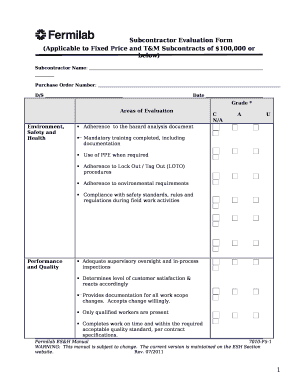
The Sub-Contractor Evaluation Form Template is a business document used by project managers and evaluators to assess subcontractor performance in construction projects.
pdfFiller scores top ratings on review platforms




Who needs Sub-Contractor Evaluation?
Explore how professionals across industries use pdfFiller.

Sub-Contractor Evaluation is needed by:
-
Project Managers assessing subcontractor work quality
-
Construction firms evaluating safety compliance
-
Contract administrators managing subcontractor agreements
-
Quality assurance teams conducting performance evaluations
-
Procurement officers reviewing subcontractor capabilities
How to fill out the Sub-Contractor Evaluation
-
1.Access pdfFiller and search for 'Sub-Contractor Evaluation Form Template' to open the document.
-
2.Once the form is open, familiarize yourself with the layout and sections including subcontractor information and evaluation criteria.
-
3.Before filling out the form, gather necessary details such as subcontractor name, project specifics, and evaluation guidelines to ensure accuracy.
-
4.Navigate through the fillable fields using your cursor. Click on each section to enter information, such as subcontractor performance metrics like quality, punctuality, and teamwork.
-
5.When completing the evaluation criteria, use checkboxes where applicable to denote compliance with safety regulations and project requirements.
-
6.In the space provided, write a final rating based on your assessment. Ensure your evaluations are clearly articulated and justified.
-
7.After completing all sections, review the entire form to confirm all information is accurate and adequately filled out.
-
8.Finally, save the completed form on pdfFiller. You can download it directly to your device or choose to submit electronically via the available submission options.

Who is eligible to use the Sub-Contractor Evaluation Form Template?
Any project manager, evaluator, or organization involved in subcontracting services within construction or project management can use this form to assess subcontractor performance.
What is the deadline for submitting the Sub-Contractor Evaluation Form?
The submission deadline varies depending on project timelines. It’s essential to complete the evaluation promptly after the subcontractor’s work to ensure evaluations are relevant.
How do I submit the completed form?
You can submit the completed Sub-Contractor Evaluation Form through pdfFiller electronically, or you can download it and submit a hard copy to your organization’s contract administrator.
Are there any supporting documents required when submitting this form?
Generally, no additional documents are required with the Sub-Contractor Evaluation Form, but you may need to attach supporting evidence such as contracts, invoices, or previous evaluation reports for context.
What common mistakes should I avoid when filling this form?
Avoid leaving sections blank, ensure that evaluation criteria are fully addressed, and double-check your final rating for accuracy and clarity to prevent misunderstandings.
How long does it take to process the evaluation after submission?
Processing times may vary based on the organization's procedures, but typically allow 1-2 weeks for the evaluation to be reviewed and feedback to be provided.
Can I edit the form after saving it on pdfFiller?
Yes, pdfFiller allows you to reopen and edit your saved forms at any time before final submission, ensuring you can make necessary changes as needed.
Related Forms



Get the latest insights from our blog



If you believe that this page should be taken down, please follow our DMCA take down process
here
.
This form may include fields for payment information. Data entered in these fields is not covered by PCI DSS compliance.