
Last updated on
Oct 19, 2026

Get the free Constituent Contact Sheet
We are not affiliated with any brand or entity on this form

Fill out
Complete the form online in a simple drag-and-drop editor.

eSign
Add your legally binding signature or send the form for signing.

Share
Share the form via a link, letting anyone fill it out from any device.

Export
Download, print, email, or move the form to your cloud storage.
Why pdfFiller is the best tool for your documents and forms


End-to-end document management
From editing and signing to collaboration and tracking, pdfFiller has everything you need to get your documents done quickly and efficiently.
Accessible from anywhere
pdfFiller is fully cloud-based. This means you can edit, sign, and share documents from anywhere using your computer, smartphone, or tablet.
Secure and compliant
pdfFiller lets you securely manage documents following global laws like ESIGN, CCPA, and GDPR. It's also HIPAA and SOC 2 compliant.
What is Contact Sheet
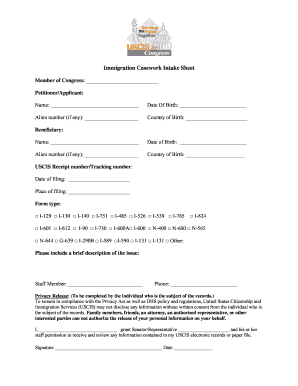
The Constituent Contact Sheet is a government document used by officials to record and track communications with constituents effectively.
pdfFiller scores top ratings on review platforms




Who needs Contact Sheet?
Explore how professionals across industries use pdfFiller.

Contact Sheet is needed by:
-
Government officials managing constituent inquiries
-
Public service agencies requiring communication records
-
Administrative staff handling citizen services
-
Nonprofit organizations assisting constituents
-
Community outreach coordinators
-
Political campaign teams engaging with voters
Comprehensive Guide to Contact Sheet
What is the Constituent Contact Sheet?
The Constituent Contact Sheet is a crucial tool for government officials, designed to efficiently track and document communications with constituents. This form allows officials to record important constituent inquiries and concerns, aiding in transparency and accountability. Key fields on the sheet include the constituent's name, address, phone number, and subject of communication, which collectively streamline the tracking process.
Benefits of Using the Constituent Contact Sheet
Utilizing the Constituent Contact Sheet significantly enhances record-keeping for interactions with constituents. This form improves response times and provides accountability as all communications are documented. Furthermore, it ensures that constituents' voices are acknowledged and addressed promptly, fostering trust and efficiency in government operations.
Key Features of the Constituent Contact Sheet
The Constituent Contact Sheet includes various essential fields for effective communication tracking. These fields encompass:
-
Name
-
Address
-
Phone number
-
Subject of inquiry
-
Actions taken
This fillable form is designed with user-friendliness in mind, making it easy for officials to complete and manage.
How to Fill Out the Constituent Contact Sheet Online
Filling out the Constituent Contact Sheet online is a straightforward process. Follow these steps:
-
Access the form through pdfFiller.
-
Begin inputting information in the designated fields, ensuring accuracy.
-
Pay attention to sensitive information, especially when entering details like the social security number.
-
Review all entries carefully before submission.
This careful process ensures that all necessary information is included and correctly presented.
Submission Methods for the Constituent Contact Sheet
Once completed, the Constituent Contact Sheet can be submitted through various methods. Options include:
-
Online submission via pdfFiller
-
Mailing the physical form
-
Submitting in person at designated government offices
Be mindful of submission deadlines and processing times to ensure timely responses. After submission, it is important to verify your submission through confirmation methods as needed.
Common Errors and How to Avoid Them
When filling out the Constituent Contact Sheet, it's important to avoid common mistakes that can lead to processing issues. Common errors include:
-
Missing required information
-
Providing incorrect data
To mitigate these risks, double-check your entries and ensure clarity in all provided information, which is vital for successful submissions.
Security Measures when Handling the Constituent Contact Sheet
Protecting sensitive information on the Constituent Contact Sheet is a priority. pdfFiller incorporates several security features, including:
-
256-bit encryption ensuring data integrity
-
Compliance with SOC 2 Type II, HIPAA, and GDPR
Be particularly cautious with sensitive details, such as social security numbers, to maintain confidentiality throughout form completion and submission.
Using pdfFiller to Optimize Your Experience with the Constituent Contact Sheet
pdfFiller enhances the process of using the Constituent Contact Sheet by offering various benefits, including:
-
Editing and filling capabilities for easy form customization
-
eSigning options to streamline the submission process
-
Access to templates that facilitate efficient completion
The platform's user-friendly design and comprehensive support further simplify the interaction with government contact forms.
Examples and Sample Completed Constituent Contact Sheets
To aid users in understanding the completion of the Constituent Contact Sheet, several examples of filled-out forms are available. These samples can serve as a reference guide, helping to clarify how each field should be completed. Users are encouraged to customize these examples to fit individual needs while ensuring that all necessary fields are accurately filled out.
How to fill out the Contact Sheet
-
1.To access the Constituent Contact Sheet on pdfFiller, go to the pdfFiller website and search for the form by name or category.
-
2.Once you've opened the form, familiarize yourself with pdfFiller's interface, which includes tools for filling out, editing, and saving documents.
-
3.Before you start filling in the form, gather necessary information such as the constituent's name, address, phone number, and social security number.
-
4.Begin by clicking on the appropriate fields and enter the required information. Use the provided sections for the subject of communication and any actions taken.
-
5.Make sure to double-check each field for accuracy, ensuring all details are correctly filled in according to the constituent's information.
-
6.After completing the form, use the review feature to confirm that all entries are accurate and that you have not missed any sections.
-
7.To save your progress, click on the save option. You can choose to download the completed form as a PDF or submit it directly through the pdfFiller platform.

Who is eligible to use the Constituent Contact Sheet?
The Constituent Contact Sheet can be used by any government officials or staff members who are tasked with recording communications with constituents. This includes administrative personnel and public service employees.
Are there any deadlines for submitting the completed form?
While there are no specific deadlines for submitting the Constituent Contact Sheet itself, it is advisable to fill out and document communications promptly to ensure timely responses to constituents.
How can I submit the Constituent Contact Sheet once completed?
Once completed, the Constituent Contact Sheet can be submitted directly through pdfFiller, downloaded for your records, or printed and handed over to the appropriate department or office.
What supporting documents are required with the Constituent Contact Sheet?
Typically, no additional supporting documents are required with the Constituent Contact Sheet itself. However, if there are specific inquiries related to a constituent's case, it may be helpful to include relevant correspondence or documentation.
What are some common mistakes to avoid when filling out this form?
Common mistakes include missing fields, typos in constituent information, and not clearly stating the subject of communication. Ensure you double-check all entries before submission.
What is the expected processing time for the information submitted via this form?
Processing times may vary based on the agency's workload. Generally, it is advisable to allow at least a few business days for review and response to any inquiries logged through the Constituent Contact Sheet.
Can this form be modified for different types of communications?
Yes, while the Constituent Contact Sheet is standardized, it can be adapted to include specific fields or notes pertinent to different types of communications or inquiries as needed by the agency.
Related Forms




Get the latest insights from our blog


If you believe that this page should be taken down, please follow our DMCA take down process
here
.
This form may include fields for payment information. Data entered in these fields is not covered by PCI DSS compliance.