
Last updated on
Oct 7, 2026

Get the free Provider Referral Form
We are not affiliated with any brand or entity on this form

Fill out
Complete the form online in a simple drag-and-drop editor.

eSign
Add your legally binding signature or send the form for signing.

Share
Share the form via a link, letting anyone fill it out from any device.

Export
Download, print, email, or move the form to your cloud storage.
Why pdfFiller is the best tool for your documents and forms


End-to-end document management
From editing and signing to collaboration and tracking, pdfFiller has everything you need to get your documents done quickly and efficiently.
Accessible from anywhere
pdfFiller is fully cloud-based. This means you can edit, sign, and share documents from anywhere using your computer, smartphone, or tablet.
Secure and compliant
pdfFiller lets you securely manage documents following global laws like ESIGN, CCPA, and GDPR. It's also HIPAA and SOC 2 compliant.
What is Referral Form
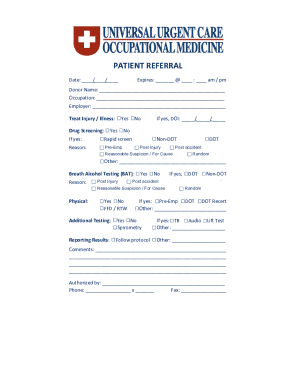
The Provider Referral Form is a healthcare document used by healthcare providers to refer patients to disease and wellness management programs.
pdfFiller scores top ratings on review platforms




Who needs Referral Form?
Explore how professionals across industries use pdfFiller.

Referral Form is needed by:
-
Healthcare providers seeking to refer patients
-
Patients requiring disease management services
-
Wellness program coordinators
-
Medical office administrators
-
Insurance companies processing referrals
Comprehensive Guide to Referral Form
What is the Provider Referral Form?
The Provider Referral Form plays a critical role in healthcare by facilitating referrals between healthcare providers. This form is essential for compiling necessary information for patient care, including patient details, healthcare provider information, and biometric results. By providing structured documentation, the Provider Referral Form enhances communication in various healthcare settings.
It includes sections dedicated to patient information, provider details, and specific biometric data, making it comprehensive and user-friendly.
Purpose and Benefits of the Provider Referral Form
The Provider Referral Form is instrumental in both disease management and wellness programs. It ensures that healthcare providers have the pertinent information required for effective patient care and follow-up. By utilizing this form, healthcare providers can better track patient health over time.
Advantages of the Provider Referral Form include improving coordinated care between different health systems and promoting comprehensive wellness management. This ultimately leads to enhanced patient outcomes and streamlined healthcare processes.
Key Features of the Provider Referral Form
This form is designed with user experience in mind, featuring multiple fillable fields and clearly defined sections. Instructions for completing and submitting the form are provided, which ensures correct usage and minimizes errors.
-
Fillable fields for efficient data entry.
-
Comprehensive sections covering all necessary information.
-
Guidance on submission processes for ease of use.
Who Needs the Provider Referral Form?
The Provider Referral Form is essential for various users within the healthcare system. Primary users include healthcare providers who refer patients to specialized programs.
Examples of scenarios requiring this form include referrals for diagnostic testing, rehabilitation programs, or wellness assessments, ensuring effective patient transitions between services.
How to Fill Out the Provider Referral Form Online
Filling out the Provider Referral Form online through pdfFiller is a straightforward process. To begin, access the form via a browser and edit it directly without the need for downloads.
-
Navigate to pdfFiller and locate the Provider Referral Form.
-
Edit the form to include all required patient details and provider information.
-
Ensure all necessary biometric results are accurately entered.
Before submitting, gather all essential information to avoid delays in processing.
Submission Methods for the Provider Referral Form
Once completed, the Provider Referral Form can be submitted securely through various methods. Users have the option to send the form via fax or secure email, catering to different preferences for document submission.
Secure transmission of sensitive patient data is crucial to maintaining confidentiality and complying with healthcare regulations.
Common Errors and How to Avoid Them
Completing the Provider Referral Form can sometimes lead to errors. Common mistakes include submitting incomplete forms or providing incorrect patient data.
-
Check for missing fields; every section should be filled out completely.
-
Review all provided information for accuracy before submission.
Using a review and validation checklist can help in minimizing these errors.
What Happens After You Submit the Provider Referral Form?
After submission, the form undergoes review by the receiving healthcare facility. Processing timelines may vary based on the institution, so it is essential to remain aware of the expected duration for any referrals.
Users can track the status of their submission to ensure timely follow-up and to manage any required actions efficiently.
Security and Compliance for the Provider Referral Form
Security measures are paramount in handling the Provider Referral Form, especially given the sensitivity of patient data. This form employs advanced security features such as 256-bit encryption to protect your information.
Moreover, pdfFiller is committed to adhering to GDPR and HIPAA compliance, ensuring that all user data remains confidential and secure throughout the submission process.
Maximize Your Experience with pdfFiller
Utilizing pdfFiller for completing the Provider Referral Form offers numerous advantages. Users can take advantage of the platform’s user-friendly features, including eSignature capabilities and document sharing options.
This cloud-based solution streamlines the process of filling, editing, and managing healthcare forms, enhancing overall efficiency and user satisfaction.
How to fill out the Referral Form
-
1.Access the Provider Referral Form by visiting pdfFiller and using the search feature to locate it quickly.
-
2.Once opened, navigate through the form's sections using the toolbar. You will find fillable fields for patient information, healthcare provider details, and biometric screening results.
-
3.Before starting, gather all necessary information, including the patient’s identifying information and relevant medical history.
-
4.Begin by filling out the patient information section, ensuring accuracy and completeness in every field.
-
5.Next, provide the healthcare provider's information, including their name, contact details, and any relevant credentials.
-
6.Insert the biometric screening results in the designated section, ensuring that data is accurate and clearly presented.
-
7.After completing all sections, thoroughly review the form for any errors or missing information by using the preview function.
-
8.Finalize the form by clicking on the save option. You can choose to download it as a PDF or save it to your pdfFiller account.
-
9.To submit, either fax the completed form to the provided number or send it securely via email as instructed on the document.

Who is eligible to use the Provider Referral Form?
Healthcare providers and professionals who need to refer patients to disease and wellness management programs are eligible to use this form. Patients may also need to be involved in providing necessary information.
Are there any deadlines for submitting the Provider Referral Form?
Deadlines for submission depend on the specific wellness or disease management program requirements. It is advisable to consult with the program coordinator for any time-sensitive issues.
What methods are available for submitting the Provider Referral Form?
The completed Provider Referral Form can be submitted via fax or secure email. Make sure to follow the submission guidelines provided in the form.
What supporting documents are required with this form?
Typically, the Provider Referral Form may require the patient’s medical history or biometric screening results. It’s essential to check specific program requirements.
What are common mistakes to avoid when filling out the form?
Common mistakes include leaving fields blank, providing inaccurate information, or missing the submission deadline. Always review the form before submission to avoid these issues.
How long does it take to process the Provider Referral Form?
Processing times can vary depending on the healthcare facility or program. Usually, you can expect processing to take a few days. Contact the appropriate office for specific timelines.
Can the Provider Referral Form be filled out online?
Yes, the Provider Referral Form can be filled out online using pdfFiller, where you can navigate through the form's fields, save your progress, and submit it effectively.
Related Forms





Get the latest insights from our blog


If you believe that this page should be taken down, please follow our DMCA take down process
here
.
This form may include fields for payment information. Data entered in these fields is not covered by PCI DSS compliance.