
Last updated on
Oct 7, 2026

Get the free Account Change Request Form
We are not affiliated with any brand or entity on this form

Fill out
Complete the form online in a simple drag-and-drop editor.

eSign
Add your legally binding signature or send the form for signing.

Share
Share the form via a link, letting anyone fill it out from any device.

Export
Download, print, email, or move the form to your cloud storage.
Why pdfFiller is the best tool for your documents and forms


End-to-end document management
From editing and signing to collaboration and tracking, pdfFiller has everything you need to get your documents done quickly and efficiently.
Accessible from anywhere
pdfFiller is fully cloud-based. This means you can edit, sign, and share documents from anywhere using your computer, smartphone, or tablet.
Secure and compliant
pdfFiller lets you securely manage documents following global laws like ESIGN, CCPA, and GDPR. It's also HIPAA and SOC 2 compliant.
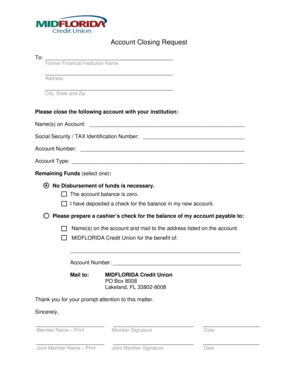
What is Account Change Form
The Account Change Request Form is a service agreement used by members of Tropical Financial Credit Union to request account changes, including removing joint owners and modifying overdraft protection.
pdfFiller scores top ratings on review platforms




Who needs Account Change Form?
Explore how professionals across industries use pdfFiller.

Account Change Form is needed by:
-
Members of Tropical Financial Credit Union looking to change account ownership.
-
Joint owners needing to withdraw from financial accounts.
-
Individuals required to modify overdraft protection services.
-
Account holders who need to cancel debit card services.
-
Anyone needing notarization for financial form submissions.
Comprehensive Guide to Account Change Form
What is the Account Change Request Form?
The Account Change Request Form is a valuable tool for members of Tropical Financial Credit Union aimed at requesting changes to their accounts. This form is essential for various scenarios including the removal of a joint owner or adjusting overdraft protection settings. It is critical that both account owners provide their signatures, and, in some cases, notarization is required to validate the changes.
Purpose and Benefits of the Account Change Request Form
Completing the Account Change Request Form helps streamline account modifications, ensuring that all requested changes are processed efficiently. By keeping account details up to date, members can safeguard their account information against unauthorized access and resolve potential disputes regarding account ownership. Additionally, using the form simplifies the process of making necessary adjustments and provides clarity throughout.
Key Features of the Account Change Request Form
The form includes multiple fillable fields and checkboxes designed for user convenience. Essential sections mandate notarization and the signatures of both the account owner and any joint owners. There are also features for cancelling debit card services and modifying overdraft protection settings, ensuring a comprehensive approach to managing account adjustments.
Who Needs the Account Change Request Form?
This form is primarily intended for primary account holders and joint owners who need to initiate account changes. To be eligible to make these modifications, individuals must meet specific criteria, which generally include being an authorized signer on the account. It is mandatory for all relevant parties to sign and, where required, notarize the document to proceed with changes.
How to Fill Out the Account Change Request Form Online
To fill out the Account Change Request Form successfully, gather the necessary information beforehand. Each field on the form must be completed accurately; common pitfalls include leaving fields blank or providing incorrect data. After finalizing the form, it’s important to review all entries and validate that the information is correct before submitting the request.
Signing and Notarizing the Account Change Request Form
The signature requirements for the Account Change Request Form may include digital signatures or traditional wet signatures. Notarization is often a necessary step; therefore, individuals should understand what documents are needed and where notarization can be obtained. Following these procedures is crucial in ensuring the form’s validity and acceptance by the credit union.
Submission Methods for the Account Change Request Form
Members have multiple options for submitting their completed Account Change Request Form, including email, in-person delivery, and fax. Be aware that there could be associated fees depending on the chosen submission method. It’s also essential to know any deadlines related to submission and how to track the status of the request after it has been sent.
What Happens After You Submit the Account Change Request Form?
Upon submission of the Account Change Request Form, users can expect a sequence of follow-ups, including confirmation notifications from the credit union. Typically, processing times may vary, but understanding what to anticipate can alleviate concerns. Should any errors arise or amendments be necessary post-submission, knowing how to address these issues is beneficial for maintaining accurate account information.
Protecting Your Information: Security and Compliance
When using services like pdfFiller to complete the Account Change Request Form, security measures such as 256-bit encryption are employed to protect sensitive information. Additionally, pdfFiller adheres to compliance standards, which helps ensure the safety of personal data during the submission process. This focus on security provides reassurance to members handling confidential documents.
Get Started with pdfFiller for Your Account Change Request Form
Using pdfFiller for completing your Account Change Request Form offers a user-friendly experience that simplifies filling and signing tasks. Members can easily edit and save their documents for future use, enhancing overall efficiency. We invite users to embark on their form completion journey using pdfFiller’s intuitive platform, making the process straightforward and accessible.
How to fill out the Account Change Form
-
1.Begin by accessing pdfFiller and search for 'Account Change Request Form'. You can use the search bar at the top of the homepage for quick access.
-
2.Once located, click on the form to open it in the editor. Familiarize yourself with the layout as it contains multiple sections.
-
3.Before filling out the form, gather any necessary information such as account numbers, joint owner details, and your signature. Having these at hand will streamline the process.
-
4.Navigate through the fillable fields on pdfFiller and input the required details. You will find sections for indicating joint owner removal and changing overdraft protection preferences.
-
5.Ensure that you correctly check any relevant boxes, such as canceling debit card services, as this affects your account functionalities.
-
6.After completing all fields, review your entries carefully. Make sure all information is accurate to prevent any processing delays.
-
7.If signatures are required, utilize pdfFiller’s signing features to add electronic signatures where necessary. Ensure all required parties sign as indicated on the form.
-
8.Once finalized, save your changes in pdfFiller. Decide if you want to download the completed form or submit it directly through the platform.
-
9.For submission, follow any additional prompts that pdfFiller may provide. Ensure you receive a confirmation once the form is submitted.

Who is eligible to use the Account Change Request Form?
The form is designed for members of Tropical Financial Credit Union who wish to request changes to their accounts, including joint owners and primary account holders.
Are there any deadlines for submitting this form?
While there are typically no hard deadlines for this form, it is essential to submit it as soon as possible for timely processing of your account changes.
What documents do I need to submit with this form?
You may need identification documents, account information, and potentially notarization for signatures, especially when removing a joint owner.
How can I submit the completed form?
You can submit the completed Account Change Request Form directly through pdfFiller by following the submission process or download it for mailing or in-person submission.
What are common mistakes to avoid when filling out this form?
Common mistakes include overlooking signature requirements, providing incorrect account details, and failing to check necessary boxes for service cancellations.
How long will it take to process my request after submission?
Processing times vary by credit union but typically take a few business days. It's advisable to check directly with Tropical Financial Credit Union for specific timelines.
Is notarization required for all signatures on this form?
Yes, notarization is required for the signatures of joint owners being removed from the account, ensuring authenticity and compliance.
Related Forms





Get the latest insights from our blog


If you believe that this page should be taken down, please follow our DMCA take down process
here
.
This form may include fields for payment information. Data entered in these fields is not covered by PCI DSS compliance.