
Last updated on
Oct 19, 2026

Get the free Medical Imaging Referral Form
We are not affiliated with any brand or entity on this form

Fill out
Complete the form online in a simple drag-and-drop editor.

eSign
Add your legally binding signature or send the form for signing.

Share
Share the form via a link, letting anyone fill it out from any device.

Export
Download, print, email, or move the form to your cloud storage.
Why pdfFiller is the best tool for your documents and forms


End-to-end document management
From editing and signing to collaboration and tracking, pdfFiller has everything you need to get your documents done quickly and efficiently.
Accessible from anywhere
pdfFiller is fully cloud-based. This means you can edit, sign, and share documents from anywhere using your computer, smartphone, or tablet.
Secure and compliant
pdfFiller lets you securely manage documents following global laws like ESIGN, CCPA, and GDPR. It's also HIPAA and SOC 2 compliant.
What is Examination Request
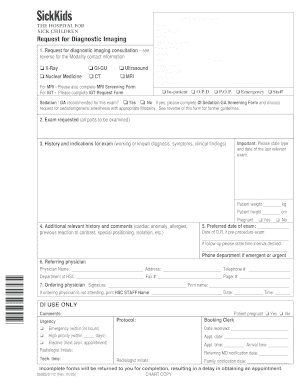
The Medical Imaging Referral Form is a healthcare document used by providers in Ontario to refer patients for various medical imaging tests.
pdfFiller scores top ratings on review platforms




Who needs Examination Request?
Explore how professionals across industries use pdfFiller.

Examination Request is needed by:
-
Healthcare providers referring patients for imaging tests
-
Patients needing medical scans
-
Radiologists requiring patient information for images
-
Medical administrators managing referrals
-
Insurance companies processing claims for imaging
-
Facilities administering medical imaging tests
Comprehensive Guide to Examination Request
What is the Medical Imaging Referral Form?
The Medical Imaging Referral Form is an essential document utilized by healthcare providers in Ontario to facilitate patient referrals for various medical imaging tests. This healthcare provider form aims to streamline the referral process and ensure that all necessary patient information is captured accurately. The form encompasses a range of medical imaging tests, including X-rays, MRIs, and CT scans, thereby playing a crucial role in patient care within the healthcare system.
Key features of this imaging test form include designated sections for patient details and test types, ensuring clarity and compliance with referring requirements. Healthcare providers can use this form to enhance efficiency in the referral process, thereby improving service delivery for both providers and patients.
Purpose and Benefits of the Medical Imaging Referral Form
The significance of the Medical Imaging Referral Form extends beyond mere documentation; it serves as a vital tool for both healthcare providers and patients. This patient referral form ensures accurate and efficient referrals for medical scans and tests, ultimately facilitating timely patient care. Benefits include streamlined processes that minimize errors and improve communication among healthcare professionals.
By utilizing this radiology referral form, providers can also improve overall patient care through better tracking of tests and results, leading to enhanced outcomes and satisfaction. The systematic use of this form aids in the organization of patient data and optimizes the workflow within medical facilities.
Who Needs the Medical Imaging Referral Form?
The primary audiences for the Medical Imaging Referral Form include referring providers, such as physicians and specialists, and patients requiring imaging tests. Eligibility for using this Canadian medical form generally falls to licensed healthcare professionals who are referring patients for imaging services. Scenarios necessitating this form encompass initial patient evaluations, follow-ups, and instances where imaging tests are essential for diagnosis.
-
Referring providers must fill out the form prior to a patient's imaging appointment.
-
Patients are required to present the completed form to the imaging facility on the day of testing.
How to Fill Out the Medical Imaging Referral Form Online
Completing the Medical Imaging Referral Form online involves a straightforward step-by-step process. First, users must access the digital version of the form on a platform such as pdfFiller. Next, they should input required patient information, which includes Full Name, Address, Date of Birth, and Health Card Number. Following this, users are encouraged to review the completed form for accuracy before submission.
-
Access the Medical Imaging Referral Form on pdfFiller.
-
Fill in the essential fields for patient information.
-
Review the form for completeness and accuracy.
-
Utilize pdfFiller’s tools for efficient submission.
Key Features of the Medical Imaging Referral Form
The Medical Imaging Referral Form is designed with several key features that enhance its functionality. It contains specific sections for different types of scans, preparation instructions, and a signature line for the referring provider, ensuring all necessary details are captured. Fillable fields and checkboxes are incorporated to facilitate user interaction and promote the accuracy of information submitted.
-
Distinct sections for various imaging tests to avoid confusion.
-
Preparation instructions to guide patients before their appointments.
-
Signature line to authenticate the referral from the provider.
Submission Methods and Delivery for the Medical Imaging Referral Form
Submitting the Medical Imaging Referral Form can be accomplished through several methods, including online submission, faxing, or delivering it in person. Each submission method has specific guidelines and requirements to ensure successful processing. It is vital to follow these instructions meticulously to avoid delays in appointment scheduling.
-
Online submission is encouraged for quick processing.
-
Fax services are available for providers who prefer traditional methods.
-
In-person delivery is an option for urgent requests.
What Happens After You Submit the Medical Imaging Referral Form?
Once the Medical Imaging Referral Form is submitted, several steps occur to ensure the referral is processed appropriately. The initial phase involves the processing of the form, followed by confirmation of receipt sent to the referring provider. Tracking the submission status is also possible through various healthcare systems.
Common issues may arise, such as incomplete forms or discrepancies with patient information. Addressing these promptly is essential to prevent delays in receiving imaging results and subsequent patient care.
Security and Compliance for the Medical Imaging Referral Form
When handling sensitive patient information, security measures are paramount. pdfFiller employs advanced security protocols, including 256-bit encryption, to protect the confidentiality and integrity of data submitted through the Medical Imaging Referral Form. Compliance with healthcare regulations such as HIPAA and GDPR ensures that personal health information is managed securely and responsibly.
How pdfFiller Can Help You with the Medical Imaging Referral Form
pdfFiller offers a range of capabilities tailored to enhance the experience of filling out the Medical Imaging Referral Form. With robust editing, signing, and form-filling features, users can easily manage their documentation needs. The platform is highly accessible, allowing users to complete and submit forms effectively without the need for extensive training.
Sample or Example of a Completed Medical Imaging Referral Form
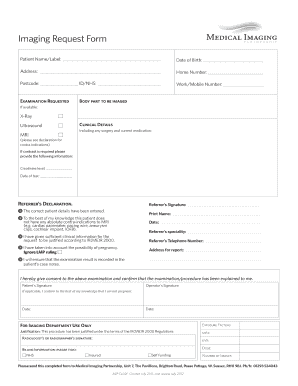
Providing a visual example or template of a filled-out Medical Imaging Referral Form can serve as a reference for users. Highlighting key areas filled in, as well as common mistakes to avoid, can significantly enhance understanding and accuracy when completing the form.
How to fill out the Examination Request
-
1.Access and open the Medical Imaging Referral Form on pdfFiller by navigating to the pdfFiller website and entering the form name in the search bar.
-
2.Once the form is loaded, familiarize yourself with the layout. You will notice fillable fields as well as checkboxes and areas for signatures.
-
3.Before filling out the form, gather necessary patient information like the full name, date of birth, address, and health card details to ensure a smooth process.
-
4.Begin completing the form by clicking on the respective fillable fields. Enter the patient's full name, ensuring accuracy in spelling and information.
-
5.Next, fill in the patient’s address, date of birth, and health card number in the designated sections.
-
6.Utilize the checkboxes for different types of scans required, selecting all that apply based on the patient's needs.
-
7.After filling in all required sections, review the form for clarity and completeness. Ensure that all fields are accurately filled and that no information is missing.
-
8.Finally, provide your signature as the referring provider in the designated area to authorize the referral.
-
9.Save your completed form by clicking on the 'Save' button. You may also download or submit the form directly from pdfFiller, utilizing the appropriate options available.

Who is eligible to use the Medical Imaging Referral Form?
Any licensed healthcare provider in Ontario can complete and submit the Medical Imaging Referral Form for their patients requiring medical imaging tests.
What information is required to fill out this form?
You will need the patient's full name, address, date of birth, health card details, and the type of medical imaging required. Ensure all information is accurate to avoid delays.
How do I submit the form once completed?
The completed Medical Imaging Referral Form can be submitted online or printed and delivered to any licensed healthcare facility in Ontario. Ensure that all necessary signature fields are filled out.
What are common mistakes to avoid while filling out the form?
Common mistakes include missing signatures, incomplete fields, and incorrect patient information. Double-check all entries before finalizing the form to prevent errors.
Are there any processing fees for submitting this form?
The Medical Imaging Referral Form typically does not involve processing fees. However, check with the healthcare facility for any specific costs related to imaging tests.
What types of medical imaging does this form cover?
This form is designed to cover various types of medical imaging tests, including X-rays, MRIs, and CT scans. Ensure you specify the required tests in the form.
How can I ensure my form is processed quickly?
To ensure quick processing, provide complete and accurate information, sign the form, and submit it directly to a licensed healthcare facility in Ontario.
Related Forms





Get the latest insights from our blog


If you believe that this page should be taken down, please follow our DMCA take down process
here
.
This form may include fields for payment information. Data entered in these fields is not covered by PCI DSS compliance.