
Last updated on
Oct 19, 2026

Get the free Customized Durable Medical Equipment Repair Request
We are not affiliated with any brand or entity on this form

Fill out
Complete the form online in a simple drag-and-drop editor.

eSign
Add your legally binding signature or send the form for signing.

Share
Share the form via a link, letting anyone fill it out from any device.

Export
Download, print, email, or move the form to your cloud storage.
Why pdfFiller is the best tool for your documents and forms


End-to-end document management
From editing and signing to collaboration and tracking, pdfFiller has everything you need to get your documents done quickly and efficiently.
Accessible from anywhere
pdfFiller is fully cloud-based. This means you can edit, sign, and share documents from anywhere using your computer, smartphone, or tablet.
Secure and compliant
pdfFiller lets you securely manage documents following global laws like ESIGN, CCPA, and GDPR. It's also HIPAA and SOC 2 compliant.
What is DME Repair Request
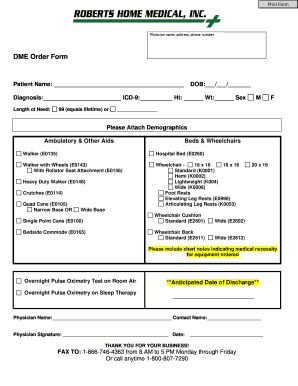
The Customized Durable Medical Equipment Repair Request is a healthcare form used by practitioners and vendors to request repairs for customized medical equipment in California.
pdfFiller scores top ratings on review platforms




Who needs DME Repair Request?
Explore how professionals across industries use pdfFiller.

DME Repair Request is needed by:
-
Prescribing practitioners in California
-
Durable Medical Equipment (DME) vendors
-
Healthcare providers managing patient equipment
-
Patients requiring medical equipment repairs
-
Insurance providers assessing repair requests
Comprehensive Guide to DME Repair Request
What is the Customized Durable Medical Equipment Repair Request?
The Customized Durable Medical Equipment (CDME) Repair Request form is a vital document used in healthcare for the request of repairs on customized medical devices. This form holds significant importance as it ensures that necessary repairs are made efficiently, maintaining the functionality and safety of the equipment involved.
Typically, this form is utilized by prescribing practitioners and Durable Medical Equipment (DME) vendors to facilitate the repair process. By submitting a CDME Repair Request, healthcare providers can ensure that their patients receive the equipment needed to support their medical conditions.
Purpose and Benefits of the Customized Durable Medical Equipment Repair Request
The CDME Repair Request is essential for streamlining communication between healthcare providers and DME vendors, ultimately leading to timely repairs. Using this form, practitioners can quickly document equipment issues, allowing for a structured approach to repairs.
Furthermore, the repair request is crucial in ensuring patient safety. A swift response to equipment malfunctions enhances patient well-being and assures that users have access to fully functioning medical devices.
Key Features of the Customized Durable Medical Equipment Repair Request
This repair request form includes various fillable fields that collect essential patient information. Required fields typically include patient name, equipment details, and practitioner information to streamline processing.
-
The form mandates signatures from both the prescribing practitioner and the DME vendor for authorization.
-
Accurate and thorough completion of the form is essential to ensure efficient processing and minimize delays.
Who Needs the Customized Durable Medical Equipment Repair Request?
The CDME Repair Request is primarily designed for healthcare providers and DME vendors involved in the equipment repair process. Specific roles, including those of practitioners who prescribe equipment and vendors who manage repairs, are central to the form's use.
Patients may also play a role in this process, particularly when there is a need for patient consent or input regarding equipment issues. Understanding these roles ensures a collaborative approach to addressing equipment repairs and enhancing patient care.
How to Fill Out the Customized Durable Medical Equipment Repair Request Online
Filling out the CDME Repair Request form online is straightforward. Users should begin by carefully entering required information in each section as follows:
-
Input patient details, including name and contact information.
-
Provide equipment specifics along with the nature of the required repair.
-
Collect required signatures from both the prescribing practitioner and the DME vendor.
It's essential to double-check all entries for accuracy before submission, ensuring that potential pitfalls are avoided during this process.
Submission Methods for the Customized Durable Medical Equipment Repair Request
The CDME Repair Request can be submitted through various methods, enhancing flexibility for users. Common submission methods include online submission, mailing the form, or faxing it directly to the relevant party.
-
Be aware of deadlines to ensure timely processing of repair requests.
-
Consider potential fees or charges related to specific submission methods, such as expedited service fees.
What Happens After You Submit the Customized Durable Medical Equipment Repair Request?
After submission, the processing timeline for the CDME Repair Request varies depending on the method of submission and the DME vendor's procedures. Users can track the status of their request through the appropriate channels provided by the vendor or healthcare provider.
In case of any issues or delays, having a clear follow-up protocol allows healthcare providers to address concerns promptly, ensuring repairs are managed effectively.
Security and Compliance for the Customized Durable Medical Equipment Repair Request
When handling sensitive information, security is a paramount concern. The CDME Repair Request utilizes pdfFiller's 256-bit encryption to protect patient data. Additionally, it adheres to HIPAA compliance standards, ensuring that patient information is securely managed throughout the submission process.
Understanding these security measures is crucial for healthcare providers and DME vendors when submitting forms and ensuring compliance with healthcare regulations.
User-Friendly Solutions with pdfFiller
pdfFiller offers a robust platform that enhances the process of filling out and managing the CDME Repair Request form. With features like text editing, electronic signing, and the ability to create fillable forms, users can navigate the repair request process more efficiently.
Healthcare professionals can leverage pdfFiller for not only completing this form but also for managing a variety of other healthcare documents seamlessly.
Your Next Steps
To get started with the Customized Durable Medical Equipment Repair Request using pdfFiller, you can register on the platform and explore its user-friendly features.
Utilizing pdfFiller's capabilities for form automation and management offers numerous benefits, simplifying your workflow in handling important healthcare documents.
How to fill out the DME Repair Request
-
1.To access the Customized Durable Medical Equipment Repair Request form on pdfFiller, go to the pdfFiller website and search for the form by title or upload a blank version directly.
-
2.Once the form is open, navigate to each fillable field. Click on a field to enter information such as the patient's name, equipment details, and the prescribing practitioner's information.
-
3.Gather the required patient details, equipment specifics, and any necessary prescriptions before starting to fill out the form. Ensure all data is accurate and up-to-date.
-
4.Utilize checkboxes and drop-down menus where applicable to streamline the completion process, ensuring that you follow the explicit instructions indicated in the form.
-
5.After filling in all necessary fields, review the form thoroughly for any missing information or errors. Ensure that both the prescribing practitioner and DME vendor sign in the appropriate sections.
-
6.Once you are satisfied with the completed form, look for options to save or download your work. You may also choose to print the form for physical submission if required.
-
7.Finally, submit the completed form according to the guidelines specified by your local DME vendor or healthcare facility to ensure timely processing.

Who is eligible to use the Customized Durable Medical Equipment Repair Request form?
The form is primarily for prescribing practitioners and DME vendors in California, as well as healthcare providers managing patient equipment. Patients seeking repairs must have their practitioner complete the form.
Are there any deadlines for submitting the repair request form?
While there are typically no strict submission deadlines for this form, it is advisable to submit it as soon as repairs are needed to avoid delays in restoring essential medical equipment.
What methods can I use to submit the repair request form?
You can submit the form electronically through various healthcare platforms or print and deliver it physically to the DME vendor or related healthcare provider based on their submission requirements.
What supporting documents do I need to include with the form?
You may need to include a prescription from the prescribing practitioner and any previous repair history or documentation related to the medical equipment in question.
What are common mistakes to avoid when filling out this form?
Ensure all fields are completed accurately, particularly signatures from both the prescribing practitioner and DME vendor. Avoid leaving required fields blank, as this can lead to delays in processing.
How long does it take to process the repair request form?
Processing times can vary by provider or DME vendor but expect it can take several days. Check with the vendor directly for accurate timelines and potential expedited options.
What should I do if I encounter issues with the form?
If you encounter issues, review the form completion instructions carefully. If problems persist, contact the DME vendor or healthcare provider for assistance in addressing the issue.
Related Forms





Get the latest insights from our blog



If you believe that this page should be taken down, please follow our DMCA take down process
here
.
This form may include fields for payment information. Data entered in these fields is not covered by PCI DSS compliance.