
Last updated on
Oct 19, 2026

Get the free Client Information Form for Social Security Benefits
We are not affiliated with any brand or entity on this form

Fill out
Complete the form online in a simple drag-and-drop editor.

eSign
Add your legally binding signature or send the form for signing.

Share
Share the form via a link, letting anyone fill it out from any device.

Export
Download, print, email, or move the form to your cloud storage.
Why pdfFiller is the best tool for your documents and forms


End-to-end document management
From editing and signing to collaboration and tracking, pdfFiller has everything you need to get your documents done quickly and efficiently.
Accessible from anywhere
pdfFiller is fully cloud-based. This means you can edit, sign, and share documents from anywhere using your computer, smartphone, or tablet.
Secure and compliant
pdfFiller lets you securely manage documents following global laws like ESIGN, CCPA, and GDPR. It's also HIPAA and SOC 2 compliant.
What is Social Security Form
The Client Information Form for Social Security Benefits is a personal financial document used by individuals and their spouses to gather necessary information to determine and optimize eligibility for Social Security benefits.
pdfFiller scores top ratings on review platforms




Who needs Social Security Form?
Explore how professionals across industries use pdfFiller.

Social Security Form is needed by:
-
Individuals applying for Social Security benefits
-
Spouses seeking to optimize their Social Security claims
-
Financial advisors assisting clients with retirement planning
-
Accountants managing clients' financial records
-
Social Security representatives evaluating client submissions
-
Pension plan participants
-
Dependents claiming benefits
Comprehensive Guide to Social Security Form
What is the Client Information Form for Social Security Benefits?
The Client Information Form for Social Security Benefits is a critical document used to collect detailed personal and financial information. This form is essential in determining eligibility for social security benefits and plays a vital role in optimizing the amount of benefits that individuals may receive. By accurately completing this form, applicants can ensure that all pertinent information is considered in the evaluation process.
This form serves not only to gather data but also streamlines the application process for social security benefits, enabling clients to receive the assistance they need.
Purpose and Benefits of the Client Information Form
The primary purpose of the Client Information Form is to facilitate the collection of necessary personal and financial details from individuals seeking social security benefits. This form highlights the advantages of gathering such information efficiently, which can significantly influence the decision-making process related to claiming benefits.
By utilizing this form, clients can make informed choices, leading to optimized social security claiming status and better management of their financial futures. The comprehensive nature of the form ensures that critical factors are not overlooked.
Who Needs the Client Information Form for Social Security Benefits?
The Client Information Form is designed for various individuals, including those actively seeking social security benefits. This group encompasses retirees, disabled individuals, and dependents who may qualify for benefits based on another person's earnings.
Additionally, financial planners and advisors might recommend this form to assist their clients in navigating the complexities of social security benefits, ensuring they maximize their eligibility.
Key Features of the Client Information Form for Social Security Benefits
The Client Information Form includes several key features aimed at enhancing user experience and accuracy in data collection:
-
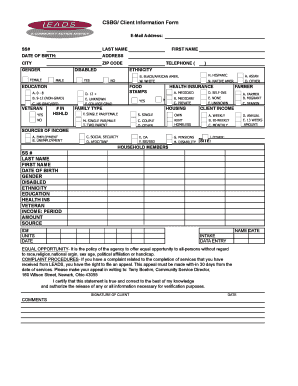
Fillable fields for demographic information, including personal details and relationship status.
-
Sections dedicated to work status and pension information, critical for assessing eligibility.
-
User-friendly design with clear instructions for each section of the form.
How to Fill Out the Client Information Form for Social Security Benefits
Filling out the Client Information Form correctly is essential for a successful application. Follow these steps to ensure accurate completion:
-
Start by gathering all necessary documents, including your Social Security number, work history, and pension details.
-
Carefully fill in each section, providing accurate information about your demographics and financial situation.
-
Review your entries to avoid common errors such as missing fields or incorrect figures.
Pay particular attention to instructions within the form, and ensure that all required fields are completed to avoid delays in processing.
Submission Methods for the Client Information Form
Once the Client Information Form is completed, there are several methods available for submission:
-
Online submission through the Social Security Administration’s portal.
-
Printing the form and submitting it via U.S. Mail.
-
In-person submission at local Social Security offices.
Be mindful of any associated fees for postal services and note the submission deadlines to ensure timely processing of your application.
Security and Compliance with the Client Information Form
Ensuring the security of your personal information is paramount when handling the Client Information Form. The form is designed with data protection measures in place to comply with regulations such as HIPAA and GDPR.
It is crucial to understand the importance of secure handling of sensitive data, ensuring that your information remains confidential and protected throughout the application process.
What Happens After You Submit the Client Information Form
After submitting your Client Information Form, you can track your application status. Typically, you will receive a confirmation once your form has been processed. Keep an eye on potential outcomes, as timelines for receiving benefits may vary based on specific circumstances.
Understanding common reasons for rejection can also be helpful; addressing these issues upfront can significantly enhance your chances of a successful application.
Using pdfFiller for Your Client Information Form Needs
Utilizing pdfFiller for your Client Information Form can simplify the form-filling process tremendously. This platform offers numerous advantages, including editing capabilities and eSigning options, ensuring that your form is completed correctly and efficiently.
Moreover, pdfFiller guarantees the security and compliance of your documents, providing peace of mind while managing sensitive information. The user-friendly interface allows for easy navigation and integration of features to enhance your experience.
Sample of a Completed Client Information Form for Social Security Benefits
To assist you further, a sample of a completed Client Information Form is available. This example provides a visual reference, outlining the data typically required.
By reviewing this sample, you can better understand how to accurately reflect personal information on your application, ensuring a smoother submission process for your Social Security earnings record.
How to fill out the Social Security Form
-
1.To access the Client Information Form on pdfFiller, navigate to the website and use the search bar to locate the form by typing its name.
-
2.Open the form in pdfFiller’s interface. Ensure you have a stable internet connection for optimal performance.
-
3.Start by gathering all necessary information, including your personal identification details, employment history, financial statements, and any relevant pension or dependent information.
-
4.Begin filling in the form by entering your demographic information in the provided fields. Ensure accuracy as these details define your eligibility.
-
5.Use the checkboxes to indicate relationship status, work status, and any pensions you may receive. Make sure to fill each section correctly.
-
6.For sections requiring numerical data such as earnings and pensions, double-check your figures for accuracy before submission.
-
7.Once all fields are completed, review the entire form thoroughly. Ensure all information provided is correct and complete, as inaccuracies might delay processing.
-
8.After reviewing, finalize your form by using pdfFiller’s save function. Choose to either save it to your device or submit it directly through the platform.
-
9.If you need to download a copy of the filled form, locate the download option and select your preferred format.
-
10.Submitting the form may involve emailing it to the appropriate Social Security office or uploading it via an online portal, based on current submission methods recommended.

Who is eligible to use the Client Information Form for Social Security Benefits?
Anyone seeking to claim or optimize Social Security benefits can use this form. This includes individuals, their spouses, and dependents.
What documents do I need to complete the form?
You will need personal identification, employment history, financial statements, and details about any pensions or dependents to fill out the form accurately.
How should I submit the completed Client Information Form?
You can submit your completed form by emailing it to the designated Social Security office or using an online submission portal, as directed by current guidelines.
Are there any common mistakes to avoid when filling out the form?
Common mistakes include providing inaccurate personal information, omitting required sections, or misentering financial data. Always double-check for accuracy before submission.
What is the processing time for the Client Information Form?
Processing times can vary; however, expect it to take several weeks for your application to be reviewed and processed by the Social Security administration.
Can I make changes to the form after submission?
Once submitted, changes may be challenging. Contact the Social Security office to inquire about amending your submission if necessary.
Is notarization required for this form?
No, notarization is not required for the Client Information Form for Social Security Benefits, making it easier to complete and submit.
Related Forms



Get the latest insights from our blog


If you believe that this page should be taken down, please follow our DMCA take down process
here
.
This form may include fields for payment information. Data entered in these fields is not covered by PCI DSS compliance.