
Last updated on
Oct 19, 2026

Get the free Fire and Life Safety Inspection Form
We are not affiliated with any brand or entity on this form

Fill out
Complete the form online in a simple drag-and-drop editor.

eSign
Add your legally binding signature or send the form for signing.

Share
Share the form via a link, letting anyone fill it out from any device.

Export
Download, print, email, or move the form to your cloud storage.
Why pdfFiller is the best tool for your documents and forms


End-to-end document management
From editing and signing to collaboration and tracking, pdfFiller has everything you need to get your documents done quickly and efficiently.
Accessible from anywhere
pdfFiller is fully cloud-based. This means you can edit, sign, and share documents from anywhere using your computer, smartphone, or tablet.
Secure and compliant
pdfFiller lets you securely manage documents following global laws like ESIGN, CCPA, and GDPR. It's also HIPAA and SOC 2 compliant.
What is Fire Safety Inspection
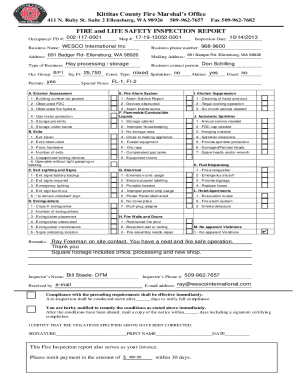
The Fire and Life Safety Inspection Form is an official document used by the Escondido Fire Department to ensure businesses comply with essential fire safety regulations.
pdfFiller scores top ratings on review platforms




Who needs Fire Safety Inspection?
Explore how professionals across industries use pdfFiller.

Fire Safety Inspection is needed by:
-
Business owners in Escondido needing inspection compliance
-
Fire Inspectors responsible for safety evaluations
-
Representatives from the Fire Department conducting inspections
-
Compliance officers monitoring fire safety regulations
-
Property managers ensuring tenant safety
Comprehensive Guide to Fire Safety Inspection
What is the Fire and Life Safety Inspection Form?
The Fire and Life Safety Inspection Form is an essential document used by the Escondido Fire Department to ensure fire safety compliance within local businesses. This form serves as a structured way to record inspection results, identify potential violations, and ensure that businesses meet fire safety regulations. It is vital for maintaining safety standards and preventing fire hazards.
Signatures from both business representatives and inspectors are required on the form, confirming the accuracy of the information provided and accountability in compliance efforts. As part of the fire safety compliance process, this form plays a critical role in safeguarding both life and property.
Purpose and Benefits of the Fire and Life Safety Inspection Form
The primary purpose of the Fire and Life Safety Inspection Form is to improve overall safety standards while minimizing fire hazards across various business establishments. By utilizing this form, businesses can avoid fire safety violations that may lead to severe penalties from local authorities.
Additionally, the form helps businesses comply with fire safety regulations, demonstrating their commitment to ensuring a safe environment for employees and patrons alike. This proactive approach not only mitigates risks but also fosters trust within the community.
Key Features of the Fire and Life Safety Inspection Form
The Fire and Life Safety Inspection Form includes several key components that facilitate thorough inspections. Business information sections allow businesses to disclose critical details, while checkboxes help inspectors identify specific violations quickly.
-
Blank fields for comprehensive business details
-
Checkboxes for accurate recording of violations
-
Clear instructions for both inspectors and business representatives
Thorough documentation is vital for compliance and enforcement efforts by the fire department, ensuring all concerns are addressed appropriately.
Who Needs the Fire and Life Safety Inspection Form?
This form is targeted primarily at businesses required to undergo fire department inspections. Various establishments, including restaurants, retail stores, and industrial sites, must complete this form to comply with legal requirements concerning fire safety.
Understanding one’s legal obligations is crucial for businesses to maintain compliance and avoid potential repercussions. Ensuring prompt inspections can significantly reduce risks associated with fire hazards and regulatory penalties.
How to Fill Out the Fire and Life Safety Inspection Form Online (Step-by-Step)
Filling out the Fire and Life Safety Inspection Form online is a straightforward process. Follow these steps to complete the form efficiently:
-
Access the form on the pdfFiller platform.
-
Enter all necessary business and inspection details in the designated fields.
-
Utilize checkboxes to identify any violations accurately.
-
Secure required signatures from both the business representative and the inspector.
-
Review the completed form for accuracy before submission.
The user-friendly design of pdfFiller ensures an easy and accessible experience, allowing businesses to manage their documents effectively.
Common Errors and How to Avoid Them
While filling out the Fire and Life Safety Inspection Form, users may encounter a few common mistakes. These include incorrect information input and missing signatures, both of which can impede the compliance process.
-
Double-check entries to ensure all information is accurate.
-
Verify that all required signatures are present before submission.
By following these simple tips, businesses can enhance their fire safety compliance and streamline the inspection process.
How to Submit the Fire and Life Safety Inspection Form
Submitting the Fire and Life Safety Inspection Form can be accomplished through various methods. Online submission via pdfFiller is highly recommended due to its convenience.
Other submission options may include mailing a hard copy or submitting in person at the fire department. It is crucial to be aware of deadlines and any applicable fees for submissions to ensure timely compliance with fire safety regulations.
Security and Compliance for the Fire and Life Safety Inspection Form
When utilizing pdfFiller to complete the Fire and Life Safety Inspection Form, users can be assured of robust security measures that protect sensitive information. The platform employs 256-bit encryption and complies with industry standards such as SOC 2 Type II and HIPAA.
Maintaining confidentiality during the submission and storage of the form is critical, safeguarding businesses against potential data breaches and unauthorized access.
Sample or Example of a Completed Fire and Life Safety Inspection Form
For reference, a completed sample of the Fire and Life Safety Inspection Form is available. This example serves as a guide for users to understand how to fill out their forms accurately.
The sample showcases proper completion methods and highlights critical fields that require attention, helping businesses see what is expected during the inspection process.
Enhance Your Form-Filling Experience with pdfFiller
Utilizing pdfFiller for your Fire and Life Safety Inspection Form needs can greatly enhance your form-filling experience. The platform offers various features such as eSigning capabilities and comprehensive document management tools, making the process seamless.
Accessible from any browser, pdfFiller allows users to manage their documents efficiently, ensuring a quick turnaround without the need for downloads, thus catering to the modern business environment.
How to fill out the Fire Safety Inspection
-
1.Access the Fire and Life Safety Inspection Form by visiting pdfFiller's website and searching for the form name.
-
2.Once located, click on the form to open it in the pdfFiller interface where you can view all fields.
-
3.Before filling out the form, gather necessary information such as business details, previous inspection reports, and any current compliance issues.
-
4.Begin by entering the business name, address, and contact information in the designated fields at the top of the form.
-
5.Proceed to fill in the inspection details by checking relevant compliance boxes and providing explanations where necessary.
-
6.Ensure you detail any fire safety violations detected during the inspection to maintain accurate records.
-
7.After filling in all relevant sections, review each entry to confirm accuracy and completeness before finalizing.
-
8.Check the signature fields to ensure the required signatories, like business representatives and inspectors, have signed where necessary.
-
9.Once finalized, save your work through the pdfFiller save feature to keep a copy or proceed with downloading the completed form.
-
10.Consider using the submission options available through pdfFiller if you need to send the form electronically or print it for mail submission.

Who is required to complete the Fire and Life Safety Inspection Form?
The form must be completed by business owners and representatives during a fire safety inspection conducted by authorized fire inspectors.
What happens if a business does not complete this form?
Failure to complete the Fire and Life Safety Inspection Form may result in violations, penalties, or revocation of the business's operational license.
Are there deadlines for submitting the Fire and Life Safety Inspection Form?
It's essential to complete and submit the Fire and Life Safety Inspection Form promptly after the inspection to avoid compliance issues and ensure local safety regulations are met.
What documents do I need when filling out this form?
When filling out this form, gather previous inspection reports, business licenses, and any documentation related to fire safety compliance or violations.
Can I submit the Fire and Life Safety Inspection Form electronically?
Yes, using pdfFiller allows you to complete and submit the Fire and Life Safety Inspection Form electronically if your local fire department accepts digital submissions.
What are common mistakes to avoid when completing this form?
Ensure all fields are filled out completely and accurately, check for missing signatures, and avoid submitting without a thorough review of compliance details.
How long does it take to process the Fire and Life Safety Inspection Form?
Processing times may vary but generally allow several business days for the fire department to review and respond after submission.
Related Forms





Get the latest insights from our blog


If you believe that this page should be taken down, please follow our DMCA take down process
here
.
This form may include fields for payment information. Data entered in these fields is not covered by PCI DSS compliance.