
Last updated on
Sep 15, 2026

Get the free Complaint Verification Form
We are not affiliated with any brand or entity on this form

Fill out
Complete the form online in a simple drag-and-drop editor.

eSign
Add your legally binding signature or send the form for signing.

Share
Share the form via a link, letting anyone fill it out from any device.

Export
Download, print, email, or move the form to your cloud storage.
Why pdfFiller is the best tool for your documents and forms


End-to-end document management
From editing and signing to collaboration and tracking, pdfFiller has everything you need to get your documents done quickly and efficiently.
Accessible from anywhere
pdfFiller is fully cloud-based. This means you can edit, sign, and share documents from anywhere using your computer, smartphone, or tablet.
Secure and compliant
pdfFiller lets you securely manage documents following global laws like ESIGN, CCPA, and GDPR. It's also HIPAA and SOC 2 compliant.
What is Complaint Form
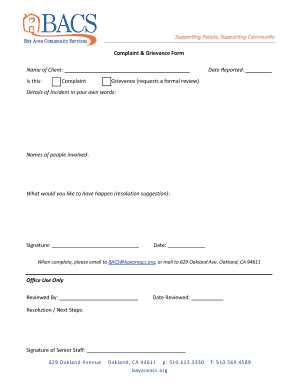
The Complaint Verification Form is a document used by individuals to submit comments or complaints to relevant authorities, ensuring their concerns are officially recorded.
pdfFiller scores top ratings on review platforms




Who needs Complaint Form?
Explore how professionals across industries use pdfFiller.

Complaint Form is needed by:
-
State Contractors submitting complaints regarding services.
-
Pensioners needing to voice concerns related to pension issues.
-
Staff members wishing to report grievances.
-
Citizens seeking a formal mechanism for lodging complaints.
-
Individuals requiring a structured approach to document their complaints.
Comprehensive Guide to Complaint Form
What is the Complaint Verification Form?
The Complaint Verification Form is a crucial tool that allows users to submit structured complaints or comments. Typically utilized by state contractors, pensioners, and staff, this form ensures that concerns are conveyed effectively to the relevant authorities. By using the Complaint Verification Form, individuals enhance the clarity and structure of their communications, making it easier for entities to address their issues.
Submitting comments or complaints in this organized manner is essential for accountability and tracking resolution processes. Utilizing this form streamlines the complaints process, ensuring that all submissions are formally recognized and documented.
Purpose and Benefits of the Complaint Verification Form
The primary purpose of the Complaint Verification Form is to facilitate clear communication with the authorities responsible for addressing complaints. This officially sanctioned format offers several advantages compared to informal complaint processes.
Firstly, it provides a legal record of the complaint, which can be useful for future reference. Secondly, using the form helps ensure that the complaint is directed to the appropriate channels, thereby increasing the chances of a timely and effective resolution. This structured approach is significantly beneficial for all users, including staff who need to document their concerns properly.
Key Features of the Complaint Verification Form
This form boasts several features designed to enhance the user experience and effectiveness of complaint submissions. It includes fillable fields that require basic personal information, such as name, address, contact number, and specific details about the complaint.
Additionally, the online submission capability provides users with the convenience of submitting their complaints quickly from any device. Security measures are also in place to protect user data, ensuring that personal information remains confidential throughout the process.
Who Needs the Complaint Verification Form?
Several groups of individuals may find the Complaint Verification Form beneficial. State contractors, pensioners, and staff are the primary users who can file complaints using this form. Each group may encounter different situations where filing a complaint is necessary, from poor service to violations of contract terms.
It is crucial for individuals to recognize the importance of timely submissions, which can impact the resolution of their complaints. By understanding when and why to use the form, users can ensure their grievances are addressed effectively and promptly.
How to Fill Out the Complaint Verification Form Online (Step-by-Step)
Filling out the Complaint Verification Form online is a straightforward process that users can complete in a few easy steps:
-
Access the Complaint Verification Form on the designated platform.
-
Fill in all required fields, including your name, address, and contact information.
-
Provide detailed information about your complaint in the designated section.
-
Review your entries to ensure accuracy and completeness.
-
Submit the form electronically through the online portal.
Common errors to avoid include leaving fields blank or providing inaccurate information. Ensuring all sections are filled out correctly will help streamline the processing of your complaint.
Submission Methods for the Complaint Verification Form
Submitting the completed Complaint Verification Form can be done through various methods. Users have the option to submit their forms online or via physical mail, depending on personal preference and urgency.
Choosing the correct submission method is essential; while online submission is typically quicker, physical mail may be preferred in certain situations. Users should also be aware of processing times associated with each method and consider tracking their submission status to ensure it has been received.
What Happens After You Submit the Complaint Verification Form?
Upon submitting the Complaint Verification Form, users can expect their complaints to be reviewed through a standard process. Typically, each submission will undergo a review by the relevant authorities, who will assess the complaint's validity and determine the appropriate course of action.
Users will be notified of the outcomes related to their complaints, including any actions taken. The timeline for feedback may vary, but understanding this process helps set expectations around follow-up communications from the authorities.
Importance of Security and Compliance for the Complaint Verification Form
The secure handling of personal information is a top priority for the Complaint Verification Form. Measures are in place to ensure data protection and compliance with relevant regulations, including GDPR and HIPAA.
These compliance standards are crucial in assuring users that their sensitive data will be treated with the utmost care, thereby fostering confidence in the use of the Complaint Verification Form within a trustworthy platform.
Maximizing Your Use of the Complaint Verification Form with pdfFiller
Utilizing pdfFiller for filling out the Complaint Verification Form enhances the experience significantly. The platform offers ease of use and robust security features, setting it apart from other options.
In addition to form filling, pdfFiller provides essential services such as eSigning and PDF editing, which can be useful for managing documentation related to complaints. Users are encouraged to take advantage of these capabilities to streamline their form-related tasks.
How to fill out the Complaint Form
-
1.To begin, visit pdfFiller’s website and log into your account or create a new one if you don’t have an account yet.
-
2.Use the search bar to locate the 'Complaint Verification Form' by entering the form name in the search field.
-
3.Click on the form to open it; you will be redirected to the editor interface where you can fill out the necessary fields.
-
4.Gather all necessary information before starting, including your name, address, company details if applicable, contact number, and specific details regarding your complaint.
-
5.Navigate through the form using pdfFiller’s easy-to-use interface. Click on each blank field to enter your information. Ensure all required fields are completed with accurate details.
-
6.Once all fields are filled, review your entries for any mistakes or omissions. You can move back and forth to adjust your inputs as needed.
-
7.Finalizing the form is key; ensure everything is correctly filled out. After that, click the 'Submit' button to proceed with your complaint submission.
-
8.After submission, you can save and download a digital copy for your records directly through pdfFiller, ensuring you have a copy of your complaint.

Who is eligible to use the Complaint Verification Form?
Any individual, including state contractors, pensioners, and staff members, can utilize the Complaint Verification Form to voice their concerns or issues.
Is there a deadline for submitting the Complaint Verification Form?
While specific deadlines may vary based on jurisdiction or agency, it is advisable to submit your form as soon as possible after the issue arises to ensure timely processing.
What are the methods to submit the Complaint Verification Form?
The completed form can be submitted directly through pdfFiller, allowing you to send it electronically to the relevant authority or download it for mailing.
Are there any supporting documents required with the form?
Typically, supporting documents are not required for this form. However, you may want to attach any relevant evidence or correspondence related to your complaint.
What common mistakes should I avoid when filling out this form?
Ensure all required fields are filled out completely and accurately. Common mistakes include typos and leaving blank fields that are mandatory.
How long does it take to process the Complaint Verification Form?
Processing times can vary, but once submitted, expect a response within a few weeks, depending on the authority handling the complaint.
What should I do if I have concerns after submitting the form?
If concerns arise post-submission, contact the relevant authority directly for updates or additional guidance regarding your complaint's status.
Related Forms





Get the latest insights from our blog


If you believe that this page should be taken down, please follow our DMCA take down process
here
.
This form may include fields for payment information. Data entered in these fields is not covered by PCI DSS compliance.