
Last updated on
Sep 15, 2026

Get the free California Trespassing Notice
We are not affiliated with any brand or entity on this form

Fill out
Complete the form online in a simple drag-and-drop editor.

eSign
Add your legally binding signature or send the form for signing.

Share
Share the form via a link, letting anyone fill it out from any device.

Export
Download, print, email, or move the form to your cloud storage.
Why pdfFiller is the best tool for your documents and forms


End-to-end document management
From editing and signing to collaboration and tracking, pdfFiller has everything you need to get your documents done quickly and efficiently.
Accessible from anywhere
pdfFiller is fully cloud-based. This means you can edit, sign, and share documents from anywhere using your computer, smartphone, or tablet.
Secure and compliant
pdfFiller lets you securely manage documents following global laws like ESIGN, CCPA, and GDPR. It's also HIPAA and SOC 2 compliant.
What is Trespassing Notice
The California Trespassing Notice is a legal document used by property owners or agents to request enforcement of trespassing laws on private property in California.
pdfFiller scores top ratings on review platforms




Who needs Trespassing Notice?
Explore how professionals across industries use pdfFiller.

Trespassing Notice is needed by:
-
Property owners looking to enforce trespassing laws
-
Real estate agents managing properties in California
-
Landlords needing to address unauthorized access
-
Security companies protecting private properties
-
Local authorities involved in law enforcement
-
Individuals seeking legal recourse for trespassing issues
Comprehensive Guide to Trespassing Notice
What is the California Trespassing Notice?
The California Trespassing Notice is a vital legal document designed for property owners and authorized agents in California. This notice serves to formally inform individuals that they are trespassing on private property, thus enabling enforcement of trespassing laws. Its legal significance stems from its role in protecting the property rights of owners.
Purpose and Benefits of the California Trespassing Notice
The primary purpose of the California Trespassing Notice is to safeguard private property rights. By issuing this notice, property owners can effectively communicate their boundaries to unauthorized individuals. This document plays a crucial role in the legal enforcement of trespassing laws, ensuring that property owners can take action against violators.
Some of the benefits of utilizing the trespassing notice form include:
-
Clear communication of property rights.
-
Legal backing to remove unauthorized individuals.
-
Protection of property against future violations.
Key Features of the California Trespassing Notice
The California Trespassing Notice includes several essential elements to ensure its effectiveness. Key features of the form consist of fillable fields such as:
-
Property Address/Parcel Number
-
Gate Code
-
Security Camera information
Additionally, the requirement for signatures and notarization highlights the form's legal nature. This ensures that the document is properly executed, which is crucial for trespassing enforcement.
Who Needs the California Trespassing Notice?
This notice is primarily designed for property owners and their agents. Various scenarios may necessitate the use of the California Trespassing Notice. For instance, property owners may require this notice when dealing with recurring trespassers or when establishing new boundaries. Different roles involved include:
-
Property Owners
-
Authorized Agents
Eligibility Criteria for the California Trespassing Notice
The California Trespassing Notice can be filled out by qualified property owners or their authorized agents. Eligibility criteria include having ownership of the property or having express permission from the owner. Necessary supporting documents may also be needed to validate the request, including notarization of the document.
How to Fill Out the California Trespassing Notice Online (Step-by-Step)
Filling out the California Trespassing Notice online through pdfFiller is straightforward. Follow these steps:
-
Access the California Trespassing Notice on pdfFiller.
-
Fill in the required fields including Property Address and Gate Code.
-
Provide additional information as necessary, such as security measures.
-
Sign the document and obtain notarization if required.
Each fillable field is significant as it contributes to the precise identification of the property and the requirements for enforcement.
Submission Methods and Processing of the California Trespassing Notice
Once the form is completed, it must be submitted to the appropriate authority, typically the sheriff’s office, to initiate enforcement actions. Ensure that you are aware of the submission process, which may include:
-
Submitting in person or via mail.
-
Verifying any specific guidelines for your local jurisdiction.
Be cognizant of deadlines and processing times, as these can vary by location.
Security and Compliance for the California Trespassing Notice
Handling the California Trespassing Notice requires adherence to privacy and security measures, especially when using cloud-based services like pdfFiller. The platform provides robust security features, including 256-bit encryption and compliance with regulations such as HIPAA and GDPR, ensuring sensitive information is protected throughout the process.
Sample or Example of a Completed California Trespassing Notice
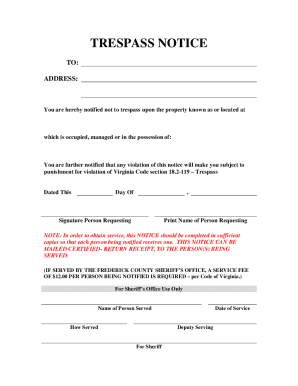
To assist users, pdfFiller offers examples of completed California Trespassing Notices. When reviewing the example, pay attention to how each section is filled out and the necessary details included. It is crucial to avoid common errors, such as:
-
Leaving required fields blank.
-
Providing incorrect property details.
Why Choose pdfFiller for Your California Trespassing Notice?
Utilizing pdfFiller for your California Trespassing Notice simplifies the form-filling process. Its user-friendly platform offers flexibility and a range of features, including easy editing and secure storage. Completing the form digitally not only enhances convenience but also provides added security for your sensitive documents.
How to fill out the Trespassing Notice
-
1.To access the California Trespassing Notice form on pdfFiller, start by visiting the pdfFiller website and logging into your account or creating a new one.
-
2.Once logged in, use the search bar to type 'California Trespassing Notice' and select the appropriate form from the search results.
-
3.Upon opening the form, you will see various fields that require filling. Prepare all necessary information beforehand, such as the property address, any security measures, and gate codes.
-
4.Click on each fillable field to enter the required information. Utilize pdfFiller’s tooltips and support features if you need guidance on how to complete specific sections.
-
5.After completing all necessary fields, take a moment to review your entries for accuracy. Double-check the details to ensure everything is correct before proceeding.
-
6.Once you are satisfied with the filled form, you can finalize it by clicking the 'Finish' button. This option will allow you to save a copy to your device.
-
7.To save, download, or submit the form, select the appropriate options provided on pdfFiller. You can save it in various formats or choose to directly email it to the sheriff's office.

Who is eligible to use the California Trespassing Notice?
The form is designed for property owners or agents who wish to formally request enforcement of trespassing laws on their private property in California.
Is notarization required for the California Trespassing Notice?
Yes, the California Trespassing Notice must be signed and notarized to be legally valid and accepted by law enforcement.
What information do I need to gather before filling out the form?
You will need the property address, any applicable gate codes, descriptions of security measures (like cameras), and details about access permissions for the property.
How long is the California Trespassing Notice valid?
The notice is valid for up to 12 months, provided the property is clearly posted as closed to the public.
What are common mistakes to avoid when completing this form?
Common mistakes include omitting important details, providing inaccurate property information, failing to notarize the form, and not reviewing the completed document for errors.
How can I submit the completed California Trespassing Notice?
After filling out the form, you can submit it by delivering it in person or mailing it to the sheriff's office, depending on your preferred submission method.
What do I do if I've missed the deadline for submitting the notice?
If you miss the deadline, you may need to fill out a new notice and resubmit it. Ensure you act promptly to address any ongoing trespassing issues.
Related Forms




Get the latest insights from our blog


If you believe that this page should be taken down, please follow our DMCA take down process
here
.
This form may include fields for payment information. Data entered in these fields is not covered by PCI DSS compliance.