
Last updated on
Oct 1, 2026

Get the free MDS 3.0 Nursing Home PPS Assessment Form
We are not affiliated with any brand or entity on this form

Fill out
Complete the form online in a simple drag-and-drop editor.

eSign
Add your legally binding signature or send the form for signing.

Share
Share the form via a link, letting anyone fill it out from any device.

Export
Download, print, email, or move the form to your cloud storage.
Why pdfFiller is the best tool for your documents and forms


End-to-end document management
From editing and signing to collaboration and tracking, pdfFiller has everything you need to get your documents done quickly and efficiently.
Accessible from anywhere
pdfFiller is fully cloud-based. This means you can edit, sign, and share documents from anywhere using your computer, smartphone, or tablet.
Secure and compliant
pdfFiller lets you securely manage documents following global laws like ESIGN, CCPA, and GDPR. It's also HIPAA and SOC 2 compliant.
What is MDS 3.0 Form
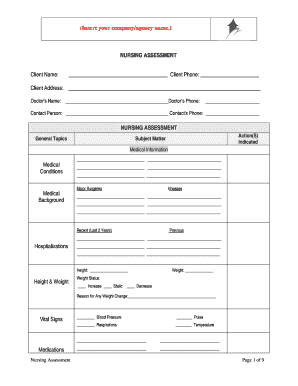
The MDS 3.0 Nursing Home PPS Assessment Form is a medical document used by skilled nursing facilities to conduct resident assessments and care screenings for Medicare Part A stays.
pdfFiller scores top ratings on review platforms




Who needs MDS 3.0 Form?
Explore how professionals across industries use pdfFiller.

MDS 3.0 Form is needed by:
-
Skilled nursing facility administrators
-
Healthcare professionals managing resident care
-
Medicare Part A applicants
-
Quality assurance teams in healthcare
-
Regulatory compliance officers
-
Resident advocates
Comprehensive Guide to MDS 3.0 Form
What is the MDS 3.0 Nursing Home PPS Assessment Form?
The MDS 3.0 Nursing Home PPS Assessment Form serves a critical function in skilled nursing facilities by facilitating thorough resident assessment and care screening. This form includes essential components like the MDS 3.0 PPS Item Set, which catalogs detailed resident information necessary for quality care delivery.
Key sections of the form consist of identification information, types of assessments, and demographics, which are crucial for Medicare Part A stays. Having accurate records is vital for optimal resident care and ensuring compliance with healthcare policies.
Purpose and Benefits of the MDS 3.0 Nursing Home PPS Assessment Form
The MDS 3.0 Nursing Home PPS Assessment Form is instrumental in effectively assessing residents and supporting healthcare quality reporting. This form not only tracks vital resident care data but also plays a significant role in improving patient outcomes.
Moreover, it aids healthcare providers in maintaining compliance with regulations concerning quality reporting. By streamlining the data collection process, it simplifies administrative burdens, allowing for more focus on resident care.
Key Features of the MDS 3.0 Nursing Home PPS Assessment Form
This assessment form possesses several unique attributes that enhance its usability. Key features include:
-
Fillable fields and checkboxes to ensure ease of entry.
-
Carefully designed sections for comprehensive data collection.
-
Integration capabilities with healthcare quality monitoring systems.
Such features not only emphasize its user-friendly design but also its effectiveness in skilled nursing facility operations.
Who Needs the MDS 3.0 Nursing Home PPS Assessment Form?
The MDS 3.0 Nursing Home PPS Assessment Form is essential for various users. Primarily, it is utilized by skilled nursing facilities to determine Medicare Part A eligibility. Additionally, healthcare providers rely on it for conducting thorough resident assessments.
Nursing home administrators and staff also benefit from using this form, as it ensures that all necessary data is collected to comply with regulatory requirements and enhance resident care quality.
How to Fill Out the MDS 3.0 Nursing Home PPS Assessment Form Online
Filling out the MDS 3.0 Nursing Home PPS Assessment Form online involves a series of straightforward steps:
-
Begin by accessing the online form platform.
-
Navigate through each section, filling in the required information field by field.
-
Utilize tips for ensuring data accuracy and compliance throughout the process.
Following these steps helps ensure that the form is correctly completed and ready for submission.
Common Errors and How to Avoid Them When Submitting the MDS 3.0 Nursing Home PPS Form
When submitting the MDS 3.0 Nursing Home PPS Form, users often face several common errors. These can include inaccurate data entry or incomplete sections. To mitigate such pitfalls, consider the following:
-
Review a validation checklist to verify all required fields are completed.
-
Double-check to ensure the accuracy of the information provided.
Accurate data entry is crucial for compliance and successful processing of the form.
Security and Compliance for the MDS 3.0 Nursing Home PPS Assessment Form
Ensuring the security and compliance of sensitive information during the handling of the MDS 3.0 Nursing Home PPS Assessment Form is paramount. pdfFiller implements specific measures to safeguard data, including:
-
Utilization of 256-bit encryption to protect form data.
-
Strict adherence to HIPAA and GDPR regulations.
-
Adopting best practices for secure document management.
These measures not only protect sensitive information but also enhance user confidence in the form handling process.
How to Submit the MDS 3.0 Nursing Home PPS Assessment Form
Submitting the MDS 3.0 Nursing Home PPS Assessment Form can be accomplished through various accepted methods, depending on user preference:
-
Online submission for immediate processing.
-
Faxing the form to the designated office.
-
Mailing the form to ensure delivery to the correct address.
Users should be aware of specific submission deadlines and can track their submission status for confirmation of processing.
What Happens After Submitting the MDS 3.0 Nursing Home PPS Assessment Form?
After submitting the MDS 3.0 Nursing Home PPS Assessment Form, users enter a review process where timelines for processing may vary. Should any further information be required, users will need to take proactive steps to provide the necessary details.
Additionally, maintaining an active follow-up on the status of submissions ensures that no important communication is missed in the processing of their forms.
Transform Your Form Experience with pdfFiller
Using pdfFiller to complete the MDS 3.0 Nursing Home PPS Assessment Form enhances the overall experience through its convenient features. Users benefit from functionalities that streamline the filling out and submitting process:
-
Robust features to simplify data entry and form management.
-
Security measures that protect sensitive information throughout.
By adopting pdfFiller, users can effectively manage documents while ensuring compliance and security throughout the process.
How to fill out the MDS 3.0 Form
-
1.Access pdfFiller and log in to your account. If you don't have an account, create one to get started.
-
2.Use the search bar to locate the 'MDS 3.0 Nursing Home PPS Assessment Form'. Click on the form to open it in the editor.
-
3.Familiarize yourself with the form fields by reviewing the structure. Identify sections such as identification information, assessment types, and resident demographics.
-
4.Before filling out the form, gather necessary information including resident personal details, previous assessments, and care needs. This may involve consulting with team members.
-
5.Begin entering data into the form's blank fields, carefully following the prompts for each section. Use the 'Check all that apply' options where relevant to ensure complete information is captured.
-
6.Regularly save your progress to avoid losing any data. Use the save option located on the toolbar to keep your changes secure.
-
7.Once all fields are filled out, review each section for accuracy. Check that all required fields are complete and correct any errors using pdfFiller's editing tools.
-
8.Finalize the form by clicking 'Submit' or 'Download' to produce a copy for your records. Choose the appropriate option based on your submission requirements, such as submitting electronically or printing for mail.

What are the eligibility requirements for using the MDS 3.0 Nursing Home PPS Assessment Form?
To use the MDS 3.0 Nursing Home PPS Assessment Form, residents must be part of a Medicare Part A stay in a skilled nursing facility, and the assessment must be completed as part of their care.
Is there a deadline for submitting the completed MDS 3.0 form?
While specific deadlines depend on individual facility policies, the MDS 3.0 form typically needs to be completed within a designated timeframe of resident admission or significant changes in condition.
How do I submit the MDS 3.0 Nursing Home PPS Assessment Form?
The completed form can be submitted electronically through Medicare's designated platforms or printed and mailed to the appropriate offices as per your facility's protocols.
What supporting documents are required when submitting the MDS 3.0 form?
When submitting the MDS 3.0 form, supporting documents may include resident medical history, prior assessments, care plans, and any other relevant clinical information.
What common mistakes should I avoid when filling out the MDS 3.0 form?
Ensure all required fields are completed, avoid using vague descriptions in resident assessments, and double-check for accurate resident identification to prevent processing delays.
How long does it take to process the MDS 3.0 Nursing Home PPS Assessment Form?
Processing times can vary based on facility protocols, but typically it takes a few days to a week for review and entry into Medicare systems.
What should I do if I encounter issues while filling out the form on pdfFiller?
If you encounter issues while using pdfFiller, check their help documentation or support services for assistance. Ensure your browser is updated, and consider clearing cache if the platform exhibits glitches.
Related Forms





Get the latest insights from our blog


If you believe that this page should be taken down, please follow our DMCA take down process
here
.
This form may include fields for payment information. Data entered in these fields is not covered by PCI DSS compliance.