
Last updated on
Oct 1, 2026

Get the free 2025 Connecticut Annual Income and Expense Report
We are not affiliated with any brand or entity on this form

Fill out
Complete the form online in a simple drag-and-drop editor.

eSign
Add your legally binding signature or send the form for signing.

Share
Share the form via a link, letting anyone fill it out from any device.

Export
Download, print, email, or move the form to your cloud storage.
Why pdfFiller is the best tool for your documents and forms


End-to-end document management
From editing and signing to collaboration and tracking, pdfFiller has everything you need to get your documents done quickly and efficiently.
Accessible from anywhere
pdfFiller is fully cloud-based. This means you can edit, sign, and share documents from anywhere using your computer, smartphone, or tablet.
Secure and compliant
pdfFiller lets you securely manage documents following global laws like ESIGN, CCPA, and GDPR. It's also HIPAA and SOC 2 compliant.
What is CT Income Expense Report
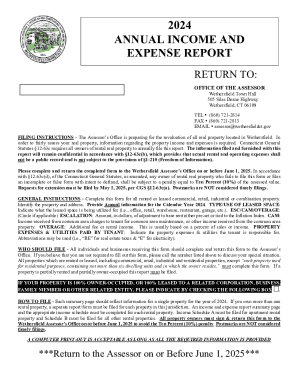
The 2025 Connecticut Annual Income and Expense Report is a government form used by property owners in Connecticut to report income and expenses associated with their rental properties.
pdfFiller scores top ratings on review platforms




Who needs CT Income Expense Report?
Explore how professionals across industries use pdfFiller.

CT Income Expense Report is needed by:
-
Property owners with rental properties in Connecticut
-
Real estate investors managing rental income
-
Landlords reporting financial information for tax purposes
-
Individuals seeking to assess property value accurately
-
Professionals assisting clients with property tax documentation
Comprehensive Guide to CT Income Expense Report
What is the 2025 Connecticut Annual Income and Expense Report?
The 2025 Connecticut Annual Income and Expense Report is a crucial document for property owners in Connecticut. This form is specifically designed to capture the necessary details regarding income and expenses related to rental properties. Property owners must report various income sources stemming from rental activities and accurately list the expenses incurred during the reporting period. Utilizing the correct Connecticut property tax form is essential for compliance and can affect property tax assessments.
Accurate completion of this report ensures transparency and correct tax representation while allowing property owners to maintain records for potential audits.
Purpose and Benefits of the 2025 Connecticut Annual Income and Expense Report
This report serves several key purposes for property owners in Connecticut. Firstly, it is a requirement to ensure that income and expenses related to rental properties are transparently reported. Completing the form can offer property owners numerous benefits, including potential tax advantages resulting from deductions for expenses. Moreover, adhering to the submission guidelines helps property owners avoid penalties that could result from late or inaccurate submissions.
By using the 2025 income expense summary effectively, property owners can maintain compliance with state regulations, thus safeguarding their investments.
Who Needs to File the 2025 Connecticut Annual Income and Expense Report?
Filing the 2025 Connecticut Annual Income and Expense Report is mandatory for specific groups of property owners. This includes individuals who own rental properties as well as real estate investors engaging in rental activities. It is important for these property owners to understand their obligations to complete the report, as failure to do so may lead to adverse implications, including fines or denial of tax deductions.
Specifically, anyone utilizing the property owner tax form must ensure they fall into the designated categories outlined by the Connecticut tax laws.
When to Submit the 2025 Connecticut Annual Income and Expense Report
The submission timeline for the 2025 Connecticut Annual Income and Expense Report is particularly important. The completed form must be submitted by June 1st, 2026. Property owners should be aware that delays or incomplete submissions can incur penalties, potentially affecting their tax calculations. Timely filing is critical to prevent complications that may arise from late reporting.
Adhering to the Connecticut tax filing instructions is vital for ensuring the smooth processing of the report.
How to Fill Out the 2025 Connecticut Annual Income and Expense Report Online
Filling out the 2025 Connecticut Annual Income and Expense Report online is a straightforward process. Property owners can follow these steps for completion:
-
Access the online form through a designated platform.
-
Input required data into all fillable fields accurately.
-
Review each section thoroughly to ensure all information is provided.
-
Check for any calculations related to expenses and income sourced from rental activities.
Utilizing tools such as pdfFiller can significantly streamline this process, allowing for ease of use and reducing the potential for errors during completion.
Field-by-Field Instructions for the 2025 Connecticut Annual Income and Expense Report
To ensure successful submission, each field in the report requires careful attention. The following sections often contain common pitfalls that property owners should watch for:
-
Clearly label all income sources to avoid confusion.
-
Accurately categorize expenses to reflect true business costs.
-
Double-check calculations for accuracy.
Every entry in the rental income expense report should represent factual and verifiable details that align with state requirements and financial regulations.
Submission Methods and Where to Send Your Form
The approved methods for submitting the completed 2025 Connecticut Annual Income and Expense Report include both physical and electronic delivery. Property owners should send the report directly to the Assessor’s Office as outlined in the filing instructions. Electronic submission options may also be available, ensuring a streamlined process for those choosing to file online.
Following the guidelines associated with the Connecticut real estate tax form will ensure that the submission reaches the appropriate office without any issues.
Common Errors and How to Avoid Them
Property owners should be aware of frequently encountered issues when filling out the report. Some common errors include:
-
Misreporting income amounts.
-
Omitting necessary expense categories.
-
Failure to sign or date the document before submission.
To avoid these pitfalls, it is essential to double-check all entries and validate information against supporting documents, thus minimizing potential reasons for rejection.
Security and Compliance when Submitting Your Form
Securing sensitive personal information is critical when completing the 2025 Connecticut Annual Income and Expense Report. Utilizing platforms like pdfFiller provides robust security measures, including 256-bit encryption to protect data. Furthermore, ensuring compliance with relevant regulations like GDPR enhances the safety of managing sensitive documents online.
Prioritizing privacy and data protection not only safeguards the homeowner's information but also fosters trust in the submission process.
Take Control of Your 2025 Connecticut Annual Income and Expense Reporting
Using pdfFiller can greatly simplify the submission process for property owners. This versatile platform aids in editing, eSigning, and managing forms easily. By leveraging pdfFiller’s resources, users can enhance their experience, significantly reduce errors, and ensure accurate completion of the property income expense form.
With its user-friendly features, pdfFiller stands ready to support property owners in navigating the complexities of Connecticut tax filing instructions effectively.
How to fill out the CT Income Expense Report
-
1.To begin, access the 2025 Connecticut Annual Income and Expense Report form by visiting pdfFiller's website. Use the search feature to quickly find the form.
-
2.Once the form is open, familiarize yourself with its layout. Identify key sections including income, expenses, and property details, which are clearly marked.
-
3.Before filling in the form, gather essential documents such as rental agreements, expense receipts, and any prior year's income data. This information will ensure accuracy.
-
4.Click on each fillable field within the form to enter relevant details. Use pdfFiller’s tools to input figures accurately and checkboxes to indicate the information required.
-
5.Periodically save your progress by clicking the save button. This prevents loss of information if you need to take a break or exit.
-
6.Once all fields are completed, carefully review the form for any errors or omissions. Make sure all required sections are filled correctly.
-
7.Finalize your form by following pdfFiller’s instructions for submission. This could involve downloading the completed form or directly submitting it to the Assessor's Office via email.
-
8.After submission, ensure you keep a copy for your records. Use the download option to save a PDF version or print it directly from pdfFiller.

Who needs to file the 2025 Connecticut Annual Income and Expense Report?
Property owners and landlords who generate rental income from their properties in Connecticut are required to file the 2025 Connecticut Annual Income and Expense Report.
What is the deadline for submitting this form?
The completed form must be returned to the Assessor's Office by June 1st, 2026. Late submissions may incur a penalty, so timely filing is crucial.
How can I submit the 2025 Connecticut Annual Income and Expense Report?
You can submit the completed form either by mail or electronically, ensuring that it reaches the Assessor's Office by the specified deadline for validation.
What supporting documents do I need for this form?
You need to collect documents that detail your rental income, including leases and receipts for expenses, which may include maintenance and utilities.
What are common mistakes to avoid when filling out this form?
Common mistakes include omitting necessary income information, forgetting to sign the form, and miscalculating total expenses. Always double-check your entries.
How long does it take to process the submitted form?
Processing times can vary, but generally expect the Assessor's Office to take several weeks to process the form. Contact them directly for specific timelines.
What happens if I submit my form late?
Submitting the form after the deadline of June 1st, 2026, may result in penalties or fines. It is important to file on time to avoid additional costs.
Related Forms






Get the latest insights from our blog


If you believe that this page should be taken down, please follow our DMCA take down process
here
.
This form may include fields for payment information. Data entered in these fields is not covered by PCI DSS compliance.