
Last updated on
Oct 1, 2026

Get the free Request for Patient Medical Records
We are not affiliated with any brand or entity on this form

Fill out
Complete the form online in a simple drag-and-drop editor.

eSign
Add your legally binding signature or send the form for signing.

Share
Share the form via a link, letting anyone fill it out from any device.

Export
Download, print, email, or move the form to your cloud storage.
Why pdfFiller is the best tool for your documents and forms


End-to-end document management
From editing and signing to collaboration and tracking, pdfFiller has everything you need to get your documents done quickly and efficiently.
Accessible from anywhere
pdfFiller is fully cloud-based. This means you can edit, sign, and share documents from anywhere using your computer, smartphone, or tablet.
Secure and compliant
pdfFiller lets you securely manage documents following global laws like ESIGN, CCPA, and GDPR. It's also HIPAA and SOC 2 compliant.
What is Medical Records Request
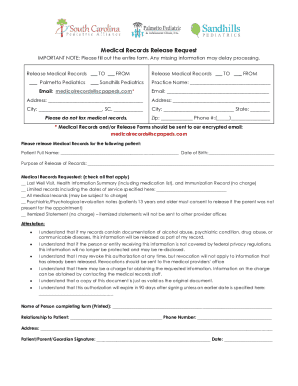
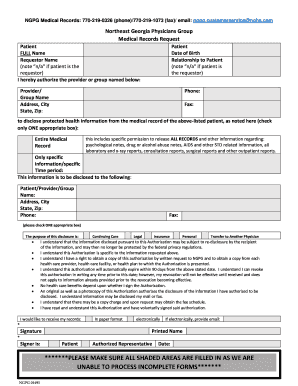
The Request for Patient Medical Records is a medical records release form used by patients to transfer their health information to another medical practice.
pdfFiller scores top ratings on review platforms




Who needs Medical Records Request?
Explore how professionals across industries use pdfFiller.

Medical Records Request is needed by:
-
Patients seeking to move their medical records.
-
Healthcare providers requiring access to patient histories.
-
Medical practices needing documentation for new patients.
-
Administrative staff managing patient record requests.
-
Specialists requesting prior health assessments or documents.
Comprehensive Guide to Medical Records Request
What is the Request for Patient Medical Records?
The Request for Patient Medical Records is a critical form designed to facilitate the transfer of essential medical information. It includes various types of documents such as health summaries, discharge summaries, and specialist letters. This document is vital for patients as it empowers them to manage their healthcare effectively.
The medical records release form serves as a mechanism for patients to obtain their health information, ensuring they have access to the details required to make informed decisions about their care.
Purpose and Benefits of the Request for Patient Medical Records
The primary purpose of the request for patient medical records is to streamline communication between different healthcare providers. This ensures that crucial health information is transferred without delay, which is beneficial for ongoing patient care.
By utilizing the medical records release form, patients take an active role in their healthcare journey. This fosters a sense of empowerment and encourages collaboration among various healthcare professionals, ultimately leading to improved continuity of care.
Key Features of the Request for Patient Medical Records
The Request for Patient Medical Records includes several important features that enhance its usability. Among these are:
-
Fillable fields for personal information, including name, date of birth, and address.
-
Options to indicate urgency for processing the request.
-
The ability to specify care plans or assessments that should be included.
These elements ensure that the form captures all necessary details for accurate processing and transfer of medical records.
Who Needs the Request for Patient Medical Records?
The Request for Patient Medical Records is essential for various individuals, including:
-
Patients transitioning to new healthcare providers.
-
Individuals requesting their health records for personal use.
-
Family members seeking records on behalf of the patient, provided they have the necessary consent.
This broad applicability highlights the form's importance in various healthcare scenarios.
How to Fill Out the Request for Patient Medical Records Online (Step-by-Step)
Filling out the Request for Patient Medical Records online can be done efficiently by following these steps:
-
Enter your personal details, including name and date of birth.
-
Provide your current address and contact information.
-
Select the urgency for processing the request.
-
Indicate the specific healthcare provider you are transferring records to.
-
Review the information for accuracy and ensure all fields are completed.
-
Sign and date the form before submission.
Accurate information is crucial, so take time to double-check your entries to avoid common mistakes.
Common Errors and How to Avoid Them
While filling out the request form, some common errors can hinder the process, such as:
-
Misspellings of names or addresses.
-
Incorrect or misformatted dates.
To minimize errors, review the entire form before submission and consider cross-referencing with official documents. Validating the information helps ensure a smooth processing experience.
Submitting the Request for Patient Medical Records
Once the form is completed, there are several methods to submit your request for patient medical records:
-
Online through secure platforms like pdfFiller.
-
By email, if the receiving provider accepts electronic requests.
-
Via postal mail, ensuring adequate precautions for sensitive information.
Check if there are any fees associated with the request and confirm receipt with the new healthcare provider to guarantee processing.
Security and Compliance for the Request for Patient Medical Records
Understanding the security measures in place is vital when handling sensitive information. The Request for Patient Medical Records adheres to strict protocols to protect patient data, including:
-
Compliance with HIPAA regulations.
-
Implementation of GDPR standards for additional protection.
pdfFiller emphasizes data privacy, ensuring that each document is handled securely throughout the request process.
How pdfFiller Simplifies the Request for Patient Medical Records Process
pdfFiller enhances the experience of completing the Request for Patient Medical Records by providing a range of user-friendly features:
-
Ability to edit PDFs directly for precision.
-
Options for e-signing, making the submission process seamless.
-
Access from any device without the need for downloads.
This ease of use allows patients to focus on their healthcare rather than worrying about paperwork.
Get Started with Your Patient Medical Records Request Today!
Using pdfFiller to initiate your patient medical records request is straightforward and beneficial. It ensures a safe and efficient process, allowing you to concentrate on what matters most—your health.
Take the first step today by utilizing the tools available through pdfFiller to expedite your medical records release form.
How to fill out the Medical Records Request
-
1.Access pdfFiller and log in to your account. If you do not have an account, create one to get started.
-
2.In the pdfFiller interface, look for the Search bar at the top and type in 'Request for Patient Medical Records' to find the form quickly.
-
3.Once located, click on the form to open it in the editor. Familiarize yourself with the various fillable fields and sections.
-
4.Before you begin filling out the form, gather necessary information including your name, date of birth, address, and any care plan details or previous records.
-
5.Start by filling in the date at the top of the form. Select if your request is urgent by checking the appropriate box.
-
6.Input the address of the doctor's surgery to which you wish to transfer your records and your current medical practice details.
-
7.Provide your full name, date of birth, and address in the designated fields, ensuring all information is accurate and complete.
-
8.Sign the form in the designated signature field and date it appropriately. Make sure your signature matches the one on any previous documents.
-
9.Review the completed form for any errors or missing information. Double-check that all required fields are filled.
-
10.Once confirmed, look for the Save button to preserve your completed form. You can also explore options to download or print the document directly.
-
11.If you need to submit the form electronically, check for submission features provided by pdfFiller or save it for submission through your healthcare provider.

Who is eligible to use the Request for Patient Medical Records?
Patients who wish to transfer their medical records to another healthcare provider are eligible to use this form. Ensure that you include accurate personal information to facilitate the transfer.
Are there any deadlines associated with this form?
While there are typically no strict deadlines, it is advisable to submit your request as soon as possible, particularly if you need records for an upcoming medical appointment or transition.
How do I submit the completed form?
The completed form can be submitted directly to your new healthcare provider, or if your practice allows, through electronic means via pdfFiller. Be sure to follow specific submission instructions provided by the receiving practice.
What supporting documents do I need to provide?
Generally, supporting documents are not required for this specific form; however, you may need to provide identification if requested by the medical office receiving your records.
What are common mistakes to avoid when filling out the form?
Common mistakes include omitting personal information, not signing the form, and failing to indicate the correct recipient's details. Ensure all fields are completed accurately.
How long does it take to process the records request?
Processing times can vary significantly based on the healthcare provider's policies. Typically, it may take several days to a few weeks, so plan accordingly.
What should I do if my transfer request is denied?
If your request for transfer is denied or delayed, contact the healthcare provider directly to understand the reasons and any further steps you may need to take.
Related Forms



Get the latest insights from our blog



If you believe that this page should be taken down, please follow our DMCA take down process
here
.
This form may include fields for payment information. Data entered in these fields is not covered by PCI DSS compliance.