
Last updated on
Oct 1, 2026

Get the free General Form Transmittal Sheet
We are not affiliated with any brand or entity on this form

Fill out
Complete the form online in a simple drag-and-drop editor.

eSign
Add your legally binding signature or send the form for signing.

Share
Share the form via a link, letting anyone fill it out from any device.

Export
Download, print, email, or move the form to your cloud storage.
Why pdfFiller is the best tool for your documents and forms


End-to-end document management
From editing and signing to collaboration and tracking, pdfFiller has everything you need to get your documents done quickly and efficiently.
Accessible from anywhere
pdfFiller is fully cloud-based. This means you can edit, sign, and share documents from anywhere using your computer, smartphone, or tablet.
Secure and compliant
pdfFiller lets you securely manage documents following global laws like ESIGN, CCPA, and GDPR. It's also HIPAA and SOC 2 compliant.
What is Transmittal Sheet
The General Form Transmittal Sheet is a legal document used by agencies to submit materials to the Office of Administrative Hearings for administrative proceedings.
pdfFiller scores top ratings on review platforms




Who needs Transmittal Sheet?
Explore how professionals across industries use pdfFiller.

Transmittal Sheet is needed by:
-
Authorized Officers from agencies submitting cases
-
Legal representatives involved in administrative hearings
-
Administrative staff coordinating hearings and documentation
-
Organizations submitting legal notices
-
Individuals scheduling hearings with the Office of Administrative Hearings
Comprehensive Guide to Transmittal Sheet
What is the General Form Transmittal Sheet?
The General Form Transmittal Sheet is a critical document used for submitting various case papers to the Office of Administrative Hearings. It functions primarily to identify the parties involved and the particulars of the case, ensuring that all necessary information is properly documented. This form is essential for streamlining the process of document submission and must be signed by an authorized officer to validate its authenticity.
Understanding the definition and function of the General Form Transmittal Sheet is crucial for individuals involved in administrative hearings. It not only facilitates communication between parties but also outlines the documentation necessary for processing a case effectively. This aids in maintaining an organized system and promotes accurate submission practices.
Purpose and Benefits of the General Form Transmittal Sheet
The General Form Transmittal Sheet plays a vital role in ensuring efficient communication with the Office of Administrative Hearings. By using this form, legal representatives can streamline the submission of important case documents, thereby enhancing the information flow.
One of the key benefits of utilizing this transmittal sheet is the assurance of accurately submitted documentation. This not only aids in maintaining a legal framework for scheduling hearings but also helps in avoiding delays in the proceeding. The incorporation of such structured processes ultimately supports the integrity of the hearing system.
Key Features of the General Form Transmittal Sheet
This form boasts several user-friendly features designed to simplify the completion process:
-
Multiple fillable fields that accommodate all required information.
-
Options for digital submission, making it accessible from anywhere.
-
A signature requirement to ensure authorization and accountability.
These attributes contribute to a smoother user experience while ensuring compliance with necessary legal standards.
Who Needs the General Form Transmittal Sheet?
The General Form Transmittal Sheet is intended for individuals or agencies that are referring cases to administrative hearings. It is especially beneficial for legal representatives and authorized officers who act on behalf of referring agencies.
Eligibility criteria for using this form include having the authority to submit documents on behalf of a case and ensuring that all necessary signatures are obtained. This helps maintain the integrity of the process, confirming that submissions are valid and officially recognized.
How to Fill Out the General Form Transmittal Sheet Online
Filling out the General Form Transmittal Sheet online is straightforward when following these steps:
-
Access the form from the designated online platform.
-
Complete each fillable field with accurate information.
-
Review all entries thoroughly to avoid common errors.
-
Submit the form digitally once all information is verified.
Additionally, taking the time to validate each entry against the required format will help to ensure successful submission and prevent unnecessary delays.
Submission Methods for the General Form Transmittal Sheet
Once the General Form Transmittal Sheet is completed, users have several submission options available:
-
Digital submission via approved online platforms.
-
Mail submission for those who prefer a physical copy.
It is important to be aware of tracking processes to confirm that submissions have been received and adhere to any established deadlines and processing times. These steps help manage expectations regarding case proceedings.
Common Errors and How to Avoid Them
To enhance the accuracy of submissions, users should be aware of common errors encountered during the completion of the General Form Transmittal Sheet:
-
Omitting required signatures, which can invalidate the submission.
-
Entering incorrect or incomplete information in any field.
Validating all details before final submission and strictly adhering to required formats will significantly reduce the likelihood of such issues arising.
Security and Compliance with the General Form Transmittal Sheet
Handling the General Form Transmittal Sheet involves strict adherence to security measures designed to protect sensitive information. For instance, platforms like pdfFiller employ encryption to safeguard data during transmission.
Additionally, compliance with regulations including HIPAA and GDPR underscores the importance of data protection. Users must understand these protocols to ensure that personal and sensitive information remains secure throughout the process.
How to Use pdfFiller to Complete the General Form Transmittal Sheet
Utilizing pdfFiller for completing the General Form Transmittal Sheet offers numerous advantages. The platform features tools such as autofill and customizable templates, which simplify the form-filling process.
Moreover, pdfFiller allows for cloud storage and convenient sharing options for completed forms, making document management more accessible and efficient. These capabilities save time and ensure that users have all necessary resources at their fingertips.
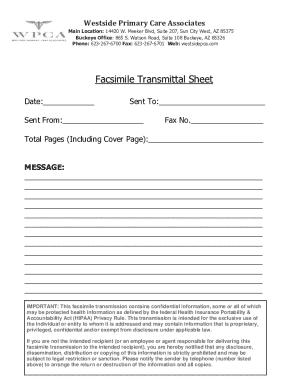
Visual Example of a Completed General Form Transmittal Sheet
A visual representation of a completed General Form Transmittal Sheet can provide substantial assistance to users. Sample forms can help illustrate how to properly fill out required fields and what accurate entries should resemble.
Furthermore, comparing user entries against this example can enhance accuracy and highlight any potential variations based on individual cases. This proactive approach assists users in preparing correctly for administrative hearings.
How to fill out the Transmittal Sheet
-
1.Start by accessing pdfFiller and log into your account or create a new one if you don’t have one already.
-
2.Search for 'General Form Transmittal Sheet' in the pdfFiller search bar, then select the appropriate form from the search results.
-
3.Once the form is open, review the sections to familiarize yourself with the required information necessary for completion.
-
4.Gather all relevant data, such as details about the involved parties, case nature, and hearing schedules, to ensure you have all required information before you start filling it in.
-
5.Navigate to each fillable field within the form. Click inside the field to enter information; use the keyboard to type your responses.
-
6.Ensure that fields related to parties' details, case specifics, and relevant dates are filled out accurately, as this information is crucial for processing.
-
7.After completing all fields, thoroughly review the information you've entered to ensure it is accurate and complete, minimizing the chance of errors.
-
8.Once everything is reviewed, locate the signature field and either apply an electronic signature or print the form to sign it physically.
-
9.Save your completed form by clicking the 'Save' button. You can also download the form directly to your device as a PDF or another file format.
-
10.If applicable, submit the form through pdfFiller’s submission options, following any additional instructions provided by the receiving agency.

Who is eligible to use the General Form Transmittal Sheet?
Any authorized officer from an agency submitting cases to the Office of Administrative Hearings can use this form. Legal representatives and administrative staff are also encouraged to access it for their submissions.
Are there any deadlines for submitting the General Form Transmittal Sheet?
Submitting the General Form Transmittal Sheet should align with any deadlines set by the Office of Administrative Hearings related to your specific case or hearing date. Always check for specific timelines to ensure timely processing.
What are the submission methods for this form?
The General Form Transmittal Sheet can be submitted electronically through pdfFiller or printed and sent physically to the Office of Administrative Hearings, depending on the agency's submission preferences.
Do I need to attach supporting documents with the form?
Yes, supporting documents may be required depending on the nature of the case. Ensure all necessary attachments are completed and included when submitting the General Form Transmittal Sheet.
What common mistakes should I avoid when filling this form?
Common mistakes include leaving fields blank, incorrect information about parties involved, and failing to provide an authorized signature. Double-check details before submission to avoid delays.
How long does processing take for this form?
Processing times for the General Form Transmittal Sheet can vary. Generally, it may take anywhere from several days to a few weeks, depending on the Office of Administrative Hearings' workflow and caseload.
Are there any fees associated with filing this form?
Typically, there are no fees connected to the submission of the General Form Transmittal Sheet itself. However, check with the Office of Administrative Hearings to confirm any other potential fees for associated services.
Related Forms

Get the latest insights from our blog


If you believe that this page should be taken down, please follow our DMCA take down process
here
.
This form may include fields for payment information. Data entered in these fields is not covered by PCI DSS compliance.