
Last updated on
Oct 1, 2026

Get the free Vehicle Particulars Form
We are not affiliated with any brand or entity on this form

Fill out
Complete the form online in a simple drag-and-drop editor.

eSign
Add your legally binding signature or send the form for signing.

Share
Share the form via a link, letting anyone fill it out from any device.

Export
Download, print, email, or move the form to your cloud storage.
Why pdfFiller is the best tool for your documents and forms


End-to-end document management
From editing and signing to collaboration and tracking, pdfFiller has everything you need to get your documents done quickly and efficiently.
Accessible from anywhere
pdfFiller is fully cloud-based. This means you can edit, sign, and share documents from anywhere using your computer, smartphone, or tablet.
Secure and compliant
pdfFiller lets you securely manage documents following global laws like ESIGN, CCPA, and GDPR. It's also HIPAA and SOC 2 compliant.
What is Vehicle Sales Form
The Vehicle Particulars Form is a document used by motor vehicle dealers in Western Australia to record essential details about vehicles being sold.
pdfFiller scores top ratings on review platforms




Who needs Vehicle Sales Form?
Explore how professionals across industries use pdfFiller.

Vehicle Sales Form is needed by:
-
Motor vehicle dealers operating in Western Australia
-
Purchasers buying vehicles in Western Australia
-
Businesses involved in vehicle sales and licensing
-
Financial institutions providing auto loans
-
Regulatory agencies overseeing vehicle registrations
Comprehensive Guide to Vehicle Sales Form
What is the Vehicle Particulars Form?
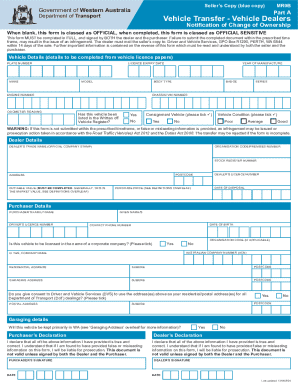
The Vehicle Particulars Form is a crucial document used specifically in Western Australia for recording vital details during motor vehicle transactions. This form includes essential data points such as the make, model, Vehicle Identification Number (VIN), odometer reading, and sale price of the vehicle. Both the dealer and purchaser must sign the form, reaffirming their agreement on the transaction and ensuring its legality. This signing process is key in providing a clear agreement that protects both parties involved in the sale.
Purpose and Benefits of the Vehicle Particulars Form
The Vehicle Particulars Form serves several significant functions in legal and transactional contexts. Firstly, it helps maintain accurate records of vehicle sales, which is vital for both regulatory compliance and consumer protection. The form also establishes a legal agreement between the dealer and the purchaser, thus protecting both parties by clearly outlining warranty status and the vehicle's condition. It complies with the standards set forth in the Motor Vehicle Dealers Act 1973, further ensuring the legality and propriety of the transaction.
Key Features of the Vehicle Particulars Form
This form includes various sections and fields to facilitate its use. Key characteristics include:
-
Vehicle Identification Number (VIN)
-
Odometer reading
-
Blank fields for make and model
-
Checkboxes for statutory warranties and designations like repairable write-offs
-
Signature lines for both the dealer and the purchaser
The standardized format of the Vehicle Particulars Form ensures consistency and ease of use for all dealers across Western Australia.
Who Needs the Vehicle Particulars Form?
Key stakeholders who need to fill out the Vehicle Particulars Form include motor vehicle dealers and purchasers. This form is required in various scenarios, such as when selling a vehicle, transferring ownership, or ensuring compliance with motor vehicle laws. Both sellers and buyers benefit from utilizing this form, as it provides a clear record of the transaction and protects their respective rights throughout the sales process.
How to Fill Out the Vehicle Particulars Form Online
Filling out the Vehicle Particulars Form online is a straightforward process. Follow these steps:
-
Access the form on a platform like pdfFiller.
-
Fill in the required fields, paying close attention to the VIN and odometer reading.
-
Utilize online features such as editing and eSigning for convenience and speed.
-
Double-check for accuracy, especially in critical fields before submission.
This online method simplifies the process, making it easier for users to complete the necessary documentation efficiently.
Submission and Delivery Methods for the Vehicle Particulars Form
When it comes to submitting the completed Vehicle Particulars Form, users have options for both electronic and physical submission. Electronic submissions are generally encouraged due to their speed and efficiency. In Western Australia, completed forms can be submitted to the relevant vehicle registration authorities. Users should also be aware of processing times and confirmation receipts to ensure their submissions are properly handled.
Common Errors and How to Avoid Them when Filling the Vehicle Particulars Form
Anticipating and avoiding common mistakes can streamline the form-filling process. Frequent errors include:
-
Incorrect or invalid VIN entries
-
Omitted signatures from either the dealer or purchaser
-
Errors in the odometer reading
To avoid these issues, users should double-check their entries and ensure all required fields are filled accurately before submission. Correct details are essential for future registration queries, making attention to detail critical.
Security and Compliance for the Vehicle Particulars Form
Handling the Vehicle Particulars Form requires strict adherence to security measures and legal compliance. This form incorporates robust data protection standards, safeguarding personal information during the transaction process. Users should prioritize secure submission practices to protect sensitive details and ensure compliance with relevant laws governing motor vehicle transactions in Western Australia.
Leveraging pdfFiller for Your Vehicle Particulars Form Needs
Using pdfFiller to complete your Vehicle Particulars Form offers numerous advantages. With features designed to simplify form completion, pdfFiller acts as a cloud-based solution for editing, eSigning, and sharing documents. By creating a free account, users can enjoy enhanced accessibility and efficiency when handling form-related tasks, making it easier to manage their vehicle particulars.
How to fill out the Vehicle Sales Form
-
1.To begin, open your preferred web browser and navigate to pdfFiller.
-
2.Once on the site, use the search bar to type ‘Vehicle Particulars Form’ and select it from the results.
-
3.After the form loads, identify or gather the required information including the vehicle's make, model, VIN, odometer reading, and sale price.
-
4.Select the corresponding fields in the form on pdfFiller and input each detail precisely.
-
5.Utilize checkboxes to denote if the vehicle is covered by a statutory warranty or is a registered repairable write-off.
-
6.Next, both the dealer and purchaser will need to sign the document. Click the signature field and choose 'Add Signature' to either draw, upload, or type their names.
-
7.Once all fields are complete and verified for accuracy, review the entire form for any missing or incorrect information.
-
8.To finalize the document, navigate to the top-right corner of the pdfFiller interface and click on 'Save' to store your progress.
-
9.If you wish to download a copy, select 'Download' and choose your preferred file format. Alternatively, consider using the 'Share' option to email the form directly.
-
10.Complete the submission process by following any specific instructions provided by your local motor vehicle authority, if applicable.

Who needs to fill out the Vehicle Particulars Form?
The Vehicle Particulars Form must be filled out by motor vehicle dealers who are selling vehicles. Purchasers also need to sign the form to validate the transaction.
Is there a deadline for submitting this form?
While there isn't a defined deadline for the Vehicle Particulars Form itself, it's important to submit it promptly upon the sale of a vehicle to comply with local licensing regulations.
How should I submit the Vehicle Particulars Form?
After completing the Vehicle Particulars Form, submit it as per your local motor vehicle authority's requirements, which may involve online submission, mailing, or in-person delivery.
What information do I need to complete the form?
Before starting the form, gather information on the vehicle’s make, model, VIN, odometer reading, price, and the signatures of both the dealer and purchaser.
What mistakes should I avoid when filling out this form?
Ensure that all vehicle details are entered accurately, double-checking the VIN and signatures, as errors can lead to delays in the registration process.
How long does processing take for the Vehicle Particulars Form?
Processing times can vary. Typically, it may take several days to a few weeks, depending on the local motor vehicle authority’s workload.
Do I need any supporting documents with this form?
Yes, it’s advisable to have copies of the vehicle’s previous registration and any warranties or agreements related to the sale as supporting documents.
Related Forms




Get the latest insights from our blog


If you believe that this page should be taken down, please follow our DMCA take down process
here
.
This form may include fields for payment information. Data entered in these fields is not covered by PCI DSS compliance.