
Last updated on
Oct 3, 2026

Get the free Child Story Consent Form
We are not affiliated with any brand or entity on this form

Fill out
Complete the form online in a simple drag-and-drop editor.

eSign
Add your legally binding signature or send the form for signing.

Share
Share the form via a link, letting anyone fill it out from any device.

Export
Download, print, email, or move the form to your cloud storage.
Why pdfFiller is the best tool for your documents and forms


End-to-end document management
From editing and signing to collaboration and tracking, pdfFiller has everything you need to get your documents done quickly and efficiently.
Accessible from anywhere
pdfFiller is fully cloud-based. This means you can edit, sign, and share documents from anywhere using your computer, smartphone, or tablet.
Secure and compliant
pdfFiller lets you securely manage documents following global laws like ESIGN, CCPA, and GDPR. It's also HIPAA and SOC 2 compliant.
What is Child Consent Form
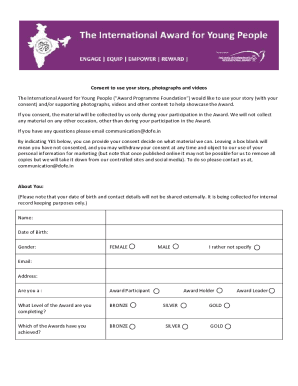
The Child Story Consent Form is a legal document used by the Australian Government to obtain parental consent for using a child's personal information for promotional purposes.
pdfFiller scores top ratings on review platforms




Who needs Child Consent Form?
Explore how professionals across industries use pdfFiller.

Child Consent Form is needed by:
-
Parents or guardians looking to provide consent for their child's promotional material usage.
-
Organizations needing to comply with Australian regulations for child data usage.
-
Social service agencies requiring documentation for child-related consent.
-
Schools or educational institutions documenting parental permissions.
-
Photographers seeking legal consent for using children's images.
Comprehensive Guide to Child Consent Form
What is the Child Story Consent Form?
The Child Story Consent Form serves a crucial role within the Australian Government's framework, specifically under the Department of Social Services. This form is designed to obtain parental consent for the use of children's personal information, including photos and recordings.
It is essential for organizations to secure this consent for promotional purposes. The form remains valid for a duration of up to six years, ensuring that consent is captured comprehensively and ethically.
Purpose and Benefits of the Child Story Consent Form
This consent form is pivotal in legal and ethical contexts, ensuring that parental consent is paramount when handling children's information. By utilizing this form, organizations can recognize and promote children's contributions safely.
-
Facilitates legal compliance regarding the use of personal information.
-
Enhances trust between parents and organizations.
-
Allows for recognition and opportunity for children.
Additionally, parents maintain the right to withdraw consent at any time, reinforcing the commitment to privacy and ethical standards.
Who Needs the Child Story Consent Form?
Parents or guardians of children are the primary audience required to fill out the Child Story Consent Form. Eligibility criteria emphasize the need for parental approval to safeguard children's interests.
-
Parents must fill the form for any use of a child's personal information.
-
The form is mandatory in specific scenarios, such as events involving media coverage.
-
Schools and organizations play a role in the consent process by informing parents of the necessity of the form.
Key Features of the Child Story Consent Form
The Child Story Consent Form includes several important features to facilitate user input. Users benefit from fillable fields and checkboxes that streamline the process.
-
Essential contact details are required for effective communication.
-
Parents acknowledge various terms of use as part of the consent process.
-
The form includes options for users to withdraw consent easily, specifying how this would be executed.
How to Fill Out the Child Story Consent Form Online (Step-by-Step)
Completing the Child Story Consent Form digitally is made straightforward through tools like pdfFiller. Here are the step-by-step instructions for filling out the form:
-
Access the Child Story Consent Form through the pdfFiller platform.
-
Input all required contact information in the designated fields.
-
Review the terms and conditions thoroughly, ensuring understanding before acknowledgment.
-
Double-check all entries for accuracy to avoid common pitfalls.
-
Submit the completed form digitally when ready.
Submission Methods and Delivery of the Child Story Consent Form
Once completed, the Child Story Consent Form can be submitted through various methods. Understanding these submission options is crucial for all users.
-
Online submission via pdfFiller provides immediate processing.
-
Paper submissions can be sent via postal mail for those preferring traditional methods.
-
Users should be aware of the timeline for processing and receive confirmation of receipt thereafter.
What Happens After you Submit the Child Story Consent Form?
After submission, users can expect a thorough review process. This stage is essential for ensuring all information is in order and accurately represents the consent given.
-
There are opportunities for correction or amendment if discrepancies arise.
-
Users can track the status of their submission for peace of mind.
Security and Compliance for the Child Story Consent Form
Security is paramount when filling out the Child Story Consent Form. Users can rest assured about the safety of their information, as robust security measures are in place.
-
All data is secured with 256-bit encryption, protecting user information during the consent process.
-
The form complies with regulations such as HIPAA and GDPR, emphasizing privacy and legal standards.
-
Best practices for data protection are implemented throughout the document management process.
Why Use pdfFiller for Your Child Story Consent Form?
Utilizing pdfFiller for your Child Story Consent Form greatly enhances the user experience. This platform is designed for efficient management of PDF documents.
-
Users can edit and manage PDFs seamlessly without needing additional downloads.
-
With capabilities like eSigning, users can complete the process smoothly and securely.
-
pdfFiller’s commitment to security ensures sensitive documents are handled with utmost care.
Next Steps After Completing Your Form
After filling out the Child Story Consent Form, users are encouraged to explore additional features available on pdfFiller. Enhancements such as editing and eSigning can streamline future document management.
-
Consider utilizing pdfFiller for related resources on consent and compliance.
-
Users are invited to share their experiences or seek further assistance if required.
How to fill out the Child Consent Form
-
1.To begin, access pdfFiller's website and search for the Child Story Consent Form available in the forms library.
-
2.Once located, click on the form to open it in the pdfFiller editor where you can interact with the document seamlessly.
-
3.Before filling out the form, gather necessary information including your child's details, contact information, and your acknowledgment of the terms.
-
4.Use the toolbar to fill out each field indicated on the form, clicking on text boxes to type and checkboxes to mark your consent as required.
-
5.Ensure all sections are completed accurately. Use the drag-and-drop feature to add any relevant attachments or documents if needed.
-
6.Carefully review all entries for any errors or omissions. It's crucial that all information is clear and correct, as this form requires accurate data.
-
7.Once satisfied with your entries, look for the 'Save' option to ensure your data is stored securely on pdfFiller.
-
8.You can then download the completed document to your device or submit it directly via the platform if online submission is permitted.

Who is required to sign the Child Story Consent Form?
The Child Story Consent Form must be signed by a parent or guardian who has the legal authority to provide consent for the use of a child's personal information.
How long is the consent valid?
The consent provided through the Child Story Consent Form is valid for up to six years after signing. Parents can withdraw consent at any time during this period.
What happens if I need to withdraw my consent?
If you wish to withdraw your consent, you can submit a written request to the organization using the form, and they must cease using the child's information immediately.
Is notarization required for this form?
No, the Child Story Consent Form does not require notarization. You simply need to sign it as a parent or guardian to provide consent.
How can I submit the completed form?
You can submit the completed Child Story Consent Form either through pdfFiller by using the submit feature or by downloading and sending it physically to the appropriate authority.
What information do I need to complete the form?
Before completing the form, you’ll need your child’s details, your contact information, and a clear understanding of the terms the form entails. Ensure that all information is accurate.
Are there any common mistakes to avoid when filling out the form?
Common mistakes include leaving fields blank, providing incorrect details, and forgetting to review the terms. Always double-check your entries for accuracy before submission.
Related Forms




Get the latest insights from our blog


If you believe that this page should be taken down, please follow our DMCA take down process
here
.
This form may include fields for payment information. Data entered in these fields is not covered by PCI DSS compliance.