
Last updated on
Oct 3, 2026

Get the free Confined Space Entry Form
We are not affiliated with any brand or entity on this form

Fill out
Complete the form online in a simple drag-and-drop editor.

eSign
Add your legally binding signature or send the form for signing.

Share
Share the form via a link, letting anyone fill it out from any device.

Export
Download, print, email, or move the form to your cloud storage.
Why pdfFiller is the best tool for your documents and forms


End-to-end document management
From editing and signing to collaboration and tracking, pdfFiller has everything you need to get your documents done quickly and efficiently.
Accessible from anywhere
pdfFiller is fully cloud-based. This means you can edit, sign, and share documents from anywhere using your computer, smartphone, or tablet.
Secure and compliant
pdfFiller lets you securely manage documents following global laws like ESIGN, CCPA, and GDPR. It's also HIPAA and SOC 2 compliant.
What is CSE Form
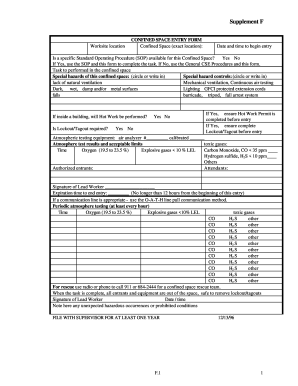
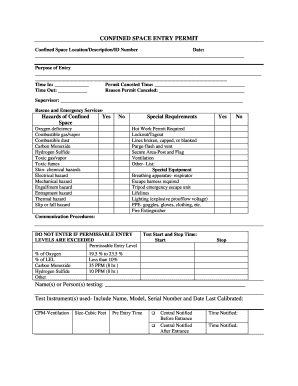
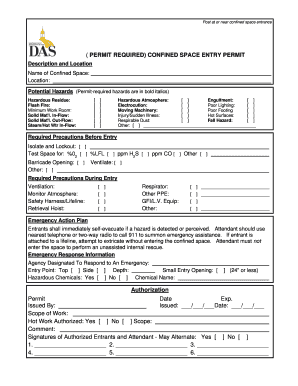
The Confined Space Entry Form is a safety document used by workers in high-risk environments to document safety protocols for entering confined spaces.
pdfFiller scores top ratings on review platforms




Who needs CSE Form?
Explore how professionals across industries use pdfFiller.

CSE Form is needed by:
-
Construction site safety managers
-
Occupational safety professionals
-
Lead workers overseeing confined space entry
-
Emergency response teams
-
Compliance officers in industrial settings
-
Workers involved in hazardous material handling
Comprehensive Guide to CSE Form
What is the Confined Space Entry Form?
The Confined Space Entry Form is an essential document used to ensure safety protocols are adhered to when entering confined spaces. This form helps identify the specific risks and hazards associated with confined areas, which can include toxic atmospheres, limited entry and exit points, and potential for engulfment.
Documenting entry procedures is vital for legal compliance and maintaining workplace safety. Proper usage of the confined space entry form minimizes risks and ensures that all safety measures are recorded, enhancing overall safety compliance.
Purpose and Benefits of the Confined Space Entry Form
The Confined Space Entry Form serves as a critical tool for promoting a safe work environment. Utilizing this form offers several key benefits, including the documentation of all safety measures taken before entry. Both workers and employers can track the accountability of safety procedures, which is crucial for maintaining health and safety standards.
Moreover, adhering to proper documentation through this safety compliance form can mitigate legal risks in case of workplace incidents. Properly completed forms not only safeguard employees but also protect employers from liability.
Key Features of the Confined Space Entry Form
This form is designed for efficiency and user-friendliness. It includes various fillable fields and checkboxes, enabling users to provide specific information about the entry location, identifiable hazards, and the results from atmospheric testing.
-
Fillable fields for location and hazards
-
Signature lines for lead workers
-
Instructions for filing with supervisors
-
Mandatory fields for date and time of entry
Correctly completing the form is essential, and understanding the validity requirements can improve compliance and safety communication within teams.
Who Needs the Confined Space Entry Form?
Various roles within an organization are required to complete the Confined Space Entry Form. The lead worker typically holds the responsibility for filling out and submitting the form, ensuring that all relevant safety protocols are followed.
This form is commonly utilized in industries such as construction, manufacturing, and utilities, where confined spaces are frequently encountered. Team members across these sectors must collaborate to ensure comprehensive safety procedures are observed during entry into confined spaces.
How to Fill Out the Confined Space Entry Form Online
-
Access the form through pdfFiller.
-
Fill in each required field accurately.
-
Review all entries for completeness.
-
Save your work and validate the information before submission.
Thoroughly reviewing the completed form increases accuracy and ensures that all safety protocols have been properly documented.
Review and Validation Checklist
Before submitting the Confined Space Entry Form, users should double-check their work to avoid common errors. Maintaining accuracy is crucial for compliance and safety.
-
Verify if all required information is filled out
-
Check for any missing signatures
-
Review atmospheric test results for accuracy
A checklist can be helpful to ensure that all necessary components are included, reinforcing the importance of a thorough review to maintain safety compliance.
How to Submit the Confined Space Entry Form
Once the Confined Space Entry Form is completed, users have several options for submission. Forms can be submitted electronically for convenience or printed and filed with the supervisor directly.
-
Submit via email or a dedicated internal submission platform
-
Print a copy for records and ensure it is signed
-
Confirm submission has been acknowledged by the supervisor
Tracking submission is crucial for maintaining a thorough record of safety compliance.
Security and Compliance for the Confined Space Entry Form
Ensuring security and compliance when handling the Confined Space Entry Form is imperative. pdfFiller employs robust security measures, including 256-bit encryption, to protect sensitive document information. Additionally, compliance with HIPAA and GDPR is maintained during document handling, ensuring confidentiality.
Proper storage of completed forms is also essential, with a requirement to retain records as per organizational procedures for a minimum of one year, thus supporting ongoing safety initiatives.
Explore pdfFiller for Your Confined Space Entry Needs
For those looking to efficiently manage their confined space entry documentation, pdfFiller offers an excellent solution. The platform provides users with advanced editing capabilities and eSigning features that enhance the form-filling experience.
Utilizing pdfFiller's secure platform ensures that sensitive documents are handled safely while promoting workplace safety. Start using the Confined Space Entry Form today to streamline your safety documentation process.
How to fill out the CSE Form
-
1.To access the Confined Space Entry Form on pdfFiller, visit the pdfFiller website and log in or create an account if you don’t have one.
-
2.Use the search bar to locate the Confined Space Entry Form by typing its name, and select it from the available templates.
-
3.Start by reviewing the form's requirements, including necessary details like the worksite location, hazards present, and atmospheric test results.
-
4.Navigate the form using pdfFiller's tools to fill in all required fields, including checkboxes for safety measures and text fields for specific information.
-
5.As you fill the form, ensure you gather all necessary information beforehand, such as the names and signatures of authorized entrants and lead workers.
-
6.Review your entries carefully to ensure accuracy and completeness, checking all sections for required signatures and dates.
-
7.Once the form is fully completed and reviewed, use the 'Save' option in pdfFiller to store your document digitally.
-
8.You can download a copy for your records or submit it directly to your supervisor through pdfFiller's sharing features.

Who needs to fill out the Confined Space Entry Form?
Any worker who is responsible for overseeing entry into a confined space must complete this form. This includes lead workers, safety managers, and anyone involved in the entry process. The form ensures all safety protocols are observed.
What information is required to complete the form?
To complete the Confined Space Entry Form, you will need to provide details such as the exact location of the confined space, any specific hazards, atmospheric test results, and the names of authorized entrants, along with required signatures.
How long do I need to keep the completed form?
The completed Confined Space Entry Form should be filed with the supervisor for at least one year to ensure compliance with safety regulations and protocols.
Can I submit the form electronically?
Yes, if you're using pdfFiller, you can submit the form electronically directly to your supervisor after completion. Ensure all required fields and signatures are completed before submitting.
What common mistakes should I avoid when filling out the form?
Common mistakes include leaving required fields blank, failing to gather necessary information before filling it out, and not obtaining all required signatures. Review the completed form carefully before submission.
Is notarization required for this form?
No, the Confined Space Entry Form does not require notarization, making it simpler to complete and submit as part of safety compliance.
What happens if the form is not filled out correctly?
If the Confined Space Entry Form is not filled out correctly, it may lead to safety violations and could impede compliance with safety protocols. It’s essential to ensure accuracy to protect all involved personnel.




Get the latest insights from our blog


If you believe that this page should be taken down, please follow our DMCA take down process
here
.
This form may include fields for payment information. Data entered in these fields is not covered by PCI DSS compliance.