
Last updated on
Oct 3, 2026

Get the free Clinical Laboratory Extended Downtime Order Request
We are not affiliated with any brand or entity on this form

Fill out
Complete the form online in a simple drag-and-drop editor.

eSign
Add your legally binding signature or send the form for signing.

Share
Share the form via a link, letting anyone fill it out from any device.

Export
Download, print, email, or move the form to your cloud storage.
Why pdfFiller is the best tool for your documents and forms


End-to-end document management
From editing and signing to collaboration and tracking, pdfFiller has everything you need to get your documents done quickly and efficiently.
Accessible from anywhere
pdfFiller is fully cloud-based. This means you can edit, sign, and share documents from anywhere using your computer, smartphone, or tablet.
Secure and compliant
pdfFiller lets you securely manage documents following global laws like ESIGN, CCPA, and GDPR. It's also HIPAA and SOC 2 compliant.
What is Lab Downtime Order
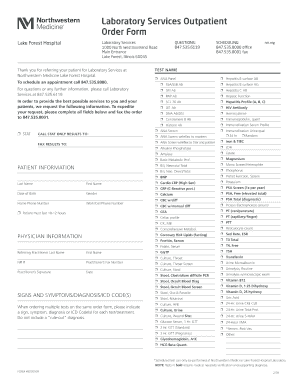
The Clinical Laboratory Extended Downtime Order Request is a healthcare form used by providers to order laboratory tests during extended downtime periods.
pdfFiller scores top ratings on review platforms




Who needs Lab Downtime Order?
Explore how professionals across industries use pdfFiller.

Lab Downtime Order is needed by:
-
Ordering Providers who need to sign and submit lab orders
-
Collection Nurses or Phlebotomists who handle specimen collection
-
Physicians involved in patient care and test ordering
-
Laboratory personnel requiring documentation of test requests
-
Patients needing to understand the lab testing process
-
Healthcare administrators managing lab order workflows
Comprehensive Guide to Lab Downtime Order
What is the Clinical Laboratory Extended Downtime Order Request?
The Clinical Laboratory Extended Downtime Order Request is a critical tool used in healthcare settings to ensure continuity of patient care during laboratory downtime situations. This form allows healthcare professionals to submit laboratory test orders even when standard operational processes are interrupted. It includes specific fields designed to gather essential patient information, test selections, and the necessary signatures, ensuring adherence to CLIA '88 regulations.
Key data fields in the form typically include patient name, date of birth (DOB), medical record number (MRN), provider signature, and specimen collection date/time. This structured approach facilitates compliance and minimizes errors during critical medication order processes.
Purpose and Benefits of the Clinical Laboratory Extended Downtime Order Request
The primary purpose of the Clinical Laboratory Extended Downtime Order Request is to maintain patient care continuity when regular lab functions are not available. This form allows healthcare providers to efficiently manage laboratory test orders, ensuring that essential diagnostic services continue without interruption.
Users of this form, including ordering providers and collection nurses, benefit significantly from its streamlined processes. Specifically, it enhances communication between departments and expedites the turnaround time for necessary test results, which is crucial for informed medical decision-making.
Key Features of the Clinical Laboratory Extended Downtime Order Request
This form contains essential features that support effective use during laboratory downtime. The form includes fields for capturing vital patient information and options for test selection through various input formats like checkboxes and dropdown menus. Additionally, customization options are available to meet specific needs, including the ability to modify templates through pdfFiller.
The straightforward design of the Clinical Laboratory Extended Downtime Order Request ensures that users can quickly and accurately fill out necessary information, minimizing errors and improving efficiency.
Who Needs to Use the Clinical Laboratory Extended Downtime Order Request?
Ordering providers are the primary users of the Clinical Laboratory Extended Downtime Order Request and are required to provide their signatures. In contrast, collection nurses and phlebotomists can participate by gathering information but do not need to sign the form. Situations where this form is necessary often arise during unexpected laboratory downtimes or emergencies, underscoring its role in effective patient management.
Key roles involved in utilizing this form include:
-
Ordering Providers
-
Physicians
-
Collection Nurses
-
Phlebotomists
How to Fill Out the Clinical Laboratory Extended Downtime Order Request Online
Filling out the Clinical Laboratory Extended Downtime Order Request online is a simple process using pdfFiller. To efficiently complete the form, gather essential data prior to beginning, including patient details and the specific tests to be ordered. Following these instructions will streamline your experience:
-
Access the form through pdfFiller.
-
Input patient details, including name, DOB, and MRN.
-
Select the required tests using the provided options.
-
Obtain the necessary provider signature.
-
Review the completed form for accuracy.
-
Submit the form electronically.
Common Errors and How to Avoid Them When Filling Out the Form
Users often encounter common errors while completing the Clinical Laboratory Extended Downtime Order Request. These may include missing essential fields, incorrect patient information, and failure to obtain required signatures. To improve accuracy, consider these tips:
-
Double-check all entered patient information against existing records.
-
Ensure all mandatory fields are filled out completely.
-
Review the form against a checklist before submission.
Submission Methods and Delivery of the Clinical Laboratory Extended Downtime Order Request
Once the Clinical Laboratory Extended Downtime Order Request is completed, it needs to be submitted to the laboratory for processing. Users can utilize the various submission methods available through pdfFiller, including direct electronic delivery. After submission, users can confirm receipt and track the status of the order, ensuring transparency throughout the request process.
Security and Compliance in Handling the Clinical Laboratory Extended Downtime Order Request
Protecting patient information is a paramount concern when using the Clinical Laboratory Extended Downtime Order Request. pdfFiller implements various security measures, including 256-bit encryption and compliance with HIPAA standards, to safeguard sensitive data throughout the form-filling process. This commitment to privacy ensures users can submit forms confidently, knowing their information remains protected.
Sample of a Completed Clinical Laboratory Extended Downtime Order Request
Reviewing a sample of a completed Clinical Laboratory Extended Downtime Order Request can be beneficial for users before filling out the actual form. This visual reference provides guidance on how different sections are filled out and clarifies the information required for accurate submission. Key sections include patient information, test selections, and provider signatures, which are critical for successful processing.
Maximize Your Experience with pdfFiller for the Clinical Laboratory Extended Downtime Order Request
Utilizing pdfFiller for the Clinical Laboratory Extended Downtime Order Request enhances the overall user experience. This platform offers features for seamlessly filling online forms, eSigning, and managing documents within the secure cloud environment. By leveraging pdfFiller's tools, users can significantly save time and streamline their document workflows.
How to fill out the Lab Downtime Order
-
1.To access the Clinical Laboratory Extended Downtime Order Request form on pdfFiller, visit the pdfFiller website and log in or create an account if necessary.
-
2.Once logged in, use the search function to locate the form by typing its name or browsing through healthcare forms.
-
3.Open the form by clicking on it, which will allow you to view and edit it directly within the pdfFiller interface.
-
4.Before filling out the form, gather patient information such as name, date of birth, medical record number, and details about the specimen and tests required.
-
5.Begin filling out the form by entering the necessary patient information in the designated fields.
-
6.Be sure to complete the sections that require the Ordering Provider's signature, as it is mandatory for processing.
-
7.Utilize the appropriate checkboxes for gender, tube types, and test selections, ensuring that all relevant details are included.
-
8.As you complete the form, take advantage of pdfFiller's tools to neatly format your input, ensuring readability and compliance.
-
9.After filling out all required fields, review the form for accuracy, ensuring all necessary signatures and information are present.
-
10.Once satisfied with your completed form, you can save it directly to your pdfFiller account or download it in your preferred file format.
-
11.To submit the form, follow the laboratory's protocol, which may include emailing the document or printing and delivering it physically.

Who is eligible to use the Clinical Laboratory Extended Downtime Order Request form?
This form is designed for healthcare providers, including Ordering Providers and Physicians, who are responsible for ordering laboratory tests during downtime periods.
What should I do if I miss including a required field?
If a required field is missed, the form may be considered incomplete. Review all entered information and ensure that every mandatory field, especially those needing a signature, is filled before submission.
How do I submit the completed form?
Submit the completed form according to your laboratory’s submission process, which may involve emailing the form or providing it physically to the lab.
Are there deadlines for submitting this form?
Yes, timely submission is critical to ensure that lab tests are conducted effectively. Verify with the laboratory for specific submission deadlines, particularly during downtime periods.
What supporting documents are required with this form?
Typically, no additional documents are required beyond the completed Clinical Laboratory Extended Downtime Order Request itself, but check with your laboratory for specific requirements.
What are common mistakes to avoid when filling out this form?
Avoid incomplete sections, especially missing signatures or patient information. Double-check all details to prevent delays in processing.
How long does it take to process the requests made via this form?
Processing times vary by laboratory but typically take one to two business days. Confirm with your laboratory for their specific timeline.
Related Forms





Get the latest insights from our blog


If you believe that this page should be taken down, please follow our DMCA take down process
here
.
This form may include fields for payment information. Data entered in these fields is not covered by PCI DSS compliance.