
Last updated on
Oct 3, 2026

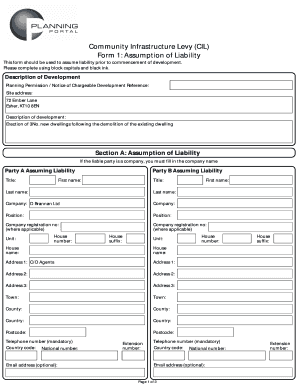
Get the free Community Infrastructure Levy (CIL) Form 10
We are not affiliated with any brand or entity on this form

Fill out
Complete the form online in a simple drag-and-drop editor.

eSign
Add your legally binding signature or send the form for signing.

Share
Share the form via a link, letting anyone fill it out from any device.

Export
Download, print, email, or move the form to your cloud storage.
Why pdfFiller is the best tool for your documents and forms


End-to-end document management
From editing and signing to collaboration and tracking, pdfFiller has everything you need to get your documents done quickly and efficiently.
Accessible from anywhere
pdfFiller is fully cloud-based. This means you can edit, sign, and share documents from anywhere using your computer, smartphone, or tablet.
Secure and compliant
pdfFiller lets you securely manage documents following global laws like ESIGN, CCPA, and GDPR. It's also HIPAA and SOC 2 compliant.
What is CIL Form 10
The Community Infrastructure Levy (CIL) Form 10 is a government form used by developers and charitable organizations to claim charitable and social housing relief prior to the commencement of development in England.
pdfFiller scores top ratings on review platforms




Who needs CIL Form 10?
Explore how professionals across industries use pdfFiller.

CIL Form 10 is needed by:
-
Developers planning new projects in England
-
Charitable organizations seeking relief
-
Agents representing claimants
-
Local authorities managing development applications
-
Individuals applying for social housing relief
-
Finance officers involved in planning permissions
-
Building contractors working on community projects
Comprehensive Guide to CIL Form 10
What is the Community Infrastructure Levy (CIL) Form 10?
The Community Infrastructure Levy (CIL) Form 10 is a document designed for individuals and organizations to claim charitable and social housing relief before starting development projects in England. Its main purpose is to provide local authorities with detailed information about potential claims, enabling them to assess and manage community development needs efficiently.
This form is integral to the CIL process, which aims to fund infrastructure that supports new development, such as roads, schools, and parks, contributing to the overall growth of communities. Completing the CIL Form 10 is a critical step in ensuring financial resources are allocated appropriately to enhance local facilities.
Purpose and Benefits of the CIL Form 10
Individuals and organizations should consider using the CIL Form 10 as it provides essential benefits for community development. Claiming charitable and social housing relief through this form can significantly reduce costs associated with property development.
Advantages include accessing government funding to support critical infrastructure projects and ensuring compliance with local regulations. By utilizing the CIL Form 10, developers play a vital role in fostering sustainable communities while benefiting from available relief options.
Who Needs the CIL Form 10?
The target audience for the CIL Form 10 includes both claimants and agents involved in the development process. Claimants are typically developers, housing associations, and charitable organizations that seek to claim relief, while agents may assist in submitting claims on behalf of these entities.
Examples of groups that may qualify for relief include nonprofit organizations constructing community facilities and developers creating affordable housing units. Understanding the roles of claimants and agents is crucial for a successful application.
Eligibility Criteria for the CIL Form 10
To file the CIL Form 10, specific eligibility criteria must be met. Applicants must demonstrate that the development aligns with charitable purposes or social housing objectives, ensuring that relief can be claimed effectively.
Conditions to claim social housing and charitable relief include being registered with relevant authorities and providing supporting documentation that proves the project satisfies necessary regulations. Fulfilling these criteria is essential for a successful claim.
How to Complete the CIL Form 10 Online (Step-by-Step)
Filling out the CIL Form 10 online is straightforward when following a step-by-step guide. Here’s how to complete the form:
-
Access the online form on the relevant government website.
-
Fill in required fields with accurate information about the development.
-
Attach necessary supporting documents, such as proof of eligibility and development plans.
-
Review the information provided for accuracy.
-
Submit the form electronically to the appropriate local authority.
Using tools like pdfFiller can simplify this process by allowing easy document editing and management, ensuring all required details are correctly inputted.
Common Errors to Avoid When Submitting the CIL Form 10
Applicants often make several common mistakes when submitting the CIL Form 10 which can delay processing or result in rejection. Here are tips to avoid these pitfalls:
-
Ensure all required fields are filled out completely and correctly.
-
Double-check that supporting documentation is included and up-to-date.
-
Review eligibility criteria to confirm compliance with all conditions.
Essential checks should include verifying that contact information is accurate and that signatures are included where required. Taking these steps can enhance the chances of successful submission.
Submitting the CIL Form 10: Guidelines and Methods
Submitting the completed CIL Form 10 involves following specific guidelines. Applicants can submit the form through several methods, including:
-
Electronic submission via the local authority's online portal.
-
Mailing a hard copy of the form to the designated office.
-
In-person submission at local government offices, if applicable.
It is important to review if any fees are associated with filing, which may vary by locality. Understanding submission methods helps streamline the application process.
Tracking Your CIL Form 10 Submission
Tracking the submission status of the CIL Form 10 is crucial for applicants after filing. Knowing how to check the application status with local authorities can provide peace of mind. Applicants should follow these steps:
-
Contact the local authority directly via phone or email.
-
Use any online tracking tools provided by the authority.
-
Be prepared to provide confirmation details from the submission.
Possible outcomes include receipt of approval, request for additional information, or rejection, prompting necessary next steps.
Security and Privacy When Using the CIL Form 10
Data security is a primary concern when completing the CIL Form 10. It is essential to use platforms that commit to protecting sensitive information. pdfFiller exemplifies this commitment with robust measures, including:
-
256-bit encryption to safeguard user data.
-
Compliance with regulations such as GDPR.
-
Regular security audits to ensure ongoing protection.
Users can feel assured that their information will be handled with the highest standards of privacy and security.
Simplify Your CIL Form 10 Experience with pdfFiller
Utilizing pdfFiller can significantly enhance the experience of filling out the CIL Form 10. The platform provides various tools that allow for an efficient and straightforward form-filling process. Benefits of using pdfFiller include:
-
Easily creating and editing fillable forms.
-
Seamlessly eSigning documents to expedite the process.
-
Organizing and sharing documents securely with collaborators.
These features make it easier to manage the entire form completion experience effectively.
How to fill out the CIL Form 10
-
1.To access the Community Infrastructure Levy (CIL) Form 10 on pdfFiller, visit the pdfFiller website and search for the form using the form name in the search bar.
-
2.Once you find the form, click on it to open. You will see a user-friendly interface with fillable fields.
-
3.Gather necessary information such as development details, claimant information, and specific sections relevant to the type of relief you are claiming before starting the form.
-
4.Begin filling out the form in pdfFiller by clicking on the fields. Use your keyboard to enter information in the designated sections like claimant details and development specifics.
-
5.Utilize checkboxes for applicable relief options. Ensure you follow instructions carefully, including using block capitals as specified.
-
6.After completing all fields, review the form thoroughly to ensure accuracy. Double-check names, details, and selected relief options.
-
7.Finalizing the form involves saving your progress. Click 'Save' or 'Download' to keep a copy for your records.
-
8.To submit the form, follow the provided guidelines to send it to the Collecting Authority, ensuring you include all necessary supporting documents and declarations.

Who is eligible to submit the CIL Form 10?
Eligibility for the CIL Form 10 typically includes developers and charitable organizations that meet specific criteria for claiming charitable or social housing relief under the Community Infrastructure Levy framework. Ensure you gather all qualifying details before applying.
What supporting documents are needed for the CIL Form 10?
Supporting documents required with the CIL Form 10 may include development plans, proof of charitable status, and any additional information that validates your claim for relief. Check with your local authority for detailed requirements.
What should I avoid when filling out the CIL Form 10?
Common mistakes when completing the CIL Form 10 include not following the specified instructions for filling out fields, omitting necessary details, or not including required supporting documents. Ensure everything is filled out completely and accurately.
How do I submit the CIL Form 10?
The CIL Form 10 should be submitted directly to the Collecting Authority as outlined in your completion instructions. Make sure you include all required documentation to avoid delays.
What is the expected processing time for the CIL Form 10?
Processing times for the CIL Form 10 may vary depending on the local authority. Generally, allow several weeks for review and response once submitted, and follow up if you do not hear back within the expected timeframe.
Are there deadlines for submitting the CIL Form 10?
Deadlines for submitting the CIL Form 10 can vary based on the development schedule and local authority rules. It is crucial to submit your claim before starting any development activities that may qualify for relief.
Can an agent submit the CIL Form 10 on behalf of a claimant?
Yes, an agent can submit the CIL Form 10 on behalf of a claimant, provided they have the necessary authorization to act on the claimant's behalf. Ensure that all required signatures are obtained.
Related Forms





Get the latest insights from our blog


If you believe that this page should be taken down, please follow our DMCA take down process
here
.
This form may include fields for payment information. Data entered in these fields is not covered by PCI DSS compliance.