
Last updated on
Oct 3, 2026

Get the free Middle School PE Waiver Request Form
We are not affiliated with any brand or entity on this form

Fill out
Complete the form online in a simple drag-and-drop editor.

eSign
Add your legally binding signature or send the form for signing.

Share
Share the form via a link, letting anyone fill it out from any device.

Export
Download, print, email, or move the form to your cloud storage.
Why pdfFiller is the best tool for your documents and forms


End-to-end document management
From editing and signing to collaboration and tracking, pdfFiller has everything you need to get your documents done quickly and efficiently.
Accessible from anywhere
pdfFiller is fully cloud-based. This means you can edit, sign, and share documents from anywhere using your computer, smartphone, or tablet.
Secure and compliant
pdfFiller lets you securely manage documents following global laws like ESIGN, CCPA, and GDPR. It's also HIPAA and SOC 2 compliant.
What is PE Waiver Form
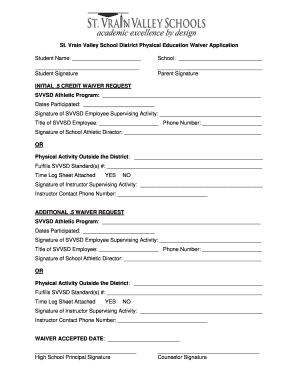
The Middle School PE Waiver Request Form is a Permission/Consent document used by parents or guardians in Florida to formally request an exemption from the physical education requirement for their child in grades 6-8.
pdfFiller scores top ratings on review platforms




Who needs PE Waiver Form?
Explore how professionals across industries use pdfFiller.

PE Waiver Form is needed by:
-
Parents or guardians of middle school students in Florida
-
School administrators handling waiver requests
-
Physical education teachers assessing alternative activities
-
Counselors providing academic guidance to students
-
Education policy makers reviewing PE requirements
-
Legal representatives working on educational contracts
Comprehensive Guide to PE Waiver Form
What is the Middle School PE Waiver Request Form?
The Middle School PE Waiver Request Form is a critical document for parents or guardians in Florida wishing to exempt their child from the physical education requirements in grades 6-8. This form serves as an official request to the school administration, ensuring that students can participate in alternate educational activities when specific criteria are met.
This form is relevant for students who may require modifications in their physical education requirements due to various factors such as health issues or involvement in external sports programs.
Purpose and Benefits of the Middle School PE Waiver Request Form
This form offers parents the ability to request waivers based on two primary scenarios: participation in outside physical activities and the need for alternate course enrollment. Utilizing this form provides several advantages, including the potential for better alignment of a child's education with their unique circumstances.
By submitting a school PE exemption form, parents can give their children the opportunity to engage in more suitable or preferred activities while adhering to Florida's educational standards.
Who Needs the Middle School PE Waiver Request Form?
The Middle School PE Waiver Request Form is designed for parents or guardians of students in grades 6-8 who meet specific eligibility criteria. Situations that may warrant a waiver include active participation in competitive sports, documented health issues, or family circumstances impacting a child’s ability to engage in standard PE classes.
Understanding these eligibility factors is vital for parents looking to navigate their child’s educational needs effectively.
How to Fill Out the Middle School PE Waiver Request Form Online (Step-by-Step)
Filling out the Middle School PE Waiver Request Form online is a straightforward process. Follow these step-by-step instructions for efficient completion:
-
Access the form via pdfFiller's platform.
-
Complete all required fields, ensuring to include specifics about alternate courses and physical activities.
-
Double-check the accuracy of all entered information.
-
Sign the form electronically or print it for a wet signature.
-
Submit the completed form following your school district's guidelines.
Field-by-Field Instructions for the Middle School PE Waiver Request Form
Each section of the Middle School PE Waiver Request Form has specific requirements. Key fields to focus on include:
-
Parent/Guardian Name: Ensure this is filled out clearly.
-
Signature: This field requires a valid electronic or handwritten signature.
-
Details regarding the student’s conditions or reasons for exemption.
It’s crucial to avoid common mistakes such as omitting the signature or failing to provide necessary details that justify the waiver.
How to Sign the Middle School PE Waiver Request Form
Signing the Middle School PE Waiver Request Form can be done either electronically or with a traditional wet signature. Both methods are valid, but choosing the right one may depend on personal preference and submission requirements.
The signature holds significant importance within the submission process, serving as a validation of consent. Carefully review the submission checklist to ensure all elements, including the signature, are completed correctly.
When and Where to Submit the Middle School PE Waiver Request Form
Timely submission of the Middle School PE Waiver Request Form is essential. Be aware of the following guidelines regarding submission deadlines:
-
Check the specific deadline set by your school district.
-
Understand that there may be consequences for late submissions, potentially impacting the waiver's acceptance.
-
Identify where to submit the completed form; this is usually designated by the local school district's office.
What Happens After You Submit the Middle School PE Waiver Request Form?
Once you submit the Middle School PE Waiver Request Form, it enters a review process within the school district. This typically includes evaluating the request and determining eligibility for waivers.
Parents can expect to receive communication regarding the outcome of their request, along with an estimated timeline for approval. Tracking the status of the submission may also be feasible through your school’s designated portal.
Security and Compliance for the Middle School PE Waiver Request Form
When dealing with the Middle School PE Waiver Request Form, pdfFiller prioritizes security and privacy through robust measures. The platform employs 256-bit encryption and adheres to regulations such as HIPAA and GDPR to ensure that sensitive documents are handled appropriately.
Parents can rest assured knowing that their information remains protected throughout the process.
Experience the Ease of Using pdfFiller for Your Middle School PE Waiver Request
Utilizing pdfFiller for your Middle School PE Waiver Request Form enhances the experience significantly. The platform provides a user-friendly environment to complete the waiver form efficiently.
Key features include tools for filling, signing, and submitting documents seamlessly, ensuring a smooth process for parents navigating this important educational form.
How to fill out the PE Waiver Form
-
1.Access the Middle School PE Waiver Request Form on pdfFiller by searching for the form name in the platform's search bar.
-
2.Once the form is open, familiarize yourself with the layout and the various sections that require completion.
-
3.Prior to filling out the form, gather all necessary information, such as your child's name, the type of physical activity, and preferred alternate course details.
-
4.Begin by entering your child's name and grade level in the designated fields at the top of the form.
-
5.Proceed to fill in your name as the parent or guardian in the corresponding section and include your signature in the required field.
-
6.If choosing to waive based on outside activities, specify the nature of those activities in the provided text area.
-
7.Ensure to double-check that all fillable fields are completed accurately, paying attention to any checkboxes that need to be marked.
-
8.Once all information is entered, review the form for any possible mistakes or omissions to avoid delays.
-
9.After completing the review, you can save your progress by clicking the save button or download the form directly to your device.
-
10.To submit the completed form, follow the prompts for electronic submission on pdfFiller or print it to mail it to the school district.

Who is eligible to submit the Middle School PE Waiver Request Form?
The form can be submitted by parents or guardians of students enrolled in middle school (grades 6-8) in Florida who wish to waive the physical education requirement.
Is there a deadline for submitting this PE waiver request?
While specific deadlines can vary by school district, it is advisable to submit the form as early as possible to ensure a timely review before the start of the school year.
How can I submit the completed PE waiver request form?
You can submit the form by using pdfFiller's electronic submission feature or by printing it and sending it directly to your child's school or the appropriate district office.
What supporting documents are required with this waiver request?
Typically, additional documentation may not be needed unless specified by the school district. However, including details about your child's participation in outside physical activities can support your request.
What are common mistakes to avoid when filling out the PE waiver form?
Common mistakes include incomplete fields, missing signatures, and forgetting to provide clear information about alternative activities or courses that your child will participate in.
How long does it take to process the waiver request after submission?
Processing times may vary by district, but generally expect a few weeks for the review and determination of your request. It's best to check with your school's administration for specific timelines.
What should I do if my PE waiver request is denied?
If denied, you may want to contact the school district to discuss the reasons for the denial and explore alternative options or appeal processes available for reconsideration.
Related Forms




Get the latest insights from our blog


If you believe that this page should be taken down, please follow our DMCA take down process
here
.
This form may include fields for payment information. Data entered in these fields is not covered by PCI DSS compliance.