
Last updated on
Oct 3, 2026

Get the free School Physical Examination Form
We are not affiliated with any brand or entity on this form

Fill out
Complete the form online in a simple drag-and-drop editor.

eSign
Add your legally binding signature or send the form for signing.

Share
Share the form via a link, letting anyone fill it out from any device.

Export
Download, print, email, or move the form to your cloud storage.
Why pdfFiller is the best tool for your documents and forms


End-to-end document management
From editing and signing to collaboration and tracking, pdfFiller has everything you need to get your documents done quickly and efficiently.
Accessible from anywhere
pdfFiller is fully cloud-based. This means you can edit, sign, and share documents from anywhere using your computer, smartphone, or tablet.
Secure and compliant
pdfFiller lets you securely manage documents following global laws like ESIGN, CCPA, and GDPR. It's also HIPAA and SOC 2 compliant.
What is School Exam Form
The School Physical Examination Form is a medical consent document used by parents/guardians to authorize a student's health information and physical assessment.
pdfFiller scores top ratings on review platforms




Who needs School Exam Form?
Explore how professionals across industries use pdfFiller.

School Exam Form is needed by:
-
Parents or guardians submitting health information for their child
-
Schools requiring health documentation for enrollment
-
Healthcare providers conducting student physical examinations
-
Coaches needing to assess student fitness levels
-
Administrators managing school health records
Comprehensive Guide to School Exam Form
What is the School Physical Examination Form?
The School Physical Examination Form is a crucial document used to collect essential health information about students. This form plays a vital role in student health assessments, as it ensures that schools have accurate and up-to-date health data. Parental or guardian authorization is required before the form can be submitted, highlighting the importance of involvement from families in their child's health and wellness.
Purpose and Benefits of the School Physical Examination Form
This form serves multiple purposes that benefit both schools and families. First, it guarantees an accurate health history for each student, which is essential for effective health management. Additionally, the form facilitates communication between parents and school health personnel, ensuring that any allergies or immunizations are appropriately managed. Schools can utilize this information to promote a safe environment for all students.
-
Ensures comprehensive health assessments
-
Enhances parent-school communication
-
Aids in managing health concerns, including allergies
Key Features of the School Physical Examination Form
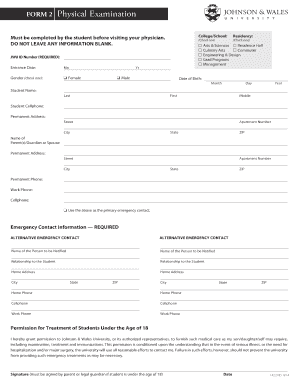
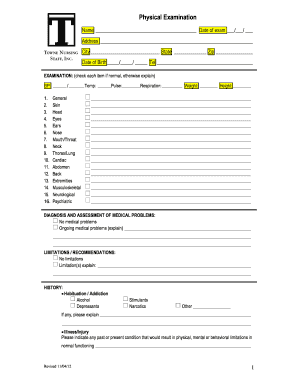
The School Physical Examination Form includes several critical fields that need to be completed accurately. These detailed fields include the student's name, grade, and height/weight information, as well as sections dedicated to physical activity and nutrition. A vital part of the form is the log for allergies and immunizations, and it also contains a table for recording medical visits.
Who Needs the School Physical Examination Form?
The responsibility for filling out the School Physical Examination Form primarily falls on parents or guardians of school-aged children. School health personnel also play a role in processing this information. This form is especially important for new students or those transferring schools, ensuring that their health history is accurately documented and available to the new educational environment.
How to Fill Out the School Physical Examination Form Online
Completing the School Physical Examination Form online using pdfFiller is a straightforward process. Begin by gathering necessary information, such as previous health records, to expedite the filling process. Follow these step-by-step instructions for successful completion:
-
Log in to pdfFiller.
-
Open the School Physical Examination Form.
-
Input student-related information in the designated fields.
-
Review the form for accuracy.
-
Submit the form for parent/guardian approval.
Providing accurate information is crucial, and pdfFiller ensures a validation process to minimize errors.
How to Sign the School Physical Examination Form
Signing the School Physical Examination Form is necessary for legal validation. Using pdfFiller, the digital signature process is simple and efficient for parents and guardians. Ensure that you meet the following requirements for a proper signature:
-
A digital signature via pdfFiller
-
Authorization from a parent or guardian
-
Consideration of wet signature options, if applicable
Where and How to Submit the School Physical Examination Form
Once you have filled out the School Physical Examination Form, it is important to understand the submission process. Forms can typically be submitted through various methods, including online and paper options. Make sure to know:
-
Where to send or deliver the completed form (specific schools or districts)
-
Deadlines for submission to ensure compliance
Security and Privacy for Sensitive Information
When handling personal health data, security and privacy are paramount. pdfFiller implements robust security measures, including 256-bit encryption, to protect sensitive information. Compliance with HIPAA and GDPR regulations further ensures that your data is handled with the utmost care. Understanding the importance of safeguarding sensitive health information is essential for peace of mind when filling out and submitting the form.
What Happens After You Submit the School Physical Examination Form?
After submitting the School Physical Examination Form, you can expect a confirmation of receipt, which assures that your documents have been received. Users can check the status of their submitted forms to stay informed about the processing of their data. There are potential outcomes regarding the students' health evaluations, and schools will typically follow up to ensure that necessary health measures are taken.
Your Solution for Completing Your School Physical Examination Form Fast and Easy
Utilizing pdfFiller provides a seamless experience for completing the School Physical Examination Form. This platform highlights the convenience and efficiency of filling out forms digitally, offering user-friendly features that simplify the process of form filling and signing. Users can also trust that pdfFiller maintains compliance and security in managing sensitive documents, ensuring a straightforward and safe experience.
How to fill out the School Exam Form
-
1.Access the School Physical Examination Form on pdfFiller by visiting the platform and searching for the form title. You can also use a direct link provided by your school or healthcare provider.
-
2.Once the form is open, familiarize yourself with the fillable fields. Navigate using the tabs or scroll through the document until you locate the areas requiring your input.
-
3.Gather all necessary information before starting to fill out the form. This includes your child's name, grade, school details, height, weight, known allergies, immunization records, and any relevant information about physical activity and nutrition.
-
4.Begin filling the form by entering your child's information into the designated fields. Ensure to accurately fill out details such as height, weight, and any allergies your child may have.
-
5.Look for the medical visit log table and record any relevant visits or treatments your child has undergone. This section is crucial for providing an overview of your child's health history.
-
6.As you complete each section, remember to periodically save your work by clicking the 'Save' button to prevent loss of information. Review each entry for accuracy and completeness.
-
7.Once all fields are filled out, review the document thoroughly to ensure all information is correct. Double-check that you have included your child’s signature and your parent/guardian signature where required.
-
8.After finalizing the information, choose the option to download a copy for your records or submit the form as directed by your school or healthcare provider. You can easily download it by clicking on the 'Download' button.

Who needs to fill out the School Physical Examination Form?
The School Physical Examination Form needs to be filled out by parents or guardians for each student requiring a physical health assessment to ensure enrollment and participation in school activities.
What information is required on the form?
The form requires details such as the student’s name, grade, school, height and weight, allergies, immunization records, and physical activity information. It's crucial to provide accurate health history.
Do I need to notarize the form?
No, the School Physical Examination Form does not require notarization. However, it does require a parent or guardian's signature for authorization.
How do I submit the completed form?
You can submit the completed School Physical Examination Form by following your school's submission guidelines. This may involve emailing the form, submitting it through their online portal, or delivering it in person.
What happens if I make a mistake on the form?
If you make a mistake while filling out the School Physical Examination Form, you can easily edit your entries before saving the final version. Review the form thoroughly to ensure accuracy before submission.
Are there any deadlines for submitting the form?
Submission deadlines for the School Physical Examination Form may vary by school. It’s best to check with your school's administrative office for specific deadlines related to student enrollment.
What should I do if I have additional questions about the form?
If you have additional questions about the School Physical Examination Form, contact your child’s school administration or the healthcare provider assessing your child for guidance on specific inquiries.
Related Forms




Get the latest insights from our blog


If you believe that this page should be taken down, please follow our DMCA take down process
here
.
This form may include fields for payment information. Data entered in these fields is not covered by PCI DSS compliance.