
Last updated on
Oct 16, 2026

Get the free Application for a Permit to Construct or Demolish
We are not affiliated with any brand or entity on this form

Fill out
Complete the form online in a simple drag-and-drop editor.

eSign
Add your legally binding signature or send the form for signing.

Share
Share the form via a link, letting anyone fill it out from any device.

Export
Download, print, email, or move the form to your cloud storage.
Why pdfFiller is the best tool for your documents and forms


End-to-end document management
From editing and signing to collaboration and tracking, pdfFiller has everything you need to get your documents done quickly and efficiently.
Accessible from anywhere
pdfFiller is fully cloud-based. This means you can edit, sign, and share documents from anywhere using your computer, smartphone, or tablet.
Secure and compliant
pdfFiller lets you securely manage documents following global laws like ESIGN, CCPA, and GDPR. It's also HIPAA and SOC 2 compliant.
What is Construction Permit Application
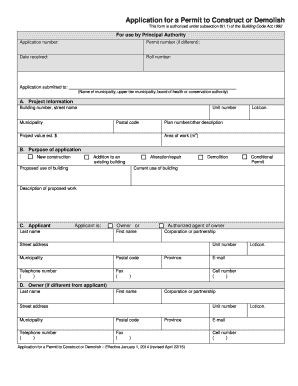
The Application for a Permit to Construct or Demolish is a government form used by residents and professionals in Ontario, Canada, to request permission for construction or demolition projects.
pdfFiller scores top ratings on review platforms




Who needs Construction Permit Application?
Explore how professionals across industries use pdfFiller.

Construction Permit Application is needed by:
-
Homeowners planning to build or demolish structures
-
Contractors executing construction or demolition work
-
Architects and designers overseeing project plans
-
Real estate developers managing construction projects
-
City officials processing construction permit applications
Comprehensive Guide to Construction Permit Application
What is the Application for a Permit to Construct or Demolish?
The Application for a Permit to Construct or Demolish is a critical document governed by the Building Code Act, 1992. This application is essential for any construction, demolition, or alteration projects in Ontario.
It serves a legal function, ensuring that projects comply with regulatory standards. Obtaining this permit is necessary for initiating work, as it plays a vital role in establishing the safety and legality of construction activities.
Purpose and Benefits of the Application for a Permit to Construct or Demolish
Securing a permit is crucial for adhering to legal and safety requirements. Compliance with these regulations protects properties and upholds public safety standards.
Some benefits of obtaining the permit include:
-
Ensuring safety during construction or demolition projects.
-
Protecting the property's value and integrity.
-
Maintaining community standards through compliance with building codes.
Failure to comply can lead to significant penalties and safety risks.
Who Needs to Complete the Application for a Permit to Construct or Demolish?
The application must be completed by designated roles: the Applicant and the Designer. Each role has specific qualifications outlined by Ontario law.
Signatures from both the Applicant and Designer are mandatory on the form, emphasizing the need for accountability and formal acknowledgment of the project details.
Required Documents and Supporting Materials for the Permit Application
To successfully submit the application, several documents must be included. These include project plans, design specifications, and any other relevant documentation.
Providing accurate information is crucial to avoid processing delays. Organizing all materials before submission can streamline the application process.
-
Detailed project plans.
-
Design specifications.
-
All necessary supporting documents as per guidelines.
How to Fill Out the Application for a Permit to Construct or Demolish Online (Step-by-Step)
To complete the application effectively using pdfFiller, follow these steps:
-
Access the online application form through pdfFiller.
-
Navigate through the fields, paying close attention to sections like ‘Application number’ and ‘Roll number’.
-
Fill out each section carefully, ensuring accuracy to prevent common errors.
These steps will help ensure a smooth application process.
Submission Methods and Important Deadlines
Understanding submission methods is essential for timely approval. Applications can typically be submitted online or in-person, depending on local regulations.
Be mindful of important deadlines for filing your application to avoid any disruptions:
-
Check submission deadlines specified by local authorities.
-
Know the expected processing time for permit approvals.
Consequences of Not Filing or Late Filing the Application
Failing to file or submitting the application late can result in severe penalties, including fines. Legal implications may arise if construction or demolition proceeds without the necessary permit.
Adhering to timelines is critical to avoid these potential repercussions and prevent unnecessary project delays.
Security and Compliance with the Application Process
Using pdfFiller for your application ensures a secure and compliant experience. The platform employs robust security measures to protect sensitive information.
All user data is handled confidentially, adhering to privacy regulations, which reassures applicants about the process's integrity.
Maximize Your Experience with pdfFiller for Your Application Needs
Utilizing pdfFiller can significantly enhance your application process. The platform simplifies form filling and submission, making it easy to manage and complete necessary paperwork.
Users enjoy benefits such as cloud accessibility and high levels of security, ensuring a seamless experience from start to finish.
How to fill out the Construction Permit Application
-
1.Access pdfFiller and search for the 'Application for a Permit to Construct or Demolish'. Click to open the form.
-
2.Familiarize yourself with the layout of the form. Use the panel on the left to navigate through different sections.
-
3.Before starting, gather the required information such as project details, applicant name, designer information, and any supporting documents needed.
-
4.Begin filling out the fields. Click on the first section where your information is required. Enter details accurately in each fillable field.
-
5.Utilize the checkboxes to indicate necessary options for your project. Ensure selections match your project specifications.
-
6.Complete all signature areas by clicking the signature field. If you need to sign, follow the prompts to create an electronic signature.
-
7.Attach any required schedules or plans by using the 'Attach File' feature. Ensure all necessary documents are included.
-
8.After filling out the form, review all entries for accuracy and completeness. Make sure all fields are filled and required documents are attached.
-
9.Once optimized for submission, save your work using the 'Save' option. You can also download it to your device if needed.
-
10.Finally, submit your completed form through pdfFiller by selecting the 'Submit' option. Follow the instructions provided to ensure proper submission.

Who is eligible to apply for this construction permit?
Homeowners, contractors, and professional designers are eligible to apply for the Construction Permit. Ensure you have the authority or representation to submit the application.
What documents are required when submitting this form?
You must provide project details, relevant designer information, and any required attachments such as schedules and project plans. Check local regulations for additional requirements.
How long does it take to process the construction permit application?
Processing times can vary based on project complexity and local regulations. Typically, it may take several weeks. Always check with your local municipality for estimated times.
Can I submit the form electronically?
Yes, you can submit the Application for a Permit to Construct or Demolish electronically via pdfFiller. Follow the submission prompts after filling out the form.
What are common mistakes to avoid when filling out this application?
Common mistakes include missing signatures, incomplete fields, and not attaching required documents. Review the form thoroughly before submission to prevent delays.
Are there fees associated with this permit application?
Yes, fees for construction permits typically vary by municipality and project type. Check with your local authority for specific fee details applicable to your application.
What should I do if my application is rejected?
If your application is rejected, carefully review the feedback provided. You may need to correct issues or provide additional information before resubmission.
Related Forms




Get the latest insights from our blog


If you believe that this page should be taken down, please follow our DMCA take down process
here
.
This form may include fields for payment information. Data entered in these fields is not covered by PCI DSS compliance.