
Last updated on
Oct 6, 2026

Get the free Prior Authorization Request Form
We are not affiliated with any brand or entity on this form

Fill out
Complete the form online in a simple drag-and-drop editor.

eSign
Add your legally binding signature or send the form for signing.

Share
Share the form via a link, letting anyone fill it out from any device.

Export
Download, print, email, or move the form to your cloud storage.
Why pdfFiller is the best tool for your documents and forms


End-to-end document management
From editing and signing to collaboration and tracking, pdfFiller has everything you need to get your documents done quickly and efficiently.
Accessible from anywhere
pdfFiller is fully cloud-based. This means you can edit, sign, and share documents from anywhere using your computer, smartphone, or tablet.
Secure and compliant
pdfFiller lets you securely manage documents following global laws like ESIGN, CCPA, and GDPR. It's also HIPAA and SOC 2 compliant.
What is Xolair PA Form
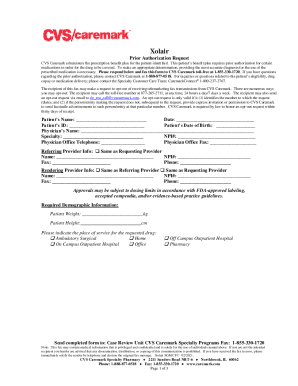
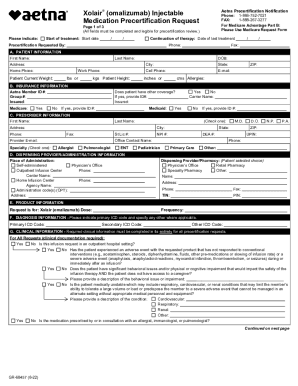
The Xolair Prior Authorization Request Form is a medical consent document used by prescribing physicians to request Medicaid coverage for Xolair medication.
pdfFiller scores top ratings on review platforms




Who needs Xolair PA Form?
Explore how professionals across industries use pdfFiller.

Xolair PA Form is needed by:
-
Prescribing physicians requiring authorization for Xolair
-
Healthcare providers assisting patients with medication requests
-
Pharmacists verifying insurance coverage for Xolair
-
Patients seeking Xolair treatment covered by Medicaid
-
Insurance companies processing prior authorization requests
Comprehensive Guide to Xolair PA Form
What is the Xolair Prior Authorization Request Form?
The Xolair Prior Authorization Request Form serves as a crucial document utilized by prescribing physicians to request Medicaid coverage for Xolair medication. Its primary purpose is to standardize the information required to facilitate coverage approval. This form is significant as it ensures that the requisite clinical details are provided to justify the need for Xolair therapy. Targeted towards prescribing physicians, the form helps streamline the process of obtaining necessary medication for patients.
Purpose and Benefits of the Xolair Prior Authorization Request Form
The Xolair Prior Authorization Request Form is essential for obtaining medication coverage, as many insurance plans and Medicaid require this documentation to process medication requests. Using this form leads to various benefits, including streamlined processing times and a higher likelihood of approval for the medication. However, incorrect completion of the form can result in delays or denials, making accuracy vital for success.
Who Needs the Xolair Prior Authorization Request Form?
This form is typically filled out by prescribing physicians, who play a central role in the medication approval process. Specific scenarios requiring the use of this form may include conditions like asthma or chronic idiopathic urticaria. Physicians must also verify patient eligibility criteria, ensuring that the patient meets the necessary requirements before submission of the form.
When and How to Submit the Xolair Prior Authorization Request Form
It is recommended to file the Xolair Prior Authorization Request Form before the patient begins treatment to avoid any delays in medication access. Submission methods may include faxing the form directly to Optum or other relevant entities. Physicians should be aware of essential deadlines related to submitting the form to ensure timely Medicaid coverage approval.
How to Fill Out the Xolair Prior Authorization Request Form Online
Completing the Xolair Prior Authorization Request Form online involves several key steps. This includes entering required fields, ensuring all pertinent information is provided. Special attention should be given to detailed sections that often cause confusion among users. By following best practices and tips for avoiding common mistakes, physicians can enhance the accuracy of their submissions.
Required Documents and Supporting Materials for Submission
Alongside the Xolair Prior Authorization Request Form, several essential documents must be submitted. Key clinical documentation is required to justify the request for Xolair, which may include medical history, treatment history, and prescription information. The completeness and accuracy of these supporting materials are critical for the approval process, as missing documents can lead to denials.
Reviewing and Validating the Xolair Prior Authorization Request Form
A thorough review process is vital to ensure that the completed form is accurate. Physicians should follow a checklist to validate details on the form, checking for common errors that could jeopardize the approval. It is crucial that the prescribing physician signs the form where required, as this signature verifies the authenticity of the submission.
What Happens After Submission of the Xolair Prior Authorization Request Form?
Once submitted, the request undergoes a typical processing phase with expected wait times varying by provider. Users can track the status of their authorization request to stay informed. Potential outcomes include approval or denial, and understanding the next steps post-decision is essential for patient care and treatment planning.
Security and Compliance for Handling the Xolair Prior Authorization Request Form
Handling sensitive patient information through the Xolair Prior Authorization Request Form requires strict adherence to security protocols. pdfFiller commits to ensuring compliance with HIPAA regulations, safeguarding all patient data. Best practices for documenting and archiving completed forms should be followed to maintain privacy and ensure data integrity.
Getting Started with pdfFiller to Complete the Xolair Prior Authorization Request Form
Prescribing physicians are encouraged to utilize pdfFiller for efficiently filling out and managing their medical forms. The platform offers features such as fillable fields and electronic signing, which assist in completing the form accurately. Utilizing pdfFiller makes the process easier and more secure, ensuring that sensitive healthcare documentation is handled appropriately.
How to fill out the Xolair PA Form
-
1.Access pdfFiller in your web browser and search for 'Xolair Prior Authorization Request Form.' Click to open the form.
-
2.Once the form opens, familiarize yourself with the layout, focusing on the fillable fields and checkboxes available.
-
3.Collect essential patient information such as their full name, date of birth, and Medicaid ID number before filling out the form.
-
4.Proceed to the designated fields, entering the patient's details accurately, ensuring that no sections are left blank.
-
5.Add prescriber information, including your name, title, and contact details, to maintain clarity in the request.
-
6.Document relevant clinical information that supports the need for Xolair treatment, referencing diagnosis codes if necessary.
-
7.Review all entered information carefully to ensure completeness and accuracy before finalizing the form.
-
8.Once satisfied with your input, navigate to the 'Save' option in pdfFiller to download or share the completed form.
-
9.Print the document if required, sign it in the designated area, and prepare it for submission.
-
10.Submit the signed form via fax to Optum, ensuring you retain a copy for your records.

Who is eligible to use the Xolair Prior Authorization Request Form?
The form is intended for use by prescribing physicians who need to obtain prior authorization from Medicaid for Xolair medication on behalf of their patients.
What supporting documents are required for submission?
You'll need to include clinical documentation that substantiates the necessity for Xolair treatment, along with the completed authorization request form.
How should I submit the completed prior authorization request?
The completed form must be signed and submitted via fax directly to Optum for processing as outlined in the form's instructions.
Are there any common mistakes I should avoid when filling out the form?
Ensure all fields are filled accurately, especially the patient and prescriber details. Missing information may delay processing.
What is the typical processing time for prior authorization requests?
Processing times can vary, but typically, you can expect a response within a few business days after submission of the request.
Are there any fees associated with submitting the Xolair prior authorization request?
There are generally no fees for submitting the prior authorization request form, but it can depend on specific insurance policies.
Is a notarized signature required for the Xolair Prior Authorization Request Form?
No, the Xolair Prior Authorization Request Form does not require notarization; a prescriber’s signature is sufficient.
Related Forms




Get the latest insights from our blog



If you believe that this page should be taken down, please follow our DMCA take down process
here
.
This form may include fields for payment information. Data entered in these fields is not covered by PCI DSS compliance.