
Last updated on
Oct 6, 2026

Get the free Employee Onboarding Checklist Form
We are not affiliated with any brand or entity on this form

Fill out
Complete the form online in a simple drag-and-drop editor.

eSign
Add your legally binding signature or send the form for signing.

Share
Share the form via a link, letting anyone fill it out from any device.

Export
Download, print, email, or move the form to your cloud storage.
Why pdfFiller is the best tool for your documents and forms


End-to-end document management
From editing and signing to collaboration and tracking, pdfFiller has everything you need to get your documents done quickly and efficiently.
Accessible from anywhere
pdfFiller is fully cloud-based. This means you can edit, sign, and share documents from anywhere using your computer, smartphone, or tablet.
Secure and compliant
pdfFiller lets you securely manage documents following global laws like ESIGN, CCPA, and GDPR. It's also HIPAA and SOC 2 compliant.
What is Onboarding Checklist
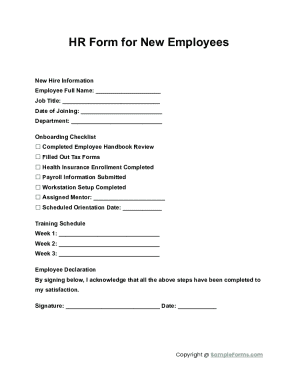
The Employee Onboarding Checklist Form is a New Hire Paperwork document used by HR departments to ensure a structured onboarding process for new employees.
pdfFiller scores top ratings on review platforms




Who needs Onboarding Checklist?
Explore how professionals across industries use pdfFiller.

Onboarding Checklist is needed by:
-
Human Resources departments responsible for new hire processes
-
Managers overseeing the onboarding of new team members
-
Employees completing onboarding requirements
-
Compliance teams ensuring legal document completion
-
IT departments managing access setups for new hires
Comprehensive Guide to Onboarding Checklist
What is the Employee Onboarding Checklist Form?
The Employee Onboarding Checklist Form is a critical tool designed to facilitate a structured onboarding process for new hires. This form ensures that all necessary paperwork, including legal documents and IT access, is completed efficiently. It typically requires signatures from three key parties: the employee, the HR representative, and the manager. This structured approach makes it particularly beneficial for new hires and HR departments alike, streamlining the onboarding experience and ensuring compliance.
Purpose and Benefits of the Employee Onboarding Checklist Form
The primary purpose of the Employee Onboarding Checklist Form is to enhance the onboarding experience by helping new employees navigate essential steps. Key benefits of the form include:
-
Tracking critical onboarding tasks such as completing legal documents.
-
Providing IT access and assigning training schedules.
-
Helping HR departments maintain a standardized onboarding process.
This form serves as an essential component of the HR onboarding process, ensuring that all steps are documented and met accordingly.
Key Features of the Employee Onboarding Checklist Form
This form comes equipped with several user-friendly and compliance-supporting features, such as:
-
Multiple fillable fields and clear instructions for each section.
-
Checkboxes that indicate which steps have been completed.
-
Space for signatures from the employee, HR representative, and manager.
Each signature validates the onboarding process, confirming that all necessary actions have been taken to support the new hire.
Who Needs the Employee Onboarding Checklist Form?
The primary users of the Employee Onboarding Checklist Form include HR staff, managers, and new hires. Each role plays a crucial part in the effective onboarding process, ensuring that:
-
HR staff maintains compliance with legal and company standards.
-
Managers facilitate a smooth transition for new employees.
-
New hires receive all necessary resources and support.
Example scenarios where this form is essential include onboarding sessions where multiple documents must be verified or legal steps requiring signatures from various parties.
How to Fill Out the Employee Onboarding Checklist Form Online (Step-by-Step)
Filling out the Employee Onboarding Checklist Form online using pdfFiller is straightforward. Follow these steps to complete key fields accurately:
-
Access the form through the pdfFiller platform.
-
Fill in your full name and contact details in the designated fields.
-
Review each instruction carefully and check the appropriate boxes.
-
Ensure that all information is accurate before submission.
Tips for verifying information include double-checking spelling and ensuring that all required sections are complete for compliance.
Common Errors and How to Avoid Them
While filling out the Employee Onboarding Checklist Form, some frequent errors can occur. Common mistakes include:
-
Leaving fields incomplete or blank.
-
Inaccurate spelling of names or contact information.
-
Failing to gather all required signatures.
To ensure accurate completion, review the form carefully before submission and follow best practices such as checking each section against the checklist.
How to Sign the Employee Onboarding Checklist Form
Understanding the signing requirements is crucial for the Employee Onboarding Checklist Form. You can use either digital signatures or wet signatures. Here are the steps to eSign the document through pdfFiller:
-
Open the completed form in pdfFiller.
-
Select the eSign option and follow the prompts to add your signature.
-
Ensure that all parties have signed where necessary for validation.
Signature verification is an important step in the onboarding process as it confirms that all steps have been completed appropriately.
Security and Compliance for the Employee Onboarding Checklist Form
When handling sensitive onboarding documents, security measures are essential. The Employee Onboarding Checklist Form incorporates:
-
256-bit encryption to protect your data.
-
Compliance with HIPAA and GDPR to safeguard personal information.
Compliance standards ensure that all onboarding documentation meets legal requirements, providing peace of mind for both the employee and the employer.
How to Download and Save the Employee Onboarding Checklist Form PDF
To securely download the completed Employee Onboarding Checklist Form, follow these guidelines:
-
Final review the filled form in pdfFiller.
-
Select the option to download the PDF to your device.
-
Save the document in a secure location for future reference.
Keeping records of all onboarding materials is crucial for both compliance and historical tracking.
Get Started with the Employee Onboarding Checklist Form Today!
Utilize pdfFiller to simplify your onboarding needs. This platform offers the convenience and security of filling out and managing forms online, enhancing the experience for both HR teams and new hires alike.
How to fill out the Onboarding Checklist
-
1.To begin, visit pdfFiller and access your Employee Onboarding Checklist Form by searching for its title in the search bar.
-
2.Once the document is open, familiarize yourself with the layout. Utilize the zoom feature for better visibility of all sections.
-
3.Gather all necessary information such as the new employee's full name, contact details, and the dates for training sessions before filling out the form.
-
4.Begin by filling in the 'Full Name' field with the new employee's first and last name. Ensure this is done accurately and clearly.
-
5.Move on to the signature sections, where the employee, HR representative, and manager must sign to confirm completion of onboarding tasks.
-
6.For checkboxes indicating completed steps, click on the corresponding boxes as each task is finished, such as 'All Documents Verified'.
-
7.Once all fields and checkboxes are filled, review the entire form to confirm that all required information is complete and accurate.
-
8.After reviewing, utilize the options to save your progress. Choose to download the completed form to your device or submit it electronically if that option is available.
-
9.If submitting electronically, follow the prompts to enter the recipient's email, ensuring it goes to the appropriate HR or management email.
-
10.Finally, keep a copy of the completed form for your records, as it may be needed for future reference or audits.

Who is eligible to use the Employee Onboarding Checklist Form?
The form is intended for use by HR departments, managers, and new employees involved in the onboarding process of a new hire.
What is the deadline for submitting the completed onboarding form?
It is best to complete the Employee Onboarding Checklist Form before the new hire's start date to ensure all preparations are in place. Check with your HR department for specific timelines.
How do I submit the completed form?
You can submit the completed form either by downloading it as a PDF and emailing it to your HR department or using pdfFiller's submission tools directly if available.
What supporting documents may be required with this form?
Typically, additional documents like identification, tax forms, and employee agreements might be required along with the Employee Onboarding Checklist Form.
What common mistakes should be avoided when filling out this form?
Common mistakes include missing signatures, incorrect names, and forgetting to check completed items. Double-check all entries for accuracy to avoid delays.
How long does processing take after submitting the form?
Processing times can vary, generally taking a few days to a week. Follow up with your HR department for their specific processing timelines.
Is notarization required for this form?
The Employee Onboarding Checklist Form does not require notarization, but it does require signatures from involved parties.
Related Forms





Get the latest insights from our blog


If you believe that this page should be taken down, please follow our DMCA take down process
here
.
This form may include fields for payment information. Data entered in these fields is not covered by PCI DSS compliance.