
Last updated on
Oct 19, 2026

Get the free Undergraduate Application for Graduation
We are not affiliated with any brand or entity on this form

Fill out
Complete the form online in a simple drag-and-drop editor.

eSign
Add your legally binding signature or send the form for signing.

Share
Share the form via a link, letting anyone fill it out from any device.

Export
Download, print, email, or move the form to your cloud storage.
Why pdfFiller is the best tool for your documents and forms


End-to-end document management
From editing and signing to collaboration and tracking, pdfFiller has everything you need to get your documents done quickly and efficiently.
Accessible from anywhere
pdfFiller is fully cloud-based. This means you can edit, sign, and share documents from anywhere using your computer, smartphone, or tablet.
Secure and compliant
pdfFiller lets you securely manage documents following global laws like ESIGN, CCPA, and GDPR. It's also HIPAA and SOC 2 compliant.
What is Graduation Application
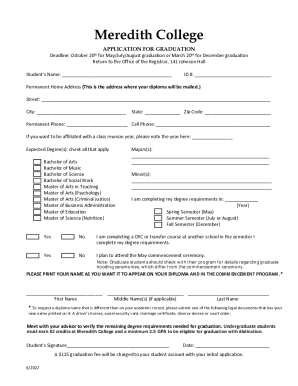
The Undergraduate Application for Graduation is a form used by students at Madonna University to officially apply for graduation.
pdfFiller scores top ratings on review platforms




Who needs Graduation Application?
Explore how professionals across industries use pdfFiller.

Graduation Application is needed by:
-
Current students seeking graduation eligibility
-
Academic advisors assisting with graduation applications
-
Registrar's office staff processing graduation requests
-
Administrative personnel overseeing graduation requirements
-
Parents or guardians supporting students through the application process
Comprehensive Guide to Graduation Application
Understanding the Undergraduate Application for Graduation
The Undergraduate Application for Graduation serves as a critical tool for students at Madonna University as they prepare for the transition from academia to graduation. This form is essential for indicating a student's intent to graduate and is required by both students and their academic advisors.
Students must fill out this application to receive formal recognition of their degree completion. Advisors play a supportive role in verifying that students meet graduation requirements, as their approval is necessary for the application to be valid.
Why You Need the Undergraduate Application for Graduation
Timely submission of the Undergraduate Application for Graduation is vital as it ensures students secure their eligibility to graduate. By applying correctly, students can avoid potential pitfalls that could delay their graduation.
Not filing the application by the deadline can lead to significant consequences, including ineligibility for graduation in the intended term. Understanding the intricacies of this college graduation form can help prevent these issues.
Eligibility and Who Should File the Undergraduate Application for Graduation
At Madonna University, specific criteria must be met for students to be eligible to file the Undergraduate Application for Graduation. Typically, students nearing the completion of their degree or major are the ones who should complete this application.
Additionally, academic advisors have a crucial role in this process, helping students navigate their academic paths and ensuring that all graduation requirements are addressed in their applications.
How to Fill Out the Undergraduate Application for Graduation
Filling out the Undergraduate Application for Graduation requires careful attention to detail. Here is a straightforward guide to assist you:
-
Begin by accessing the application form online.
-
Provide all necessary personal information, including your name and contact details.
-
Select your major and degree type you are graduating with.
-
Indicate your expected graduation date.
-
Ensure that both you and your advisor sign the application.
Emphasizing the significance of completing fillable fields accurately will streamline the process for students using the graduation application form pdf.
Required Documents and Supporting Materials
To support the Undergraduate Application for Graduation, several essential documents must be included. These typically involve the advisor’s signature and a detailed academic plan or graduation audit.
Providing complete and accurate documentation is crucial, as it ensures that the graduate review process is executed smoothly without unnecessary delays.
Submission Process for the Undergraduate Application for Graduation
Once the Undergraduate Application for Graduation is filled out, it must be submitted correctly to the Registrar's Office. The following methods are available for submission:
-
Online submission through the university’s portal.
-
In-person delivery at the Registrar's Office during business hours.
Students should be mindful of the submission deadlines and processing times to avoid any potential complications or delays in the graduation process.
Fees and Payment Methods for the Graduation Application
There are specific fees associated with the Undergraduate Application for Graduation that all applicants should be aware of. These typically include a graduation fee that students will need to remit upon applying.
Payment methods that are commonly accepted include credit cards, checks, or possible payment plans. Students should also explore options for fee waivers or financial assistance if they meet certain eligibility criteria.
After You Submit: What to Expect
After submitting the Undergraduate Application for Graduation, students can expect a confirmation and sometimes a tracking option for their application’s status. It is advisable to be proactive in monitoring any communications from the Registrar’s Office.
In case of rejection or required revisions, understanding common reasons for these outcomes can be beneficial for students trying to navigate the graduation application process successfully.
How pdfFiller Can Help with Your Application for Graduation
Utilizing pdfFiller can greatly enhance the experience of completing the Undergraduate Application for Graduation. The platform offers advanced capabilities such as eSigning, ensuring that documents remain secure and compliant.
pdfFiller simplifies the process of filling out and submitting forms online, providing users with confidence that their sensitive documentation is handled securely throughout the process.
Final Steps and Next Actions for Graduation
Students are encouraged to stay proactive after submitting their applications. Ensuring that all forms are both accurately filled out and submitted on time is essential for a smooth graduation process.
With tools like pdfFiller, students can enjoy a hassle-free experience in managing their graduation paperwork effectively.
How to fill out the Graduation Application
-
1.Access pdfFiller and search for 'Undergraduate Application for Graduation' to begin.
-
2.Open the form by selecting the document link. Ensure you have a stable internet connection.
-
3.Gather necessary information including your personal details, degree program, and expected graduation date before filling out the form.
-
4.Utilize pdfFiller’s fillable fields to enter your information. Make sure to complete every required field marked appropriately.
-
5.After filling out your personal information, fill in the details regarding your major and review your responses for accuracy.
-
6.Both you and your advisor will need to sign the form. Use pdfFiller’s signature feature to add signatures digitally or print it for manual signing.
-
7.Once the form is completed, carefully review all filled information against the instructions provided to ensure accuracy.
-
8.Save your progress frequently using the save option on pdfFiller to prevent any loss of information.
-
9.When finished, download the completed form in your preferred format or directly submit it to the Registrar’s Office through pdfFiller if this option is available.
-
10.Finally, ensure to check the submission deadline and any associated fees required with your graduation application.

Who is eligible to apply using the Undergraduate Application for Graduation?
Eligible applicants include current undergraduate students at Madonna University who are nearing completion of their degree requirements. Ensure you meet your program’s specific criteria before applying.
What is the deadline for submitting the graduation application?
Graduation applications must be submitted to the Registrar's Office by a specified deadline, which varies by semester. Check the academic calendar for exact dates to ensure timely submission.
How do I submit the completed graduation application form?
You can submit the completed graduation application form by delivering it directly to the Registrar's Office in person or submitting it via email as directed by the university guidelines.
What supporting documents are required with the graduation application?
You must include a signed copy of your plan of study or graduation audit along with the completed application form. Verify if additional documents are needed based on your major.
What are common mistakes to avoid when filling out the application?
Common mistakes include leaving required fields blank, incorrect personal information, and failing to secure the necessary signatures from both student and advisor. Double-check your entries before submission.
How long does it take to process the graduation application?
Processing times for graduation applications can vary. Typically, it takes several weeks after submission to review and confirm eligibility. It is advisable to follow up with the Registrar's Office.
Are there any fees associated with filing the graduation application?
Yes, there is often a graduation fee that must be paid when submitting your application. Ensure to check with the Registrar's Office for the exact amount and payment methods.
Related Forms




Get the latest insights from our blog


If you believe that this page should be taken down, please follow our DMCA take down process
here
.
This form may include fields for payment information. Data entered in these fields is not covered by PCI DSS compliance.