
Last updated on
Oct 8, 2026

Get the free CRH Medical Order Form
We are not affiliated with any brand or entity on this form

Fill out
Complete the form online in a simple drag-and-drop editor.

eSign
Add your legally binding signature or send the form for signing.

Share
Share the form via a link, letting anyone fill it out from any device.

Export
Download, print, email, or move the form to your cloud storage.
Why pdfFiller is the best tool for your documents and forms


End-to-end document management
From editing and signing to collaboration and tracking, pdfFiller has everything you need to get your documents done quickly and efficiently.
Accessible from anywhere
pdfFiller is fully cloud-based. This means you can edit, sign, and share documents from anywhere using your computer, smartphone, or tablet.
Secure and compliant
pdfFiller lets you securely manage documents following global laws like ESIGN, CCPA, and GDPR. It's also HIPAA and SOC 2 compliant.
What is CRH Order Form
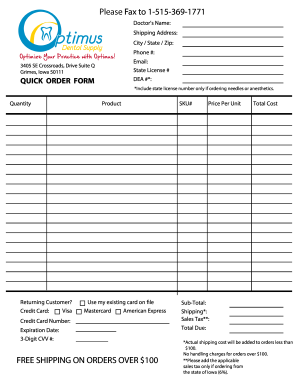
The CRH Medical Order Form is a purchase order template used by customers to order medical products from CRH Medical Corporation.
pdfFiller scores top ratings on review platforms




Who needs CRH Order Form?
Explore how professionals across industries use pdfFiller.

CRH Order Form is needed by:
-
Healthcare providers needing medical supplies.
-
Medical facilities to manage procurement.
-
Businesses requiring medical equipment.
-
Pharmacies ordering medical products.
-
Clinics updating their inventory.
-
Purchasing agents in the healthcare sector.
Comprehensive Guide to CRH Order Form
What is the CRH Medical Order Form?
The CRH Medical Order Form serves as a vital tool for customers to order medical products from CRH Medical Corporation. Through this user-friendly form, customers can streamline their ordering processes, ensuring they can access essential medical supplies efficiently. The CRH Medical Order Form contributes significantly to improving operational efficiency and accuracy for various healthcare-related needs.
Purpose and Benefits of the CRH Medical Order Form
This medical supply order form is designed to simplify the ordering process for users, making it easier to obtain necessary medical products. By leveraging the form, users can ensure that orders are accurately documented, reducing the likelihood of errors during the ordering process. This efficiency can lead to quicker fulfillment of medical supply needs for healthcare providers and institutions.
Key Features of the CRH Medical Order Form
-
Fillable fields for essential information including company name and physician's name.
-
Order contact information to facilitate streamlined communication.
-
Sections to include shipping and billing addresses for accurate delivery.
-
Payment information fields to ensure secure transactions.
-
Terms and conditions to clarify the ordering process.
-
Signature line to validate orders and confirm accuracy.
Who Needs the CRH Medical Order Form?
The target audience for the CRH Medical Order Form primarily includes healthcare providers, medical institutions, and administrative staff tasked with procurement. Specific roles that utilize the form may include physicians, nurses, and purchasing managers who require a structured method to place orders for medical equipment efficiently.
How to Fill Out the CRH Medical Order Form Online (Step-by-Step)
-
Access the CRH Medical Order Form on the designated platform.
-
Complete the fillable fields with accurate details such as company name and order contact information.
-
Provide shipping and billing addresses to ensure proper delivery of products.
-
Input payment information to facilitate transaction processing.
-
Review all entries for accuracy and completeness before submission.
-
Sign the form electronically to validate the order.
Common Errors and How to Avoid Them
-
Leaving essential fields blank, which can delay order processing.
-
Providing incorrect shipping addresses leading to delivery issues.
-
Not reviewing terms and conditions, possibly causing misunderstandings.
-
Errors in payment information that could prevent order fulfillment.
To avoid these common pitfalls, users should double-check all entries, ensure they fill out each required field, and confirm their payment details are current and accurate.
Submission Methods and Delivery of the CRH Medical Order Form
There are several submission methods for the completed CRH Medical Order Form, including online uploads directly via the company portal and fax submissions to designated numbers. Upon submission, users can expect various delivery options based on their selected shipping methods, ensuring that ordered products arrive promptly at the specified location.
Security and Compliance for the CRH Medical Order Form
Security measures for the CRH Medical Order Form are critical, as they protect sensitive information submitted by users. The form adheres to regulations like HIPAA and GDPR, ensuring that all data is handled with the utmost care and compliance. Measures such as 256-bit encryption and rigorous data protection protocols help maintain user privacy while using the form.
How pdfFiller Can Help You with the CRH Medical Order Form
pdfFiller provides a comprehensive solution for users needing to fill out, sign, and manage the CRH Medical Order Form efficiently. With key features such as cloud editing, eSigning, and secure storage, users can benefit from a streamlined experience that enhances their document management capabilities. The platform allows for convenient access to forms while ensuring compliance and security.
Get Started with the CRH Medical Order Form Today
By using pdfFiller, users can complete their medical orders easily and effectively. The platform simplifies the process of managing various forms, enhancing overall efficiency and organization for document handling needs.
How to fill out the CRH Order Form
-
1.Access the CRH Medical Order Form by visiting pdfFiller's website and searching for the form name in their template library.
-
2.Once located, open the form to view the interface where you will be filling out the details.
-
3.Gather all necessary information beforehand such as company name, physician's name, and the products needed to streamline the process.
-
4.Begin filling in the fields by clicking on the respective areas for 'COMPANY NAME', 'Physician's Name', and 'Order Contact Name'.
-
5.Provide your shipping and billing addresses in the designated fields. Ensure accuracy to avoid delays.
-
6.Enter detailed descriptions of the products you wish to order along with any quantity specifications.
-
7.Review the payment information section carefully, filling out any required financial details.
-
8.Make sure to read the terms and conditions presented within the form to fully understand your responsibilities.
-
9.Sign the form electronically by clicking on the 'Signature' line, and follow the prompts to complete that action.
-
10.After you have filled out all necessary fields, review the entire form for errors or missing information.
-
11.Once confirmed, you can save your work by clicking the appropriate button, allowing you to return later if needed.
-
12.To submit, click the submit button to send your order directly to CRH Medical Corporation or download a copy for your records.

Who is eligible to use the CRH Medical Order Form?
Any registered customer or business entity that wishes to order medical products from CRH Medical Corporation can use the CRH Medical Order Form.
What information is required to complete the form?
You will need to provide your company name, physician's name, contact information, shipping and billing addresses, product descriptions, and payment information.
How should I submit the completed form?
The completed CRH Medical Order Form can be submitted directly through pdfFiller's submission portal or downloaded for electronic submission via email or fax.
Are there any common mistakes to avoid when filling out this form?
Common mistakes include misspelling names, incorrect product descriptions, and failing to include all necessary contact information. Always double-check your entries.
What are the payment options available on the form?
Payment information can vary, but typically, the form will require details for credit card payment or other accepted payment methods as specified by CRH Medical Corporation.
What is the processing time after submission?
Processing times may vary based on order volume and product availability. Typically, confirmations are sent within a few business days.
Is notarization required for this form?
No, notarization is not required for the CRH Medical Order Form; it requires only a signature from the buyer.
Related Forms



Get the latest insights from our blog


If you believe that this page should be taken down, please follow our DMCA take down process
here
.
This form may include fields for payment information. Data entered in these fields is not covered by PCI DSS compliance.