

Get the free Marine Corps User Agreement and Consent Form
We are not affiliated with any brand or entity on this form

Fill out
Complete the form online in a simple drag-and-drop editor.

eSign
Add your legally binding signature or send the form for signing.

Share
Share the form via a link, letting anyone fill it out from any device.

Export
Download, print, email, or move the form to your cloud storage.
Why pdfFiller is the best tool for your documents and forms


End-to-end document management
From editing and signing to collaboration and tracking, pdfFiller has everything you need to get your documents done quickly and efficiently.
Accessible from anywhere
pdfFiller is fully cloud-based. This means you can edit, sign, and share documents from anywhere using your computer, smartphone, or tablet.
Secure and compliant
pdfFiller lets you securely manage documents following global laws like ESIGN, CCPA, and GDPR. It's also HIPAA and SOC 2 compliant.
What is Marine Corps Consent Form
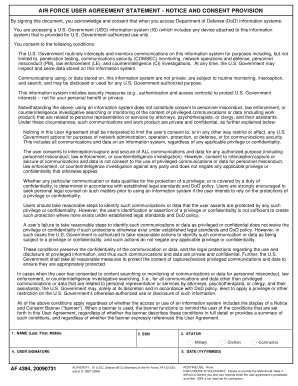
The Marine Corps User Agreement and Consent Form is a user agreement document used by the U.S. Marine Corps to outline the rules of behavior and consent for Department of Defense information systems.
pdfFiller scores top ratings on review platforms




Who needs Marine Corps Consent Form?
Explore how professionals across industries use pdfFiller.

Marine Corps Consent Form is needed by:
-
Members of the U.S. Marine Corps
-
Department of Defense employees
-
Military contractors accessing DoD systems
-
Personnel operating Marine Corps IT infrastructure
-
Users requiring access to military information systems
How to fill out the Marine Corps Consent Form
-
1.To begin, access pdfFiller and use the search bar to locate the Marine Corps User Agreement and Consent Form. Click on the form to open it in the editing interface.
-
2.Before starting, gather necessary information including your user name and any personal identification that may be required.
-
3.Once the form is open, navigate through the fillable fields. Click on 'User Name' and type your name into the field provided.
-
4.Next, move to the 'User Signature' section. Use the digital signature tool on pdfFiller to sign your name or type it if necessary. Ensure it matches your official identification.
-
5.Proceed to fill in the 'Date' field with the current date. You can use the date picker tool or type it manually.
-
6.After completing all required fields, review your entries carefully to ensure accuracy. Check for misspellings and ensure that all information aligns with your identification.
-
7.Once you are satisfied with the form, click on 'Save' to keep a copy. You may also choose to download the form as a PDF or submit it directly through the provided submission options on pdfFiller.

Who is eligible to fill out the Marine Corps User Agreement?
Eligibility to fill out the Marine Corps User Agreement is primarily for U.S. Marine Corps personnel, Department of Defense employees, and contractors accessing DoD systems.
Are there any deadlines for submitting this form?
While the specific deadline for submission may depend on your unit or the context of use, it is advisable to complete and submit the Marine Corps User Agreement promptly to avoid access issues.
What submission methods are acceptable for this form?
The Marine Corps User Agreement can be submitted electronically through pdfFiller, or you may also have options to print and submit it in-person or by mail, depending on your unit’s guidelines.
What supporting documents do I need to submit along with the form?
Typically, you do not need to submit supporting documents with the Marine Corps User Agreement. However, ensure you have proper ID ready in case of verification during the signing process.
What common mistakes should I avoid when filling out the form?
Common mistakes include leaving fields blank, signing before filling out all required information, and providing incorrect personal information. Always double-check your entries.
How long does it take to process this agreement once submitted?
Processing times for the Marine Corps User Agreement can vary, but typically it may take a few days to a week for acknowledgment of receipt and approval based on internal processes.
Can I revise the form after submission?
Once the Marine Corps User Agreement has been submitted, revisions may not be possible until you receive feedback. If updates are needed, contact your administrative office for guidance.
Related Forms



Get the latest insights from our blog


If you believe that this page should be taken down, please follow our DMCA take down process
here
.
This form may include fields for payment information. Data entered in these fields is not covered by PCI DSS compliance.