
Last updated on
Oct 8, 2026

Get the free Authorization for Disclosure of Protected Health Information (PHI)
We are not affiliated with any brand or entity on this form

Fill out
Complete the form online in a simple drag-and-drop editor.

eSign
Add your legally binding signature or send the form for signing.

Share
Share the form via a link, letting anyone fill it out from any device.

Export
Download, print, email, or move the form to your cloud storage.
Why pdfFiller is the best tool for your documents and forms


End-to-end document management
From editing and signing to collaboration and tracking, pdfFiller has everything you need to get your documents done quickly and efficiently.
Accessible from anywhere
pdfFiller is fully cloud-based. This means you can edit, sign, and share documents from anywhere using your computer, smartphone, or tablet.
Secure and compliant
pdfFiller lets you securely manage documents following global laws like ESIGN, CCPA, and GDPR. It's also HIPAA and SOC 2 compliant.
What is PHI Disclosure Authorization
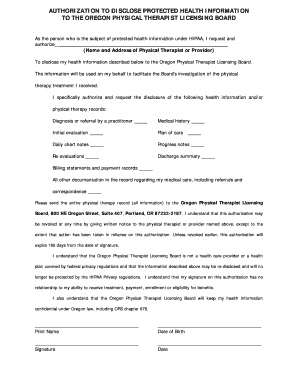
The Authorization for Disclosure of Protected Health Information (PHI) is a medical records release form used by CareOregon members to grant consent for the use and disclosure of their protected health information.
pdfFiller scores top ratings on review platforms




Who needs PHI Disclosure Authorization?
Explore how professionals across industries use pdfFiller.

PHI Disclosure Authorization is needed by:
-
CareOregon members needing to release personal health information
-
Healthcare providers requiring access to patient PHI
-
Organizations involved in medical records management
-
Family members of patients requiring access to PHI
-
Legal representatives of patients managing health information
Comprehensive Guide to PHI Disclosure Authorization
Understanding the Authorization for Disclosure of Protected Health Information (PHI)
The Authorization for Disclosure of Protected Health Information (PHI) is a critical form in the healthcare sector. It allows individuals to manage their health records effectively by authorizing the release of sensitive information. Protected Health Information (PHI) represents any data that, alone or combined with other information, can identify an individual and their health history. Understanding the importance of authorizing this disclosure is essential for personal health management. CareOregon plays a vital role in facilitating this process, ensuring members can access their medical information securely.
Purpose and Benefits of Using the PHI Disclosure Form
The PHI disclosure form serves several significant purposes in the healthcare landscape. By utilizing this form, members can easily facilitate the sharing of medical records with various healthcare providers. It is paramount that member consent is obtained prior to any disclosure of PHI, safeguarding personal health information. This authorization not only streamlines communication among healthcare professionals but also enhances the quality of care provided to patients.
-
Facilitates sharing of medical records with healthcare providers
-
Ensures member consent is obtained before PHI is shared
-
Highlights benefits for patients in terms of better care
Key Features of the Authorization for Disclosure of PHI
The Authorization for Disclosure of PHI includes essential elements that must be accurately completed. Key identification fields include the member's name and date of birth, ensuring accurate identification. The form also provides checkboxes for specifying what type of PHI will be disclosed, allowing for tailored authorization. A vital feature of this form is the specification about the duration of authorization and the clear instructions regarding how members can revoke it if necessary.
-
Identification fields: member’s name, date of birth
-
Checkboxes for types of PHI to be disclosed
-
Duration of authorization and instructions for revoking it
Who Needs the Authorization for Disclosure of PHI?
This form is essential for multiple stakeholders within the CareOregon community. Members requiring access to their medical information need to fill out the authorization to ensure compliance with regulations. Family members or authorized representatives may also use this form to manage health information effectively. Additionally, healthcare providers must obtain patient consent to access these records, underscoring the form's importance across different users.
How to Fill Out the Authorization for Disclosure of PHI Online
Filling out the Authorization for Disclosure of PHI online has been made simple and user-friendly. Users should carefully follow step-by-step instructions for completing each field of the form accurately. This includes ensuring that all personal information entered is precise and complete to avoid common mistakes. Utilizing platforms like pdfFiller greatly simplifies the process of filling out these forms electronically.
-
Visit the pdfFiller platform to access the PHI form.
-
Enter the identification information as prompted.
-
Select the types of PHI to be disclosed using the checkboxes.
Submission Methods for the Authorization for Disclosure of PHI
Once the Authorization for Disclosure of PHI is completed, users have various submission methods available. Digital submission options through pdfFiller offer a quick and efficient way to send the form. For those who prefer traditional methods, mailing instructions are also provided. It is advisable to track the submission status to ensure the documents are received and processed without issues.
-
Digital submission options via pdfFiller
-
Traditional mailing instructions if required
-
Tips for tracking the submission status
Security and Compliance When Handling PHI
When dealing with the authorization process, security remains a top priority. pdfFiller implements robust document management security measures to protect PHI. It is crucial that all processes comply with HIPAA guidelines to ensure that personal health information is handled with the utmost care and confidentiality. This level of security is vital in safeguarding sensitive medical information against unauthorized access.
After Submission: What Happens Next?
After submitting the Authorization for Disclosure of PHI, members should be aware of what comes next. The process typically includes a confirmation of either acceptance or rejection of the authorization request. Members can expect certain timeframes for processing the authorization, followed by notification about the status. Should there be any errors after submission, there are specific procedures in place for correction.
-
Confirmation of acceptance or rejection of the authorization
-
Timeframes for processing and patient notification
-
Procedures for correcting any errors post-submission
Streamlined Your Authorization Process with pdfFiller
Using pdfFiller enhances the overall experience of filling out and submitting the Authorization for Disclosure of PHI form. The platform's ease of use, including features like eSigning and secure sharing, adds to its appeal. Additionally, the convenience of a paperless environment allows for efficient management of sensitive documents without compromising security.
How to fill out the PHI Disclosure Authorization
-
1.Access the Authorization for Disclosure of Protected Health Information (PHI) form by navigating to pdfFiller's website or directly searching for the form in their search bar.
-
2.Open the form and review the introduction to understand its purpose and required fields. Ensure you have your CareOregon membership information handy.
-
3.Locate the fields where personal information like your name and date of birth needs to be filled in. Click on the designated areas to enter your details using the keyboard.
-
4.Identify the section that lists individuals or organizations to whom your PHI will be disclosed. Enter the specific names and contact information for each entity.
-
5.Utilize the checkboxes provided in the form to specify the types of PHI you are consenting to disclose. Make sure your selections reflect your true intentions.
-
6.Indicate the duration for which the authorization will be valid. Clear details can help avoid any confusion about the authorizing period.
-
7.After filling in all relevant fields, carefully review the entire form for accuracy. Double-check that all required information is provided and correctly entered.
-
8.If revisions are necessary, use the tools available on pdfFiller to make changes easily. Ensure the final version accurately reflects your information and consent.
-
9.Once you are satisfied with your entries, look for the options to save or submit the form. You can choose to download it as a PDF or directly submit it through pdfFiller.
-
10.If submitting directly, follow any instructions for submission specific to CareOregon to ensure your request is processed smoothly.

Who is eligible to use the Authorization for Disclosure of PHI form?
Any member of CareOregon is eligible to use the Authorization for Disclosure of Protected Health Information form to authorize the release of their PHI.
What information is required to complete this form?
You will need to provide personal details like your name and date of birth, contact information of individuals or organizations receiving your PHI, and the specific types of health information you wish to disclose.
How do I submit the completed PHI authorization form?
After completing the form on pdfFiller, you can submit it directly through the platform, or download it and send it via email or postal service to the appropriate CareOregon office if necessary.
Are there any common mistakes to avoid while filling out the form?
Ensure that all required fields are filled out completely and accurately. Common mistakes include forgetting to sign the form, incorrect dates, and failing to specify the type or duration of the authorized disclosure.
How long is the Authorization for Disclosure valid?
The authorization is typically valid for the duration specified on the form by the member. Always check your entries to ensure the intended time frame is correctly noted.
Is notarization required for this form?
No, notarization is not required for the Authorization for Disclosure of Protected Health Information form. However, it must be signed by the member to be valid.
Related Forms





Get the latest insights from our blog


If you believe that this page should be taken down, please follow our DMCA take down process
here
.
This form may include fields for payment information. Data entered in these fields is not covered by PCI DSS compliance.