
Last updated on
Oct 8, 2026

Get the free Tennessee Employment Verification Form
We are not affiliated with any brand or entity on this form

Fill out
Complete the form online in a simple drag-and-drop editor.

eSign
Add your legally binding signature or send the form for signing.

Share
Share the form via a link, letting anyone fill it out from any device.

Export
Download, print, email, or move the form to your cloud storage.
Why pdfFiller is the best tool for your documents and forms


End-to-end document management
From editing and signing to collaboration and tracking, pdfFiller has everything you need to get your documents done quickly and efficiently.
Accessible from anywhere
pdfFiller is fully cloud-based. This means you can edit, sign, and share documents from anywhere using your computer, smartphone, or tablet.
Secure and compliant
pdfFiller lets you securely manage documents following global laws like ESIGN, CCPA, and GDPR. It's also HIPAA and SOC 2 compliant.
What is TN Employment Form
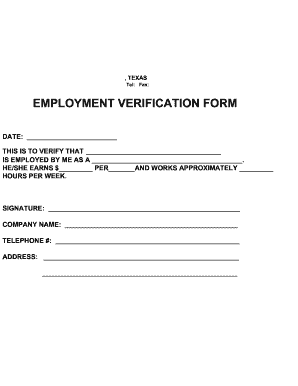
The Tennessee Employment Verification Form is a verification document used by employers or representatives to confirm a youth's employment or status in an employment readiness training program.
pdfFiller scores top ratings on review platforms




Who needs TN Employment Form?
Explore how professionals across industries use pdfFiller.

TN Employment Form is needed by:
-
Adoptive parents seeking to verify employment for youth
-
Permanent guardians ensuring youth job placement
-
Subsidy specialists needing employment confirmation
-
Employers hiring youth in transitional programs
-
Youth participating in employment readiness training
Comprehensive Guide to TN Employment Form
What is the Tennessee Employment Verification Form?
The Tennessee Employment Verification Form is a critical document used to confirm a youth's employment status or enrollment in an employment readiness training program. This form is significant for various stakeholders, including employers, guardians, and subsidy specialists who rely on accurate verification for financial assistance and training programs.
This form serves the dual purpose of ensuring that youth are prepared for employment opportunities while also protecting the interests of adoptive parents and guardians. By providing clear verification, the form is instrumental in facilitating employment and training for young individuals.
Purpose and Importance of the Tennessee Employment Verification Form
The Tennessee Employment Verification Form holds immense importance for different user groups. For adoptive parents and guardians, it serves as a reliable tool to confirm youth employment, thereby assuring their eligibility for various programs.
Subsidy specialists also find this form crucial in the approval process for financial assistance, ensuring that youth can access necessary resources for their employment readiness. Ultimately, this verification form plays a significant role in promoting youth readiness for job opportunities and fostering responsible employment practices.
Who Needs the Tennessee Employment Verification Form?
This form is primarily designed for a diverse audience, including adoptive parents, guardians, employers, and apprenticeship programs. Situations where the form is typically required include applying for financial subsidies and confirming the eligibility of youth for employment verification.
A youth seeking employment or training often needs this document to demonstrate their active participation in programs. As such, understanding the need and target audience of this form is essential for ensuring it is completed correctly.
How to Fill Out the Tennessee Employment Verification Form Online
To fill out the Tennessee Employment Verification Form online, users should first gather required information, including the youth’s name, address, and employer details. Following this, the process for completing the form via pdfFiller can be outlined in several steps:
-
Access the form on the pdfFiller platform.
-
Enter the youth’s details accurately in the designated fields.
-
Provide employer information as needed.
-
Review the filled form for accuracy before submission.
Avoid common pitfalls such as incomplete information and incorrect signatures to ensure a smooth submission process.
Required Documents and Information to Gather
Before completing the Tennessee Employment Verification Form, users need to assemble several key documents. These generally include proof of employment, identification for the youth, and any relevant documentation that verifies their participation in training programs.
It’s advisable to create a checklist of necessary information to facilitate the form-filling process. This checklist may consist of:
-
Youth’s employment status.
-
Details regarding mentors or training supervisors.
-
Proof of enrollment in any employment readiness training programs.
Accurate and complete information contributes significantly to the verification process.
How to Sign the Tennessee Employment Verification Form
The signature requirement for the Tennessee Employment Verification Form is essential, necessitating a signature from either an employer or their representative. Users must understand the differences between digital signatures and wet signatures in the context of this form.
When filling out the form, make sure to locate the designated area for signatures clearly to avoid any delays in processing. Understanding these requirements helps in ensuring compliance with submission mandates.
Where and How to Submit the Tennessee Employment Verification Form
Once the form is completed, users can submit the Tennessee Employment Verification Form through several methods. These include:
-
Online submission via the pdfFiller platform.
-
Mailing the completed form to the relevant agency.
-
Submitting the form in person at designated locations.
Each submission method comes with its own set of instructions, and users should follow these carefully to ensure their submissions are processed without issues. Tracking the application status after submission is also advisable for peace of mind.
What to Expect After Submission
After submitting the Tennessee Employment Verification Form, users can expect a specific timeline for processing the verification. It's important to monitor this timeline closely to anticipate any necessary follow-ups.
Checking the application status can typically be done online or via direct communication with the relevant party. Users should also be aware of the potential consequences of incorrect submissions and understand how to amend forms promptly to avoid delays.
Leveraging pdfFiller for Your Tennessee Employment Verification Form Needs
pdfFiller offers an efficient way to handle the Tennessee Employment Verification Form, boasting several features that enhance the user experience. Key benefits include ease of use, robust security measures, and the platform’s accessibility from any browser without downloads.
The platform also provides functionalities for editing, eSigning, and organizing documents, making it a comprehensive solution for all form-related needs. Users are encouraged to start filling out their forms using pdfFiller to take advantage of these features.
How to fill out the TN Employment Form
-
1.Access the Tennessee Employment Verification Form on pdfFiller by searching for it in the templates section or by using a direct link.
-
2.Open the form in pdfFiller’s editor, which will enable you to edit the fillable fields.
-
3.Before filling out the form, gather necessary information such as the youth's name, address, employer details, and training program information.
-
4.Begin completing the form by clicking on the relevant fields. Use the keyboard to type in the details where required.
-
5.Ensure all fields are completed accurately according to the gathered information. Pay special attention to spelling and formatting.
-
6.Once all fields are filled, review the information entered for correctness and completeness. Make sure you have not skipped any required sections.
-
7.When satisfied, check the signature line. The form must be signed by an employer or authorized representative, ensure this is secured.
-
8.Finalize your document by clicking 'Save' in the upper right corner once complete.
-
9.Choose your preferred option to download the form as a PDF, share it via email, or print directly from pdfFiller for submission.

Who is eligible to use the Tennessee Employment Verification Form?
The Tennessee Employment Verification Form is designed for adoptive parents, permanent guardians, employers, and authorized representatives verifying a youth's employment status or enrollment in a training program.
Is there a deadline for submitting this form?
The Tennessee Employment Verification Form does not typically have a strict deadline, but it should be submitted as soon as employment verification is required for processing benefits or services.
How should I submit the completed Employment Verification Form?
After completion, the Tennessee Employment Verification Form can be submitted electronically via email or printed for hand-delivery to the relevant agency or authority overseeing youth services.
What supporting documents do I need to provide with the form?
Along with the form, you may need to provide identification for the youth, details from the employer, and any additional documentation required by the governing agency overseeing youth transitions.
What are common mistakes to avoid when filling out this form?
Common mistakes include missing required signatures, omitting necessary information, and providing outdated employment details, which can delay processing.
How long does it take to process the Tennessee Employment Verification Form?
Processing times for the Tennessee Employment Verification Form vary, but typically it takes a few business days. Contact the submitting agency for specific timelines.
Can the form be filled out electronically?
Yes, the Tennessee Employment Verification Form can be filled out electronically using pdfFiller, which allows for easy editing and secure submission.
Related Forms



Get the latest insights from our blog


If you believe that this page should be taken down, please follow our DMCA take down process
here
.
This form may include fields for payment information. Data entered in these fields is not covered by PCI DSS compliance.