
Last updated on
Oct 10, 2026

Get the free Medical History Questionnaire
We are not affiliated with any brand or entity on this form

Fill out
Complete the form online in a simple drag-and-drop editor.

eSign
Add your legally binding signature or send the form for signing.

Share
Share the form via a link, letting anyone fill it out from any device.

Export
Download, print, email, or move the form to your cloud storage.
Why pdfFiller is the best tool for your documents and forms


End-to-end document management
From editing and signing to collaboration and tracking, pdfFiller has everything you need to get your documents done quickly and efficiently.
Accessible from anywhere
pdfFiller is fully cloud-based. This means you can edit, sign, and share documents from anywhere using your computer, smartphone, or tablet.
Secure and compliant
pdfFiller lets you securely manage documents following global laws like ESIGN, CCPA, and GDPR. It's also HIPAA and SOC 2 compliant.
What is Medical History Form
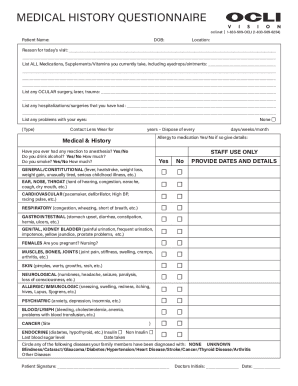
The Medical History Questionnaire is a medical document used by healthcare providers to gather comprehensive patient information regarding medical, family, and social history.
pdfFiller scores top ratings on review platforms




Who needs Medical History Form?
Explore how professionals across industries use pdfFiller.

Medical History Form is needed by:
-
Patients seeking medical care
-
Doctors requiring patient medical history
-
Healthcare providers for patient assessments
-
Clinical staff involved in patient intake
-
Parents or guardians for minors' health records
Comprehensive Guide to Medical History Form
What is the Medical History Questionnaire?
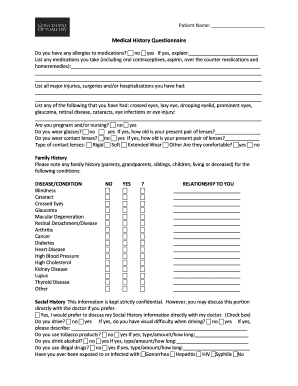
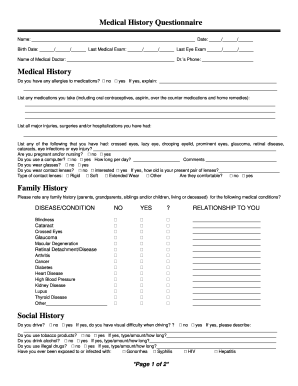
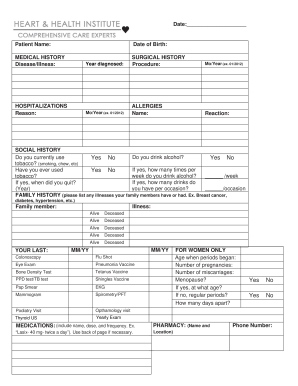
The Medical History Questionnaire is a vital document that healthcare providers use to gather important medical, family, and social histories from patients. This patient medical history form includes various sections related to personal information, medical history, family history, and social health concerns.
Each role involved—patients, doctors, and responsible parties—must ensure their information is accurate, which is crucial for comprehensive healthcare. Additionally, patient signatures verify the authenticity of the details shared within the form.
Purpose and Benefits of the Medical History Questionnaire
Employing the Medical History Questionnaire is crucial as it enables healthcare providers to compile a thorough overview of each patient's medical history. This form guarantees that complete health information is available, leading to better patient care.
Using this patient intake form streamlines the intake process, allowing healthcare providers to access accurate information quickly and effectively. This efficiency helps in tailoring care specific to one’s health requirements.
Key Features of the Medical History Questionnaire
The Medical History Questionnaire is designed with user-friendliness in mind. It incorporates fillable fields and checkboxes, making it easy for patients to input their information.
Moreover, it ensures confidentiality and security through features like encryption and compliance with HIPAA regulations. Through platforms like pdfFiller, users can easily access and complete the questionnaire with a seamless experience.
Who Needs the Medical History Questionnaire?
Several roles are responsible for completing the Medical History Questionnaire, ensuring thorough data collection for healthcare purposes:
-
Patients must provide accurate information regarding their health.
-
Doctors require the form to review patients’ histories effectively.
-
Responsible parties may also need to sign, especially in the case of minors or incapacitated individuals.
Each role's input is essential for various medical scenarios, creating a well-rounded understanding of the patient's health status.
How to Fill Out the Medical History Questionnaire Online (Step-by-Step)
Completing the Medical History Questionnaire online through pdfFiller is straightforward. Follow these steps:
-
Access the questionnaire via pdfFiller's platform.
-
Begin filling in personal details, such as name and contact information.
-
Complete the medical history section honestly, providing as much detail as possible.
-
Sign the document digitally in the designated area.
-
Review all entries for accuracy before submitting.
Taking care during each of these steps helps ensure your responses are precise.
Common Errors and How to Avoid Them
When completing the Medical History Questionnaire, users often make several common errors, which can impact the accuracy of healthcare delivered:
-
Incomplete fields that leave critical information out.
-
Errors in personal details, such as misspellings or incorrect dates.
To avoid these issues, review your entries thoroughly before submission. Clarity in your responses significantly enhances the form's reliability.
Submission Methods & Where to Submit the Medical History Questionnaire
There are multiple methods available for submitting the Medical History Questionnaire:
-
Online submission through pdfFiller, which simplifies the process.
-
Physical submission may also be required, depending on your healthcare provider's preferences.
Check with your provider for any associated deadlines or processing times to ensure timely receipt of your information.
Security and Compliance for the Medical History Questionnaire
When handling sensitive information, security is paramount. PdfFiller employs 256-bit encryption to protect your data, complying with both HIPAA and GDPR regulations.
You can trust that your personal medical information is safe while using pdfFiller for your patient medical history form. Data protection measures are in place to ensure confidentiality.
How pdfFiller Facilitates Completing the Medical History Questionnaire
PdfFiller significantly enhances the experience of completing the Medical History Questionnaire. Users can easily edit and fill out the questionnaire, ensuring no errors.
The platform allows for seamless electronic signing, streamlining the process even further. Additionally, users can convert, share, and save documents without hassle, making form management straightforward.
Get Started with the Medical History Questionnaire Today!
Using pdfFiller for your Medical History Questionnaire creates convenience and efficiency in form completion. With easy access and supportive tools available, anyone can begin the process smoothly. Take the first step and start your form today!
How to fill out the Medical History Form
-
1.To access the Medical History Questionnaire on pdfFiller, navigate to the pdfFiller website and use the search function to find the form by its name.
-
2.Once you open the form, you’ll see various fields and sections that need to be filled out. Use your mouse or touchpad to click on each field to start entering your information.
-
3.Before beginning, gather all necessary information like your personal details, medical history, and family health background. This will help you complete the form accurately.
-
4.Initialize by entering your name, date of birth, and contact information in the designated fields. Make sure to check for typos as you fill these sections.
-
5.Move through each section methodically, such as Medical History, Family History, and Social History. Use checkboxes where appropriate, and complete any additional designated text fields with relevant comments.
-
6.If you encounter any instructions within the form, make sure to read them thoroughly to avoid errors during your completion.
-
7.Once all sections are completed, review the form for any missing information or errors. Ensure all required signatures are signed, especially those from the patient, doctor, and responsible party.
-
8.Finally, save your completed form by clicking the 'Save' button. You can download the form by selecting the 'Download' option, or use the submission options provided to send it directly to your healthcare provider.

Who is required to sign the Medical History Questionnaire?
The Medical History Questionnaire must be signed by the patient, the doctor, and the responsible party when applicable. Collecting all necessary signatures ensures the validity of the medical information provided.
What type of information is collected in this form?
This questionnaire gathers personal information, medical history, family health history, social history, and a review of systems, providing healthcare providers with thorough insight into the patient’s health status.
Is notarization required for this form?
No, notarization is not required for the Medical History Questionnaire. You only need the required signatures from the patient, doctor, and responsible party.
How do I submit the Medical History Questionnaire once completed?
After completing the form, you can submit it through pdfFiller by following the submission instructions provided on the platform. Alternatively, you can download it and email or deliver it directly to your healthcare provider.
What common mistakes should I avoid when filling out the questionnaire?
Avoid leaving any mandatory fields blank, ensure that you enter your current and accurate information, and double-check for typos. Misleading or incorrect information can affect your healthcare.
Is there a time frame for submitting this questionnaire?
While there may not be a strict deadline, it is best to submit the Medical History Questionnaire before your scheduled appointment for optimal healthcare assessment.
Can I edit the Medical History Questionnaire after saving?
Yes, if you saved the form on pdfFiller, you can return to it later to make edits. Simply log back into your account to access your saved forms.
Related Forms




Get the latest insights from our blog


If you believe that this page should be taken down, please follow our DMCA take down process
here
.
This form may include fields for payment information. Data entered in these fields is not covered by PCI DSS compliance.