
Last updated on
Oct 10, 2026

Get the free Birth Verification Form
We are not affiliated with any brand or entity on this form

Fill out
Complete the form online in a simple drag-and-drop editor.

eSign
Add your legally binding signature or send the form for signing.

Share
Share the form via a link, letting anyone fill it out from any device.

Export
Download, print, email, or move the form to your cloud storage.
Why pdfFiller is the best tool for your documents and forms


End-to-end document management
From editing and signing to collaboration and tracking, pdfFiller has everything you need to get your documents done quickly and efficiently.
Accessible from anywhere
pdfFiller is fully cloud-based. This means you can edit, sign, and share documents from anywhere using your computer, smartphone, or tablet.
Secure and compliant
pdfFiller lets you securely manage documents following global laws like ESIGN, CCPA, and GDPR. It's also HIPAA and SOC 2 compliant.
What is Birth Verification
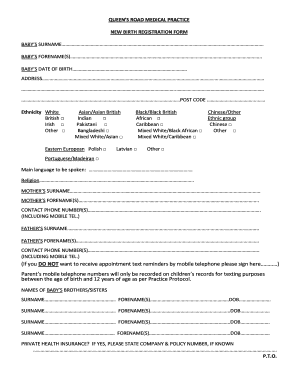
The Birth Verification Form is a personal document used by parents and guardians to verify a newborn's birth details.
pdfFiller scores top ratings on review platforms




Who needs Birth Verification?
Explore how professionals across industries use pdfFiller.

Birth Verification is needed by:
-
New parents looking to certify their child's birth information
-
Guardians responsible for completing birth documentation
-
Hospitals requiring birth verification for records
-
Legal entities needing proof of birth for identity verification
-
Social services dealing with parental rights and responsibilities
Comprehensive Guide to Birth Verification
What is the Birth Verification Form?
The Birth Verification Form serves a crucial role in recording details about a newborn. This form is essential in verifying information such as the child's name, date of birth, and birth certificate number. It captures key details that ensure accurate identification and documentation of the newborn.
Parents or guardians are responsible for certifying the information provided on the form, which emphasizes the importance of accurate data input. This certification is a vital part of the verification process.
Purpose and Benefits of the Birth Verification Form
This form is essential for parents and guardians as it provides verified records of birth information, which have numerous legal implications. A verified birth record is necessary for obtaining legal documents, primarily the birth certificate.
Additionally, the Birth Verification Form is crucial in various situations, such as applying for social security benefits or securing health insurance for the child. By having this essential documentation, parents can ensure all necessary steps are followed for their newborn's legal and medical needs.
Who Needs the Birth Verification Form?
The Birth Verification Form is typically utilized by parents and guardians looking to document and verify their newborn's details. Those who should fill out the form include biological parents, adoptive parents, and guardians, especially when updating hospital records.
It is imperative for adoptive or foster parents to understand their role in using this form. Proper completion and certification of the form ensure that the child's details are up-to-date and compliant with legal requirements.
Key Features of the Birth Verification Form
The Birth Verification Form includes several unique features that enhance its usability. With fillable fields, users can easily complete sections about the newborn's birth weight, length, and other critical information, such as the delivering doctor's name.
Furthermore, the form comprises designated sections for detailing the delivery type and time of birth. Notably, a signature from the parent or guardian is required to validate the information and officially certify the document.
How to Fill Out the Birth Verification Form Online (Step-by-Step)
Filling out the Birth Verification Form online is straightforward when following these steps:
-
Access the form through the pdfFiller platform.
-
Start by entering the child's name, date of birth, and related details in the appropriate fields.
-
Continue to provide additional information, including birth weight and hospital name.
-
Review the completed form for accuracy, ensuring all required fields are filled.
-
Once verified, eSign the document to certify the information.
To ensure the highest accuracy, users are encouraged to double-check each entry before submitting the form.
How to Submit the Birth Verification Form
Submitting the Birth Verification Form involves several important steps. Users can choose to submit it either online through the pdfFiller platform or in person at designated offices.
It is essential to be aware of any associated fees that may apply during the submission process. After submission, tracking the status can be done through the respective submission method, ensuring that users remain informed about their progress.
Privacy and Security When Using the Birth Verification Form
User data security is paramount when handling sensitive information through the Birth Verification Form. pdfFiller employs robust security measures, including 256-bit encryption, to protect user data.
Additionally, the platform complies with relevant regulations such as HIPAA and GDPR, ensuring that personal information is securely managed and handled with the utmost confidentiality, especially for newborns.
Common Errors and How to Avoid Them
When filling out the Birth Verification Form, users may encounter common errors that can hinder the process. Typical mistakes include missing signatures, incorrect dates, or incomplete fields.
To avoid these pitfalls, it is crucial to review all entries carefully before submission. Users are also encouraged to utilize the helpful tools available through pdfFiller to streamline the process and minimize potential errors.
Complete Your Birth Verification Form with Ease
Using pdfFiller for completing the Birth Verification Form simplifies the entire process. The platform offers an intuitive interface that allows users to fill out, eSign, and submit their forms electronically.
With the convenience of digital tools, users can efficiently manage their form submissions, ensuring a smooth and hassle-free experience while handling important documentation for their newborn.
How to fill out the Birth Verification
-
1.Access the Birth Verification Form on pdfFiller's website by searching for it in their template library.
-
2.Open the form in the pdfFiller editor where you can interact with the fillable fields easily.
-
3.Before starting, gather necessary information including the child's name, date of birth, birth certificate number, and parent/guardian details.
-
4.Begin filling in the form by entering the child's name, birth date, and other required details in the relevant fields.
-
5.Use the guiding prompts in pdfFiller to navigate through sections like birth weight, length, delivery type, and hospital name.
-
6.Complete the signature line by having the parent or guardian certify the information with their signature.
-
7.Once all fields are filled, review the form thoroughly for completeness and accuracy, ensuring all vital information is included.
-
8.Finalize the form by clicking the 'Save' button to store your information securely.
-
9.Download the completed form in your preferred format or submit it electronically through pdfFiller's submission options.

Who needs to fill out the Birth Verification Form?
The Birth Verification Form is primarily required by parents or guardians needing to officially certify their newborn's details for documentation purposes.
What information is required to complete the form?
You will need the child's name, date of birth, birth certificate number, and additional details such as birth weight, length, and parent/guardian information.
Is notarization required for this form?
No, the Birth Verification Form does not require notarization, making it easier for parents and guardians to complete and submit.
How can I submit the completed form?
After filling out the form on pdfFiller, you can either download it for physical submission or use pdfFiller's electronic submission feature to send it directly.
What common mistakes should I avoid while filling out the form?
Ensure all fields are completed accurately and legibly, and double-check signatures to avoid delays in processing or acceptance of the form.
How long does it take to process the Birth Verification Form?
Processing times vary, but generally, once submitted, expect a response or confirmation within a few days to a week, depending on the receiving institution.
Can I edit the form once I have saved it?
Yes, you can reopen the Birth Verification Form on pdfFiller to make any necessary edits before finalizing and submitting it.
Related Forms





Get the latest insights from our blog


If you believe that this page should be taken down, please follow our DMCA take down process
here
.
This form may include fields for payment information. Data entered in these fields is not covered by PCI DSS compliance.